Parts
of the
Camera
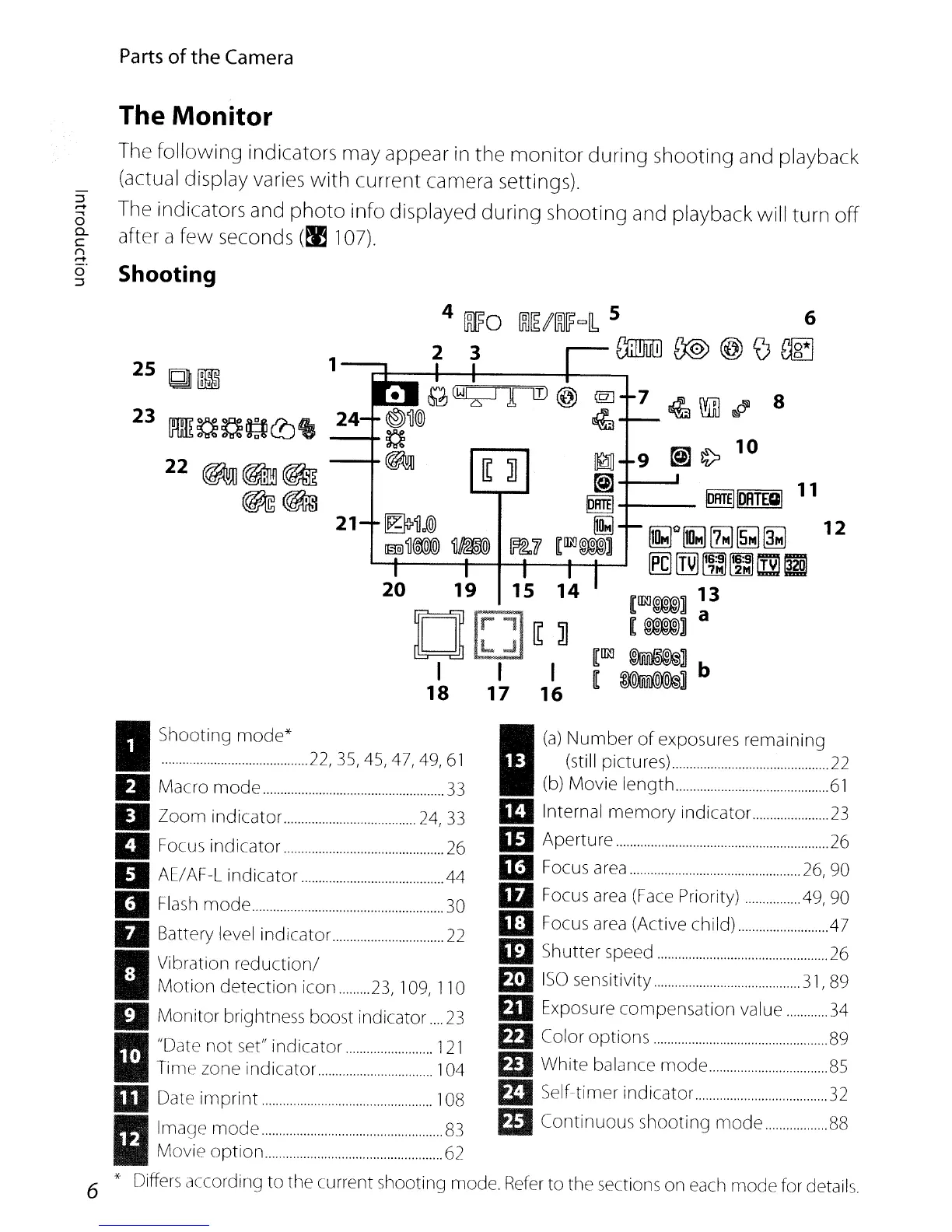
The Monitor
The
following
indicators may appear in
the
monitor
during
shooting and playback
(actual display varies
with
current camera settings).
The indicators and
photo
info displayed
during
shooting and playback
will
turn
off
after a
few
seconds
(~
107).
Shooting
12
8
@]
~
llil
~~----'
11
©RTEIIDATECII
~RTEI+---
~:~.
~il
[~~
~O~][I~~~
........
---+--+-+--+--+-.....
M
rrn
~ ~
[j]
=
[IRJ~]
13
[M]
a
[~
~]
[
~]b
21
M~@
~~@
--+-~
-+~
1
25
Q
[11
23
[~mB~~~c!Jte
22~~~
~~
I
(a)
~~I~P~~;U~:~r~.~.s.~.r.~~
..
r~~.~.i~.i.~.~.
22
(b) Movie
length
61
III
Internal
memory
indicator
23
IlJ Aperture
26
III
Focus
area
26,
90
IfJ Focus
area
(Face
Priority) .49, 90
1[1 Focus
area
(Active child)
,47
lEI
Shutter speed
26
m
ISO
sensitivity
31,
89
EJI
Exposure compensation value
34
EEl
Color options 89
Ell
White balance
mode
85
m
SelHimer
indicator
32
ED
Continuous shooting
mode
88
I
Shootl~~~~~e'22,
35,
45,47,49,61
II
Macro
mode
33
II
Zoom
indicator 24,33
II
Focus indicator
26
II
AE/AF-L indicator 44
D
Flash
mode
30
II
Battery level indicator
22
I
Vibration
reduction/
•
Motion
detection
icon
.........
23,
109,
110
II
Monitor brightness boost indicator
23
II
"Date
not
set" indicator
121
, Time zone indicator 104
III
Date
imprint
108
I
lmaqe
mode
83
Movie
option
62
6 * Differs according
to
the current shooting mode.
Refer
to
the sections on each
mode
for details.


 To Next Page
 Loading...












