Connecting
to
a Computer
Transferring Pictures from a Camera
to
a Computer
1 Start
the
computer to which Nikon Transfer was installed.
2 Turn off
the
camera.
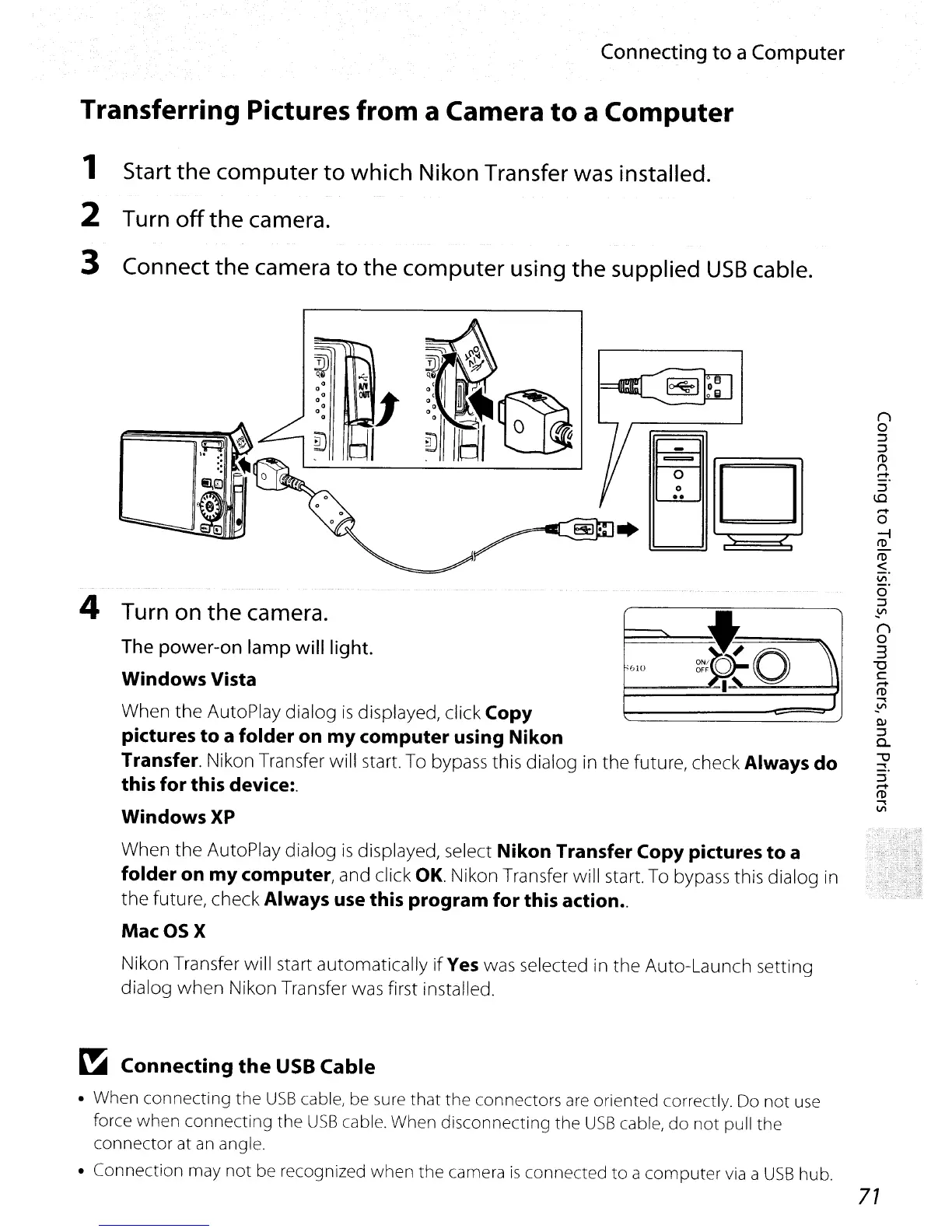
3 Connect the camera to
the
computer using the supplied
USB
cable.
'610
~.=:.
g
When
the
AutoPlay dialog
is
displayed, click Copy
pictures
to
a
folder
on
my
computer
using
Nikon
Transfer. Nikon Transfer will start. To bypass this dialog in
the
future, check Always
do
this
for
this device:.
WindowsXP
When
the
AutoPlay dialog
is
displayed, select Nikon Transfer Copy pictures
to
a
folder
on
my
computer, and click
OK.
Nikon Transfer will start. To bypass this dialog in
the
future, check Always use this
program
for
this action
..
MacOSX
Nikon Transfer will start automatically
if
Yes was selected in
the
Auto-Launch setting
dialog
when
Nikon Transfer was first installed.
4 Turn on the camera.
The power-on lamp will light.
Windows Vista
~
Connecting
the
USB
Cable
• When connecting the
USB
cable, be sure that the connectors
are
oriented correctly. Do not
use
force when connecting the
USB
cable. When disconnecting the
USB
cable,
do
not pull the
connector at
an
angle.
• Connection may not be recognized when the camera
is
connected
to
a computer
via
a
USB
hub.
71



 To Next Page
 Loading...











