SR200 & SR300 Card Printers and LM200 & LM300 Laminators User’s Guide 55
LCD Panel Menu Description
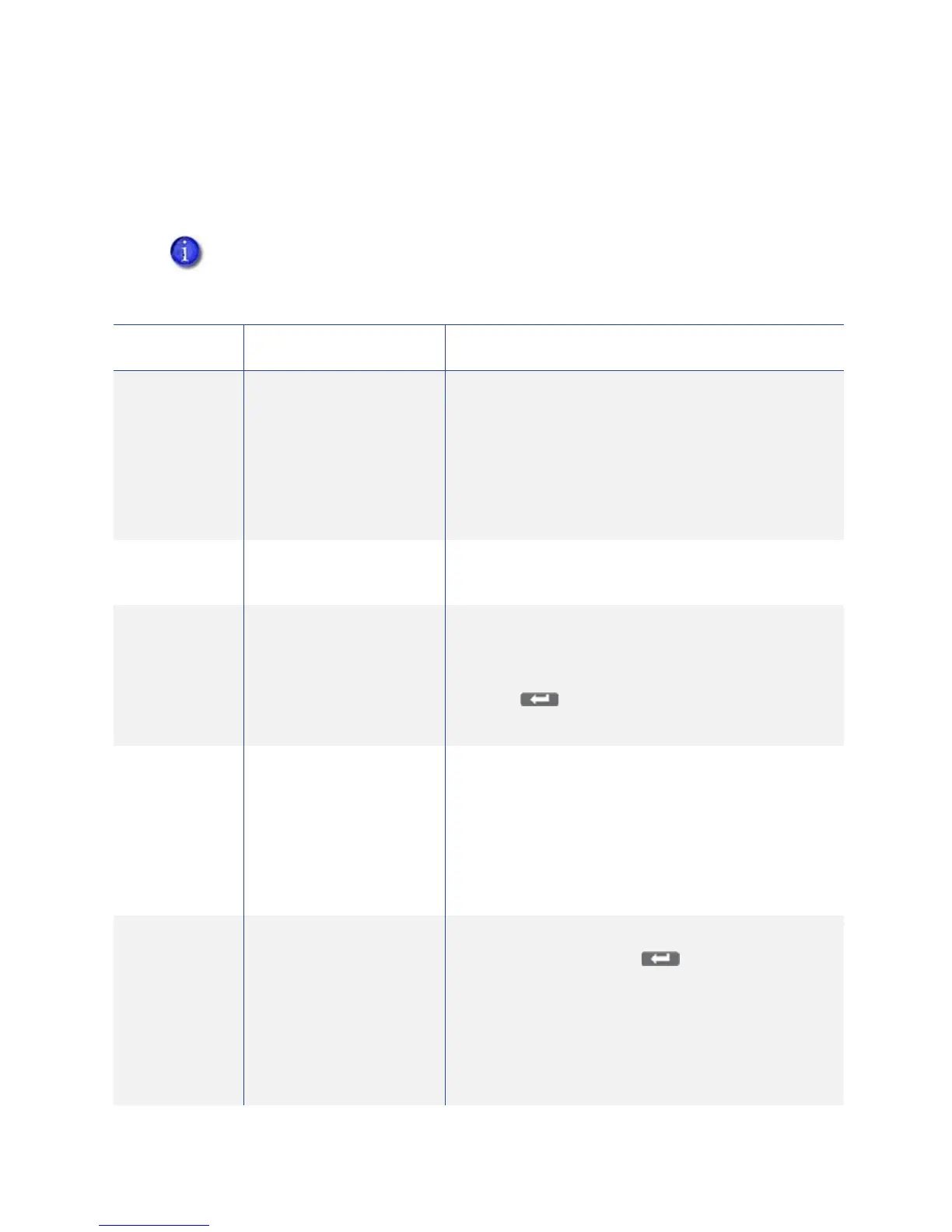
Thistablelistsanddescribesallmenuitems,andtheirsettingsandfunctions,foundonthe
printerLCDpanel
.
Ifanoptionisnotinstalledonyourcardprinterorlaminator,itisnotdisplayedontheLCD
panelmenu.Forexample,theBendRemedymenuitemisdisplayedonlyifthatoptionis
foundonyourprinter.
MenuDisplay Settings Function
Cleaning Rollers
MG
SelectRollerstostartthecleaningfunctiontoclean
thecardfeedrollersandheatedrollers.Referto
“CleaningtheCardFeedRollersandHeatRoller”on
page 73.
SelectMGHeadtocleanthemagnetic(MG)head
whenusingmagneticstripecards.Referto“Cleaning
theMagneticHead”onpage 74.
Counter
Reset OK? PresstheEnterkeytoresettheFreecounterandError
counter.
TestPrint TestPattern
PrinterSetting
NetworkSetting
LamiSetting
Selectthetypeofsamplecardtoprint:
1. PresstheChangekeytoenterthelistofchoices.
2. Usethedownarrowkeytoselectatestpattern.
3. Press(Return)toprintthetestpattern.
TestPrintcanbeusedwithorwithoutahostPC.
Download Topreparetheprinterforafirmwaredownload,press
theEnterkey.Thefirmwaremustbedownloadedfrom
aUSB‐connectedPCwiththedriverandStatus
Monitorinstalled.Referto“OthersTab”
onpage 51for
theStatusMonitorpage.
DONOTpowerofftheprinterwhilethefirmwareis
beingdownloaded.
TransportMode OK? Placetheprinterintransportmodewhenmovingor
shippingtheprinter.Press(Return)toplacethe
printerintransportmode.Please,poweroffis
displayedontheLCDpanel.Transportmodeis
cancelledwhentheprinterispoweredbackon.
Referto“PreparingthePrinterandLaminatorfor
Transport”on
page 79forinformationaboutpreparing
theprinterfortransportingit.


 To Next Page
 Loading...