Garmin aera 500 Series Pilot’s Guide
190-01117-02 Rev. C
128
Additional Features
OverviewGPS NavigationFlight PlanningHazard AvoidanceAdditional FeaturesAppendicesIndex
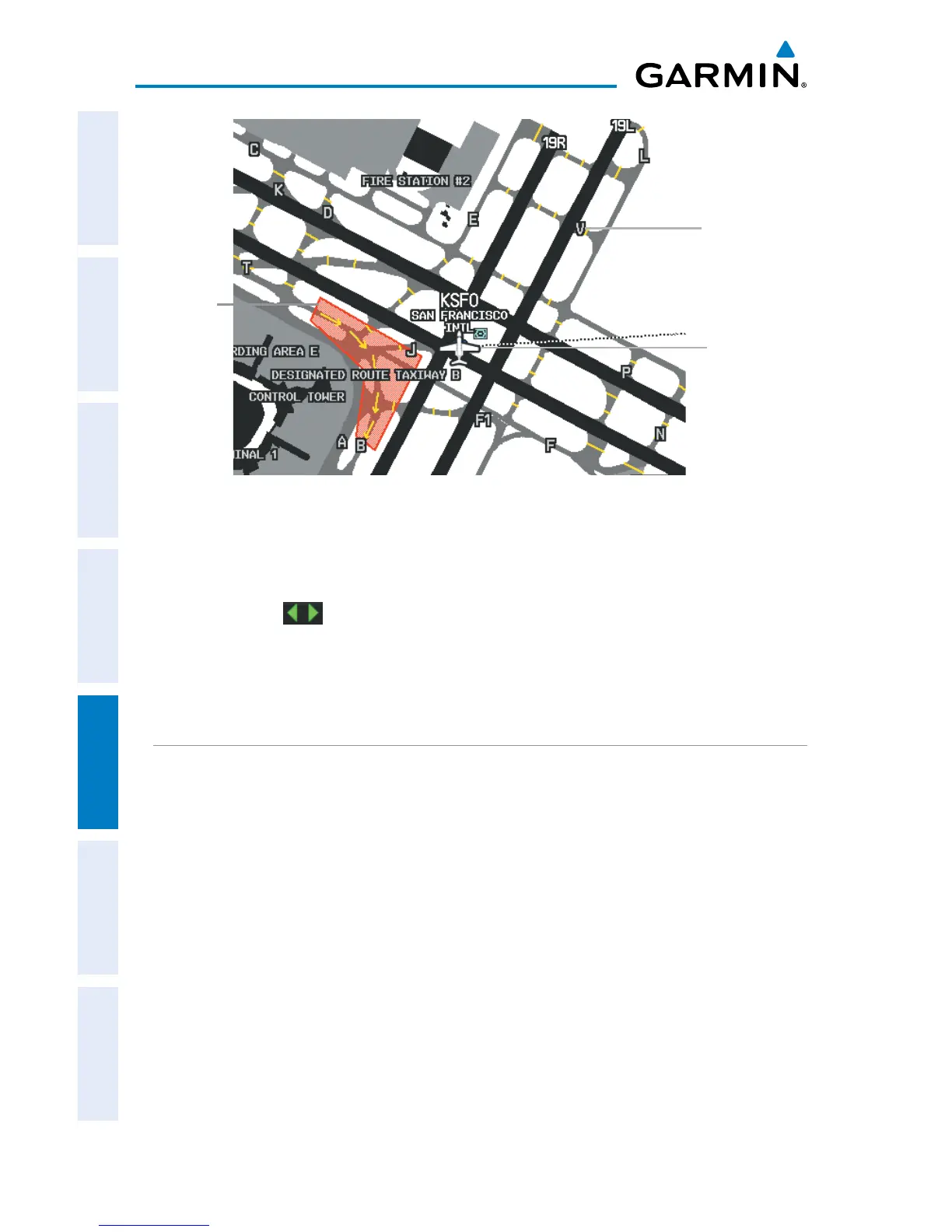
SafeTaxi Depiction
Airport Hot
Spot Outline
Aircraft
Position
Taxiway Identi-
fication
Enabling/disabling SafeTaxi:
1)
From the ‘Home’ Screen, touch Map > Menu > Set Up Map.
2)
Touch the buttons to display the 'Airport' Category.
3)
Touch Safetaxi.
4)
Touch the On/Off Button.
SAFETAXI CYCLE NUMBER AND REVISION
SafeTaxi database is revised every 56 days. SafeTaxi is always available for use after
the expiration date. When turning on the aera, the database initialization indicates
whether the databases are current, out of date, or not available. The database
initialization shows the SafeTaxi database is current when the SafeTaxi name and
expiration date are shown in white. When the SafeTaxi cycle has expired, the SafeTaxi
name and expiration date will appear in yellow.
The SafeTaxi Region, Cycle, Effective date and Expiration date of the database cycle
can also be found from the 'Home' Screen, by touching the Tools > Database.
The SafeTaxi database is provided by Garmin. Refer to Appendix C for instructions
on updating the SafeTaxi database.


 To Next Page
 Loading...