Garmin aera 500 Series Pilot’s Guide
190-01117-02 Rev. C
39
GPS Navigation
Overview GPS Navigation Flight Planning Hazard Avoidance Additional Features Appendices Index
MANUALLY SETTING A COURSE
Use the ‘Set OBS and Hold’ menu option to manually set your course to the
destination.
Manually setting a course to the destination waypoint:
1)
From the ‘Home’ Screen, touch the HSI/Panel or the Active FPL Icon.
2)
Touch the Menu Icon
3)
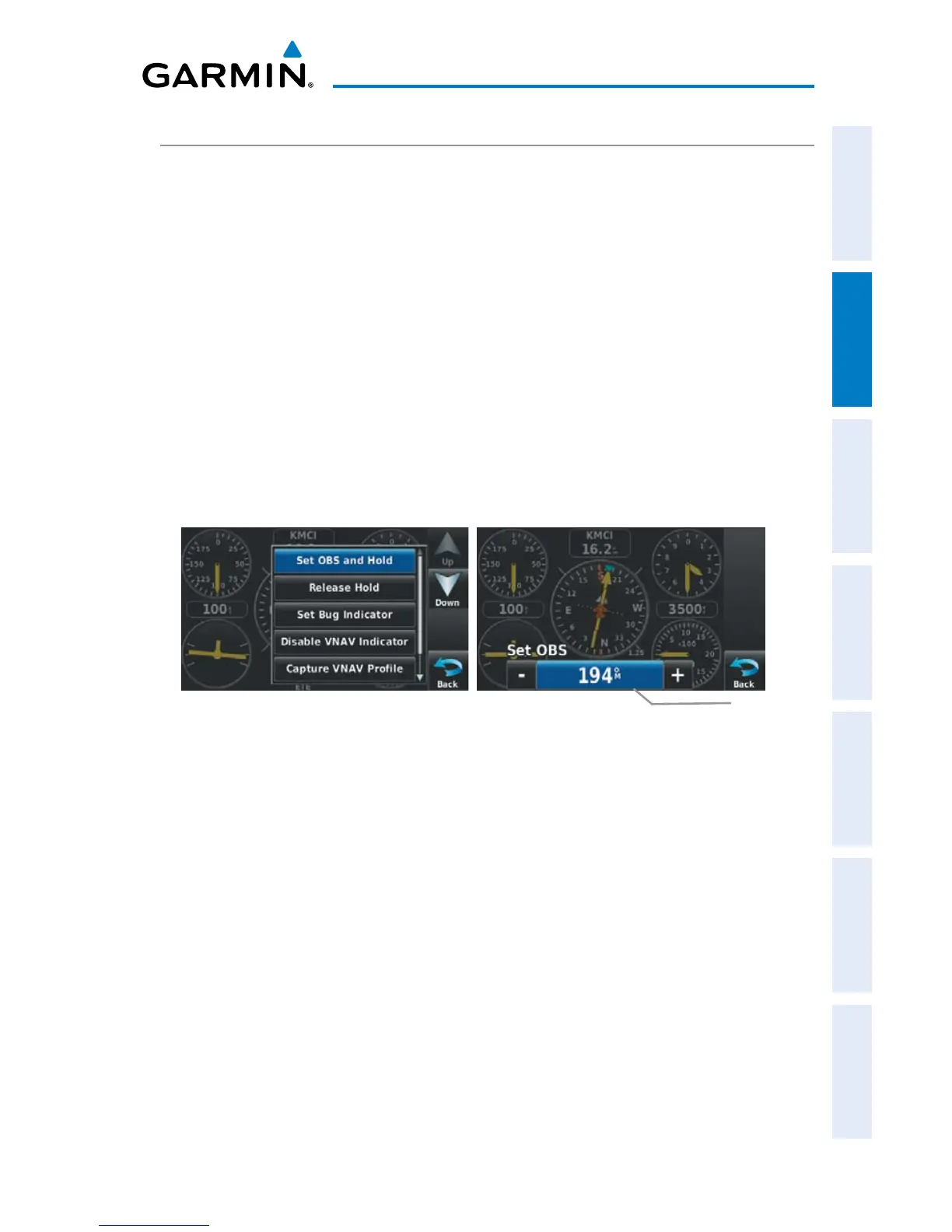
Touch the ' Set OBS and Hold' menu option (only available when
navigating a Direct To or Flight Plan).
4)
Touch the '+' or '-' Buttons to increase/decrease the value
Or
:
Touch the Radial Button to enter the desired radial using the keypad and
touch the OK Icon.
HSI/Panel Option Menu
Radial Button
Set OBS
Returning to automatic sequencing of route waypoints:
1)
From the ‘Home’ Screen, touch the HSI/Panel or the Active FPL Icon.
2)
Touch the Menu Icon
3)
Touch the 'Release Hold' menu option (only available when navigating a
Direct To or Flight Plan).


 To Next Page
 Loading...