Garmin aera 500 Series Pilot’s Guide
190-01117-02 Rev. C
Appendix G
186
OverviewGPS NavigationFlight PlanningHazard AvoidanceAdditional FeaturesAppendicesIndex
AIRCRAFT PROFILE
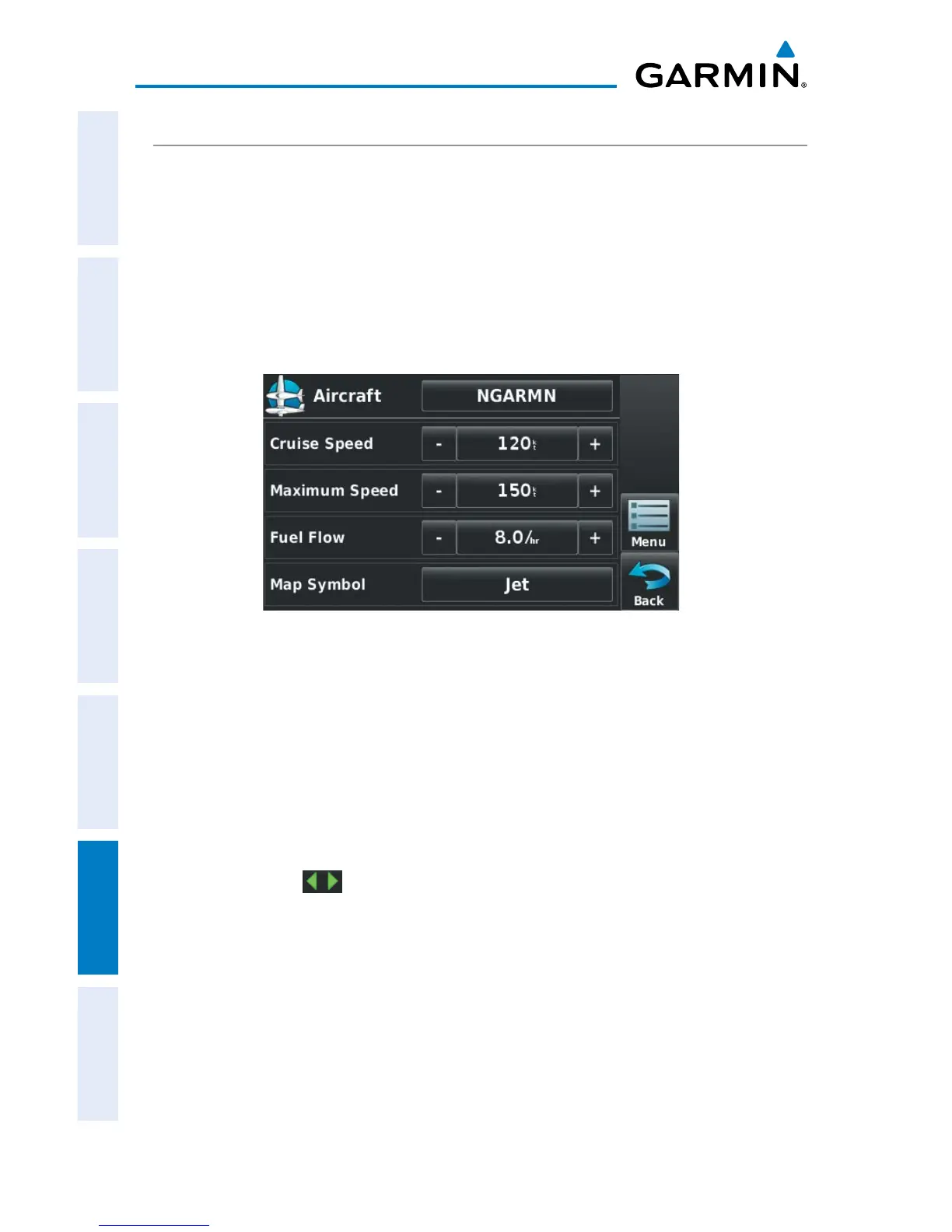
The Aircraft Profile allows the pilot to select cruising speed, maximum speed, fuel
flow, and map symbol. The unit can save up to 10 aircraft profiles.
The maximum speed is used to define the range for airspeed on the Panel and is
automatically updated if you exceed this figure.
Accessing the aircraft profile:
Fr
om the 'Home' Screen, touch Tools > Profile
Aircraft Profile
Entering an aircraft profile:
1)
From the 'Home' Screen, touch Tools > Profile > Menu > New
2)
Enter the Aircraft Name using the keypad, and touch OK.
3)
Enter the Cruise Speed, Maximum Speed, or Fuel Flow using the +/-
buttons or the keypad.
4)
Touch Map Symbol.
a)
Touch the buttons to cycle through the available symbols.
b)
Touch OK.
Selecting a saved aircraft profile:
1)
From the 'Home' Screen, touch Tools > Profile
2)
Touch the Aircraft Name Button to access a vertical list of saved profiles.
3)
Touch the desired profile from the list.


 To Next Page
 Loading...