GR SG9013089000001000
CP2000 Center
confidential
B.1.2
7. Use the ”+” and ”–” buttons (Fig. 1/7) to adjust
the suction air at the pull plate. The selected
value appears above the bar chart.
8. Use the ”+” and ”–” buttons (Fig. 1/8) to adjust
the suction air at the suction tape. The selected
value appears above the bar chart.
9. To exit the menu: Press the
Return
button
(Fig. 1/9) or a button in the banner line.
1.2 Sheet travel/Feeder pile menu
5.0 mm
Paper
run/Feeder pile
12345
Job
Name
1
2
3
4
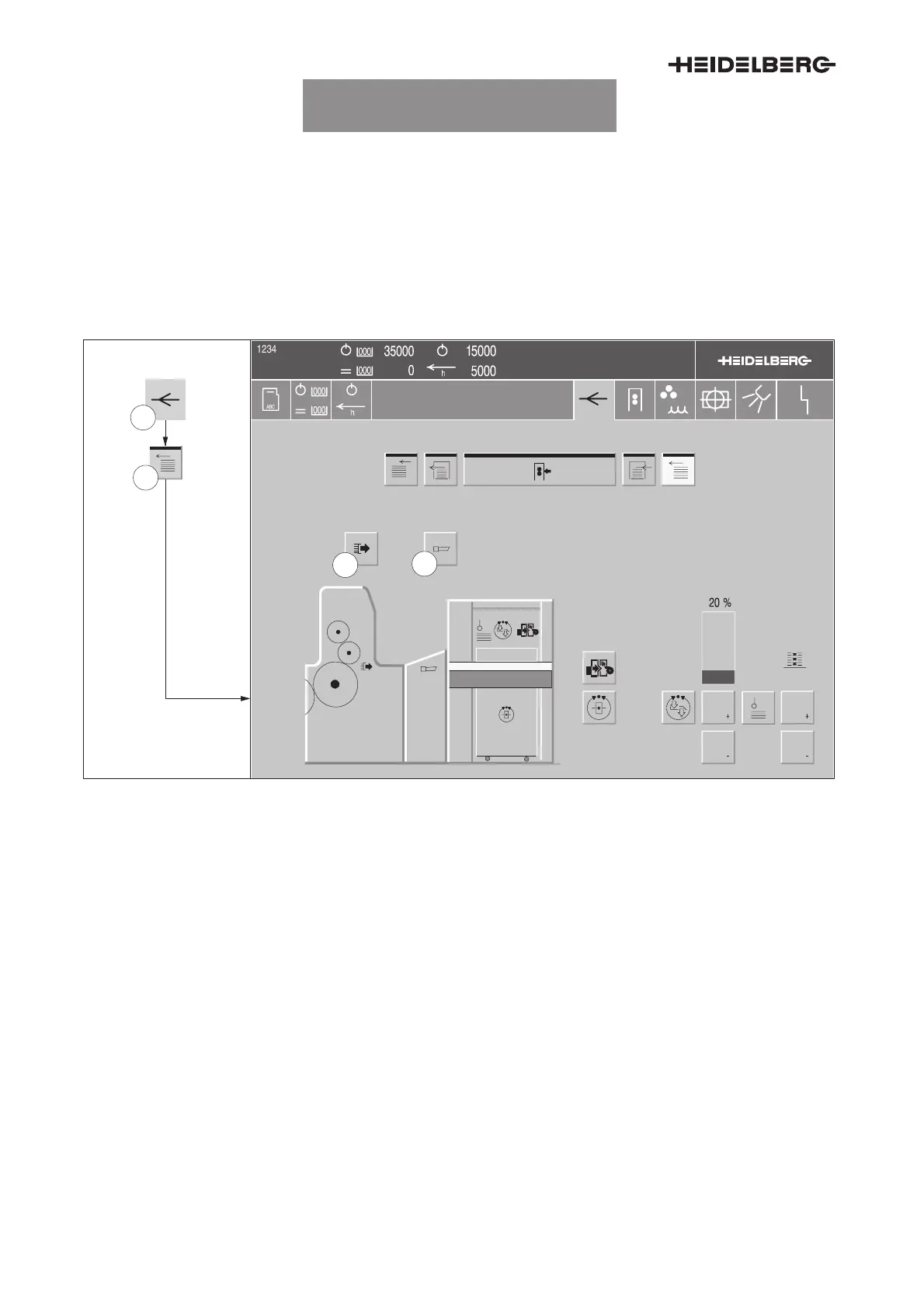
Fig. 2 Sheet travel/Feeder pile menu
1. Press the
Sheet travel
button (Fig. 2/1) in the
banner line. The Paper run menu appears.
2. Press the
Feeder pile
button (Fig. 2/2). The
Paper run/Feeder pile menu (Fig. 2) appears.
3. Switching the suction brush on/off: Press the
button (Fig. 2/3). The button is highlighted when
the suction brush is switched on.
4. Switching the pull horn on/off: Press the button
(Fig. 2/4). The button is highlighted when the
suction brush is switched on.
UTKSG9013008000000000008


 To Next Page
 Loading...