~)r
,,1t):tn]tIO!1~;
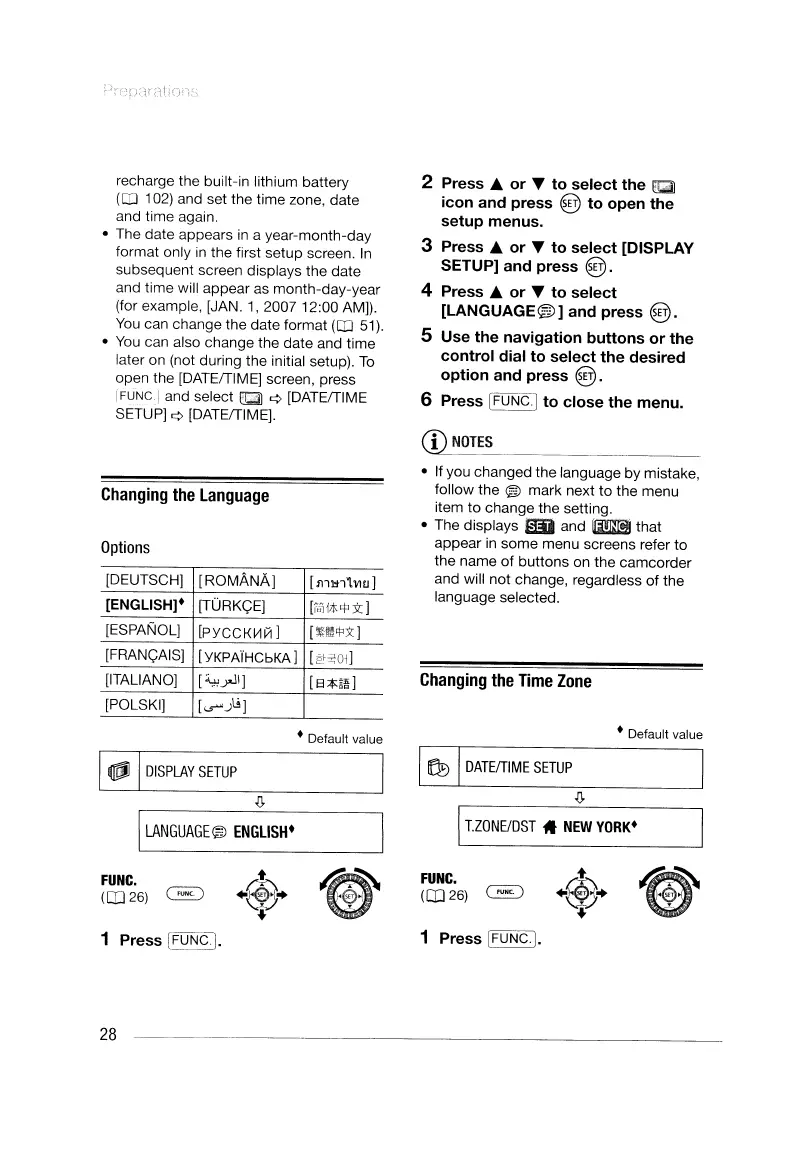
recharge the built-in lithium battery
(CD
102) and set the time zone, date
and time again.
• The date appears
in
a year-month-day
format only
in
the first setup screen.
In
subsequent screen displays the date
and time will appear as month-day-year
(for example, [JAN.
1,200712:00
AM]).
You
can change the date format
(CD
51).
•
You
can also change the date and time
later on (not during the initial setup).
To
open the [DATEfTIMEj screen, press
IFUNG.j and select tJ::i) ¢ [DATEfTlME
SETUP]
¢ [DATEfTIMEj.
2 Press ... or " to select the
Ii];l)
icon and press @ to open the
setup menus.
3 Press ... or " to select [DISPLAY
SETUP] and press
@.
4 Press ... or " to select
[LANGUAGE®]
and press
@.
5 Use the navigation buttons or the
control dial to select the desired
option and press
@.
6 Press IFUNG·I to close the menu.
CD
NOTES
Changing
the
language
Options
[DEUTSCH]
[ROMANAj
[lmtlLvw]
[ENGLISH]·
[TURK<;;E]
[iJi1*'!'3t]
[ESPANOLJ
[PYGGKVliII
]
[~m"')(j
[FRANt;;AISj
[YKPAiHCbKA]
[2>;:01]
[ITALIANO]
[~yJ\]
[8;$:i8]
[POLSKI]
[<r>.J\.; ]
• If you changed the language by mistake,
follow the
® mark next to the menu
item to change the setting.
• The displays SD and
mm!!i
that
appear
in
some menu screens refer
to
the name
of
buttons on the camcorder
and will not change, regardless
of
the
language selected.
Changing
the
Time
Zone
• Default value
FUNC.
([026)
~
I
lZONElDST
11
NEW
YORK·
~
DATEfTIME
SETUP
.(>
• Default value
I
.(>
I_LA_N_G_UA_G_E®_"'_E_N_GL_IS_H_·
I
~~
FUNC.
([026)
~
~
DISPLAY
SETUP
1 Press IFUNG.j.
1 Press IFUNCI.
28
~)r
,,1t):tn]tIO!1~;
recharge the built-in lithium battery
(CD
102) and set the time zone, date
and time again.
• The date appears
in
a year-month-day
format only
in
the first setup screen.
In
subsequent screen displays the date
and time will appear as month-day-year
(for example, [JAN.
1,200712:00
AM]).
You
can change the date format
(CD
51).
•
You
can also change the date and time
later on (not during the initial setup).
To
open the [DATEfTIMEj screen, press
IFUNG.j and select tJ::i) ¢ [DATEfTlME
SETUP]
¢ [DATEfTIMEj.
2 Press ... or " to select the
Ii];l)
icon and press @ to open the
setup menus.
3 Press ... or " to select [DISPLAY
SETUP] and press
@.
4 Press ... or " to select
[LANGUAGE®]
and press
@.
5 Use the navigation buttons or the
control dial to select the desired
option and press
@.
6 Press IFUNG·I to close the menu.
CD
NOTES
Changing
the
language
Options
[DEUTSCH]
[ROMANAj
[lmtlLvw]
[ENGLISH]·
[TURK<;;E]
[iJi1*'!'3t]
[ESPANOLJ
[PYGGKVliII
]
[~m"')(j
[FRANt;;AISj
[YKPAiHCbKA]
[2>;:01]
[ITALIANO]
[~yJ\]
[8;$:i8]
[POLSKI]
[<r>.J\.; ]
• If you changed the language by mistake,
follow the
® mark next to the menu
item to change the setting.
• The displays SD and
mm!!i
that
appear
in
some menu screens refer
to
the name
of
buttons on the camcorder
and will not change, regardless
of
the
language selected.
Changing
the
Time
Zone
• Default value
FUNC.
([026)
~
I
lZONElDST
11
NEW
YORK·
~
DATEfTIME
SETUP
.(>
• Default value
I
.(>
I_LA_N_G_UA_G_E®_"'_E_N_GL_IS_H_·
I
~~
FUNC.
([026)
~
~
DISPLAY
SETUP
1 Press IFUNG.j.
1 Press IFUNCI.
28


 To Next Page
 Loading...