To
CAPTURE
THE
STILL
IMAGE
I
Do
I..:::SY..:...:S:..:..T=EM:.:....:S=E~TU;..:-P
l I
Do
I..::.:IM.:..:G:....:Q:...:.U:....::AL=--ITY~
I
Do
[FUNG·I
¢>
IDesired image quality' I
•
The
number displayed at the bottom
indicates the approximate number of
images that
can
be
recorded with the
current quality setting.
[FUNG.I
c:>1
E!:iiII
MENU
• The still image cannot be recorded
simultaneously on the memory card
while the digital zoom
or
a digital effect
is activated.
•
To
record still images we recommend
using the
ICAMERA·
a I mode, which
offers the best quality for still images.
CD
NOTES
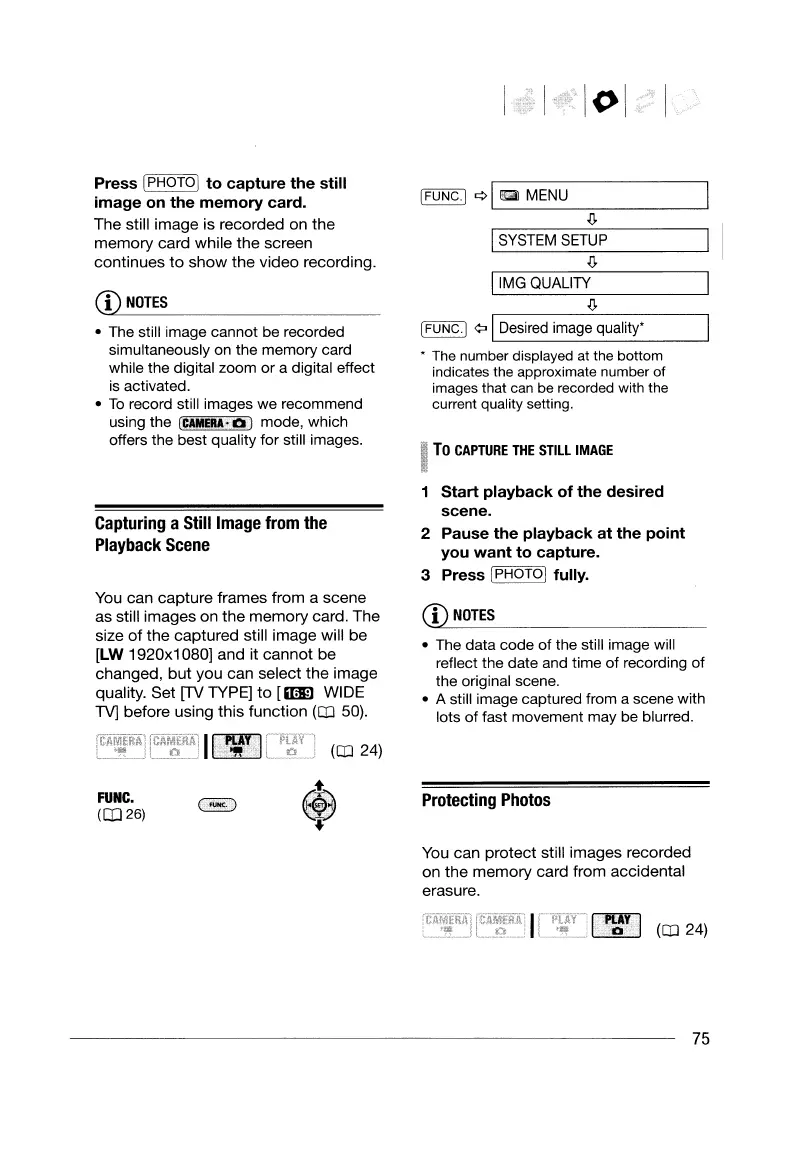
Press [PHOTOI
to
capture
the
still
image
on
the
memory
card.
The
still
image
is
recorded
on
the
memory
card
while
the
screen
continues
to
show
the
video
recording.
Capturing
aStill
Image
from
the
Playback
Scene
Start
playback
of
the
desired
scene.
2 Pause
the
playback
at
the
point
you
want
to
capture.
3 Press IPHOTOI fully.
You
can
capture
frames
from
a
scene
as
still
images
on
the
memory
card.
The
size
of
the
captured
still
image
will
be
[LW
1920x1080]
and
it
cannot
be
changed.
but
you
can
select
the
image
quality.
Set
(TV
TYPE]
to
[mI1l WIDE
TV]
before
using
this
function
(CD
50).
I~
(CD
24)
CD
NOTES
• The data code of the still image will
reflect the date and time of recording of
the original scene.
• A still image captured from a scene with
lots
of
fast movement may be blurred.
FUNC.
(CD
26)
:t
®
"
Protecting
Photos
You
can
protect
still
images
recorded
on
the
memory
card
from
accidental
erasure.
~
(CD
24)
75
To
CAPTURE
THE
STILL
IMAGE
I
Do
I..:::SY..:...:S:..:..T=EM:.:....:S=E~TU;..:-P
l I
Do
I..::.:IM.:..:G:....:Q:...:.U:....::AL=--ITY~
I
Do
[FUNG·I
¢>
IDesired image quality' I
•
The
number displayed at the bottom
indicates the approximate number of
images that
can
be
recorded with the
current quality setting.
[FUNG.I
c:>1
E!:iiII
MENU
• The still image cannot be recorded
simultaneously on the memory card
while the digital zoom
or
a digital effect
is activated.
•
To
record still images we recommend
using the
ICAMERA·
a I mode, which
offers the best quality for still images.
CD
NOTES
Press [PHOTOI
to
capture
the
still
image
on
the
memory
card.
The
still
image
is
recorded
on
the
memory
card
while
the
screen
continues
to
show
the
video
recording.
Capturing
aStill
Image
from
the
Playback
Scene
Start
playback
of
the
desired
scene.
2 Pause
the
playback
at
the
point
you
want
to
capture.
3 Press IPHOTOI fully.
You
can
capture
frames
from
a
scene
as
still
images
on
the
memory
card.
The
size
of
the
captured
still
image
will
be
[LW
1920x1080]
and
it
cannot
be
changed.
but
you
can
select
the
image
quality.
Set
(TV
TYPE]
to
[mI1l WIDE
TV]
before
using
this
function
(CD
50).
I~
(CD
24)
CD
NOTES
• The data code of the still image will
reflect the date and time of recording of
the original scene.
• A still image captured from a scene with
lots
of
fast movement may be blurred.
FUNC.
(CD
26)
:t
®
"
Protecting
Photos
You
can
protect
still
images
recorded
on
the
memory
card
from
accidental
erasure.
~
(CD
24)
75


 To Next Page
 Loading...