10x
Optical
Zoom
Press the W side of the zoom lever to
zoom out (wide angle). Press the T
side
to
zoom
in
(telephoto).
You
can also change the zoom speed
(OJ 45).
You
can select one
of
three
fixed zoom speeds
or
a variable speed
that depends on
how
you operate the
zoom lever: Press gently
for
a slow
zoom; press harder for faster zooms.
(1)
NOTES
• Keep at least 1 m (3.3 ft.) away from the
subject. At full wide angle,
you
can
focus
on
a subject
as
close
as
1 cm
(0.39
in.).
•
You
can
also
use
the T and W buttons
on the wireless controller or the
LCD
panel.
The
zoom speed will
be
the same
as
with the camcorder or fixed at
[~SPEED
3]
(when [l'mVARIABLE]
is
selected).
•
When
set to [l'mVARIABLE], the zoom
speed will be faster
in
record pause
mode.
Quick
Start
Function
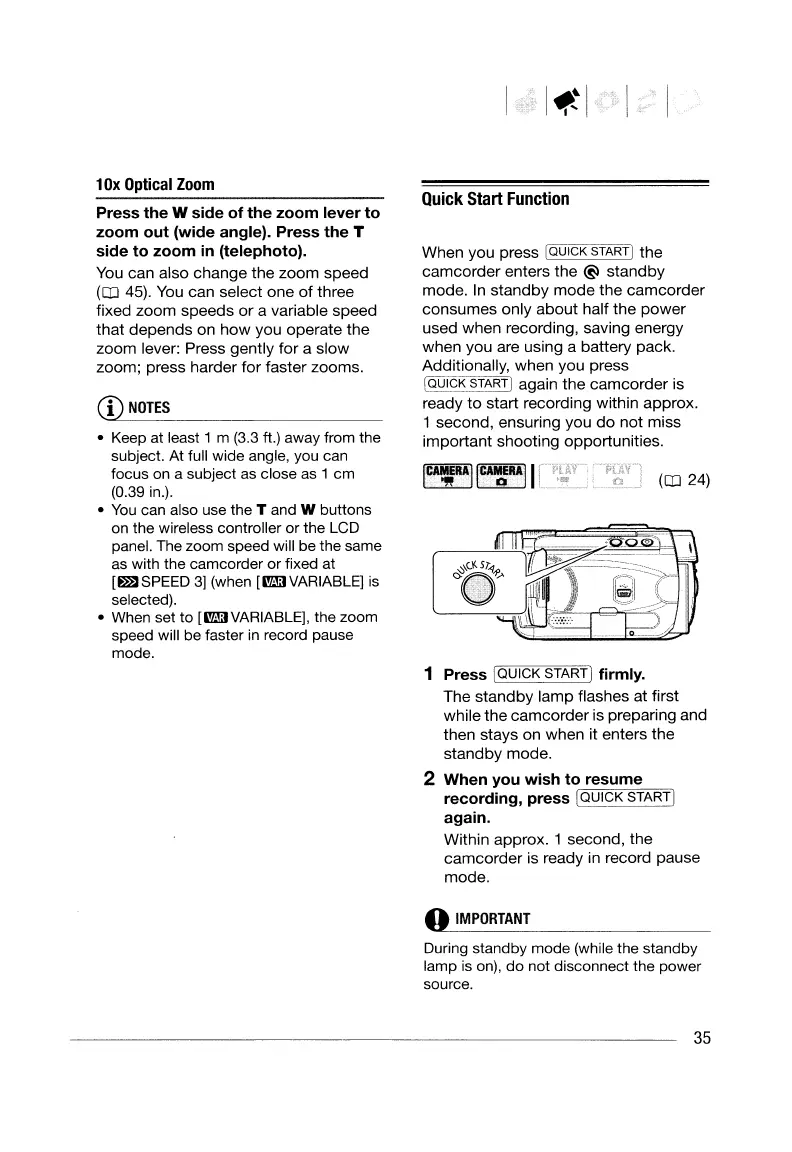
When you press [QUICK START] the
camcorder enters the @ standby
mode.
In
standby
mode
the camcorder
consumes only about half the power
used when recording, saving energy
when you are using a battery pack.
Additionally, when you press
IQUICK START] again the camcorder is
ready to start recording within approx.
1 second, ensuring you
do
not miss
important shooting opportunities.
(OJ 24)
1 Press IQUICK
STARTI
firmly.
The standby lamp flashes at first
while the camcorder is preparing and
then stays on when it enters the
standby mode.
2 When you wish
to
resume
recording, press
[QUICK
START
I
again.
Within approx. 1 second, the
camcorder is ready in record pause
mode
.
..
IMPORTANT
During standby mode (while the standby
lamp is
on),
do not disconnect the power
source.
35
10x
Optical
Zoom
Press the W side of the zoom lever to
zoom out (wide angle). Press the T
side
to
zoom
in
(telephoto).
You
can also change the zoom speed
(OJ 45).
You
can select one
of
three
fixed zoom speeds
or
a variable speed
that depends on
how
you operate the
zoom lever: Press gently
for
a slow
zoom; press harder for faster zooms.
(1)
NOTES
• Keep at least 1 m (3.3 ft.) away from the
subject. At full wide angle,
you
can
focus
on
a subject
as
close
as
1 cm
(0.39
in.).
•
You
can
also
use
the T and W buttons
on the wireless controller or the
LCD
panel.
The
zoom speed will
be
the same
as
with the camcorder or fixed at
[~SPEED
3]
(when [l'mVARIABLE]
is
selected).
•
When
set to [l'mVARIABLE], the zoom
speed will be faster
in
record pause
mode.
Quick
Start
Function
When you press [QUICK START] the
camcorder enters the @ standby
mode.
In
standby
mode
the camcorder
consumes only about half the power
used when recording, saving energy
when you are using a battery pack.
Additionally, when you press
IQUICK START] again the camcorder is
ready to start recording within approx.
1 second, ensuring you
do
not miss
important shooting opportunities.
(OJ 24)
1 Press IQUICK
STARTI
firmly.
The standby lamp flashes at first
while the camcorder is preparing and
then stays on when it enters the
standby mode.
2 When you wish
to
resume
recording, press
[QUICK
START
I
again.
Within approx. 1 second, the
camcorder is ready in record pause
mode
.
..
IMPORTANT
During standby mode (while the standby
lamp is
on),
do not disconnect the power
source.
35


 To Next Page
 Loading...