ISO Speed/Gain
60
Manual ISO Speed/Gain Value
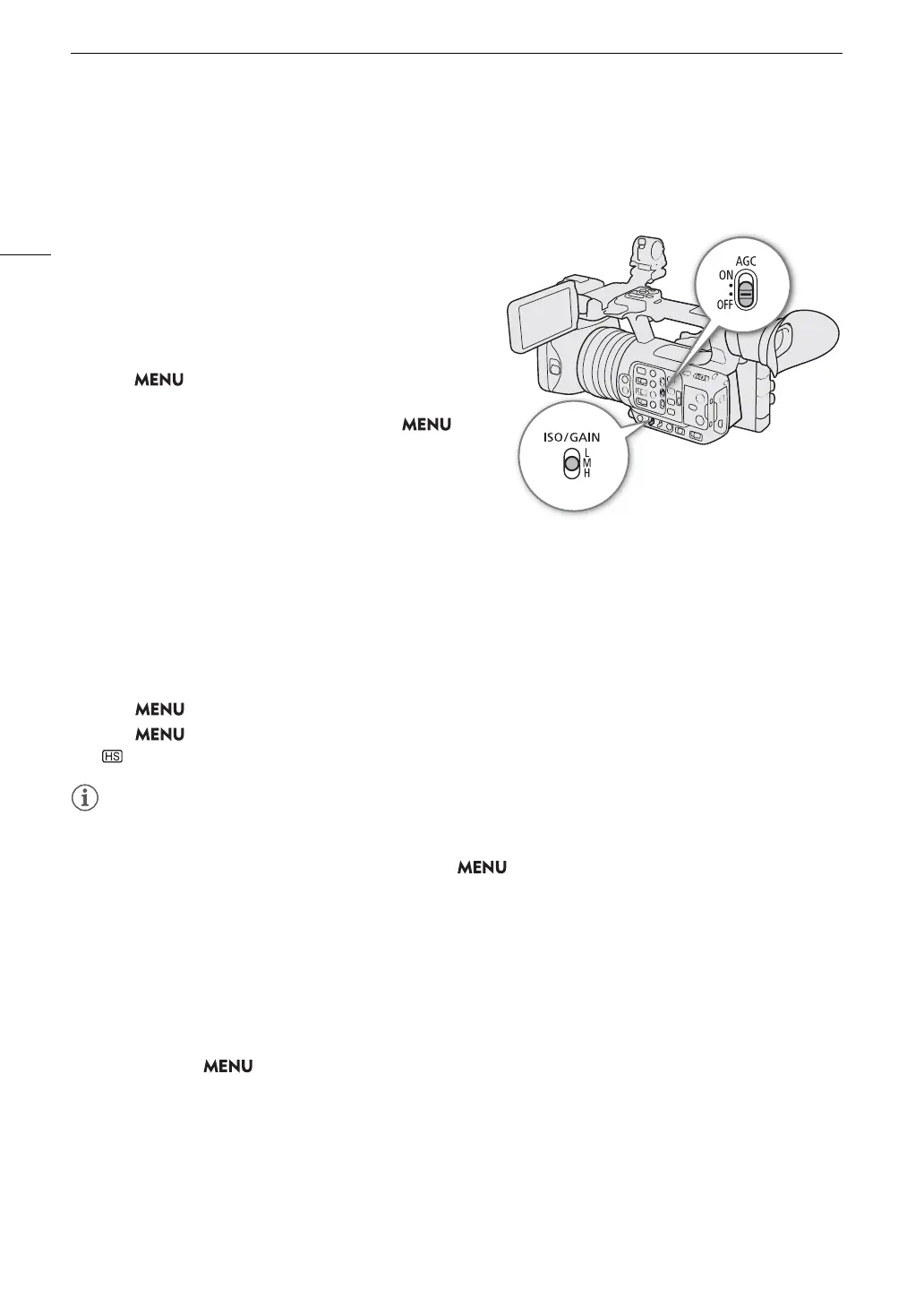
You can set beforehand 3 gain levels and then select quickly which one to apply simply by changing the position
of the ISO/GAIN switch.
1 Set the AGC switch to OFF.
2 Set the ISO/GAIN switch to the position you want to
adjust (L, M or H).
Setting the ISO Speed/Gain Value for the ISO/GAIN
Switch
1 Select > [
v
Camera Setup] > [ISO/Gain] > [ISO] or
[Gain].
2 Depending on your previous selection, select >
[
v
Camera Setup] > [ISO/Gain Increment] > Desired
option.
3 Select [
v
Camera Setup] > Desired [ISO/Gain] setting.
Changing the ISO/GAIN Value
1 Set the ISO/GAIN switch to the position you want to adjust (L, M or H).
2 Adjust the ISO speed or gain value using the direct setting mode (A 50).
• You can also use direct touch control (
A 49).
Using the High Sensitivity Mode
Using the high sensitivity mode allows for brighter recordings, useful when recording in dark environments.
1 Select > [
v
Camera Setup] > [ISO/Gain] > [Gain].
2 Select > [
v
Camera Setup] > [High Sensitivity Mode] > [On].
• will appear to the left of the gain value on the screen.
• If you set an assignable button to [Gain Boost] (A 116), you can press the button to switch between a gain
value of 36.0 dB and the currently set gain value.
• The [Gain Boost] setting (A 116) can be used when > [v Camera Setup] > [ISO/Gain] is set to
[Gain] and automatic gain control is disabled.
• If [ISO/Gain] is set to [ISO], high sensitivity mode will end.
• When high ISO speeds or gain levels are set, the picture may flicker slightly.
• When high ISO speeds or gain levels are set, bright red, green or blue dots may appear on the screen. In such
case, use a faster shutter speed (A 57) or select a lower ISO speed or gain value.
• When the ISO speed or gain level is changed, some noise may appear momentarily on the screen. Do not
adjust the ISO speed/gain level while recording.
• When infrared recording is activated (A 110), the ISO speed/gain mode will be set to automatic gain control.
• You can use the > [v Camera Setup] > [Shockless Gain] setting to make the change in the image
look smoother when you switch gain settings.
• When an RC-V100 Remote Controller is connected to the camera, you can adjust the gain value
corresponding to the current position of the ISO/GAIN switch (L, M or H) with the remote controller’s ISO/GAIN
Í
/
Î
buttons.


 To Next Page
 Loading...