Input and output patching
Reference Manual
22
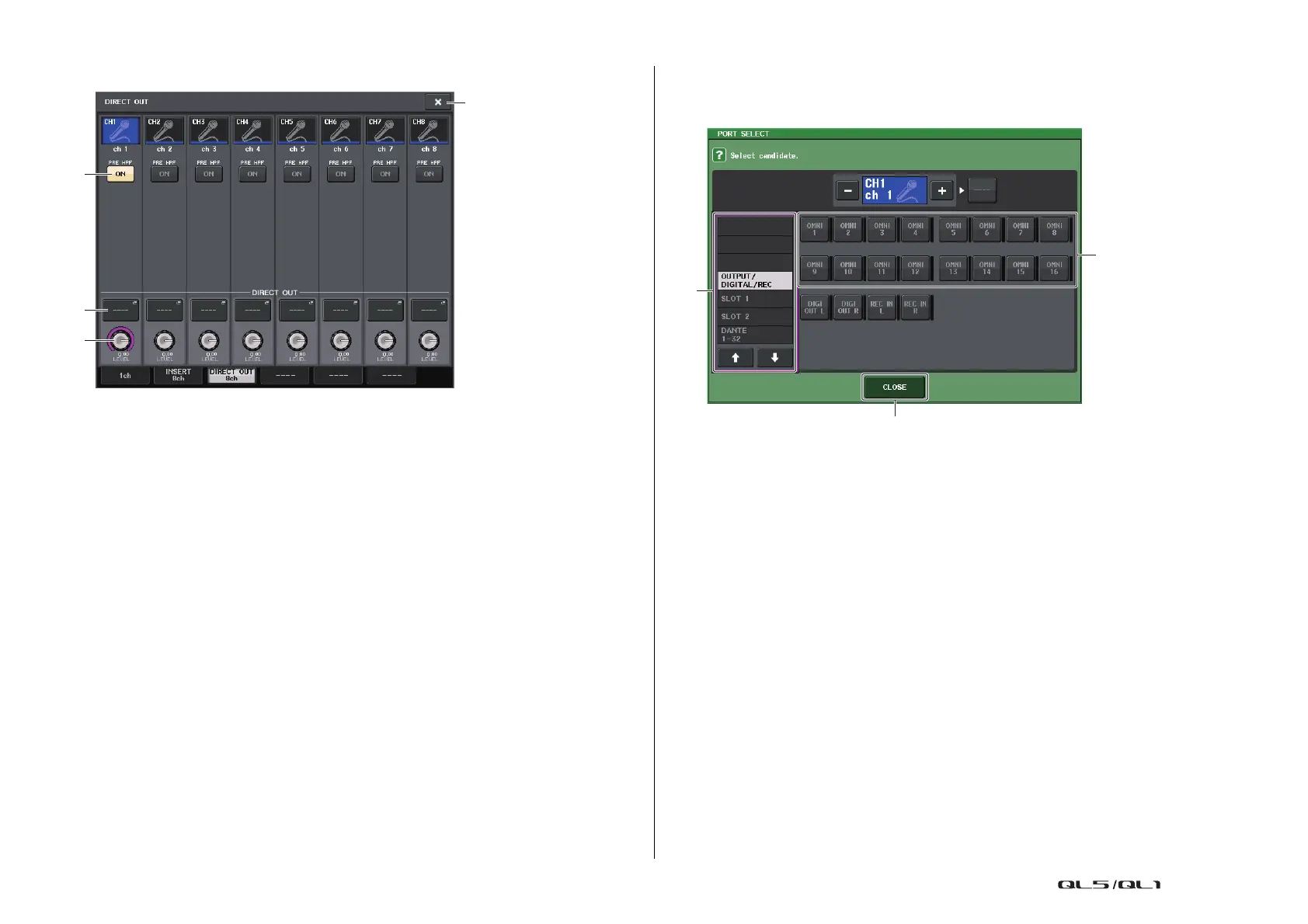
DIRECT OUT screen (8ch)
1 DIRECT OUT ON button
Switches the Direct Out on or off. The currently-selected Direct Out point is indicated
above the button.
2 DIRECT OUT PATCH button
Displays the currently-selected Direct Out output port. Press this button to open the
PORT SELECT window, in which you can select an output port.
3 DIRECT OUT LEVEL knob
Indicates the output level of the Direct Out. You can use the [TOUCH AND TURN] knob
to adjust the level.
4 Close button
Closes the screen.
PORT SELECT window
Displayed when you press the DIRECT OUT PATCH button in the one-channel or the eight-
channel INSERT/DIRECT OUT window. Set the output port used for direct output.
1 Category select list
Selects the category of output port. The categories correspond to the following output
ports. The displayed categories vary depending on the channel type.
• OUTPUT/DIGITAL/REC.........OMNI OUT1–OMNI OUT16 (QL5), OMNI OUT1–OMNI
OUT8 (QL1), DIGITAL OUT L/R, RECORDER IN(L/R)
• SLOT1....................................SLOT1(1)–SLOT1(16)
• SLOT2....................................SLOT2(1)–SLOT2(16)
• DANTE1–32...........................DANTE1–DANTE32
• DANTE33–64.........................DANTE33–DANTE64 (QL5 only)
2 Output port select buttons
Assign the output port used for direct output of the currently-selected INPUT channel.
3 CLOSE button
Closes the window.



 To Next Page
 Loading...