Document printing workflow
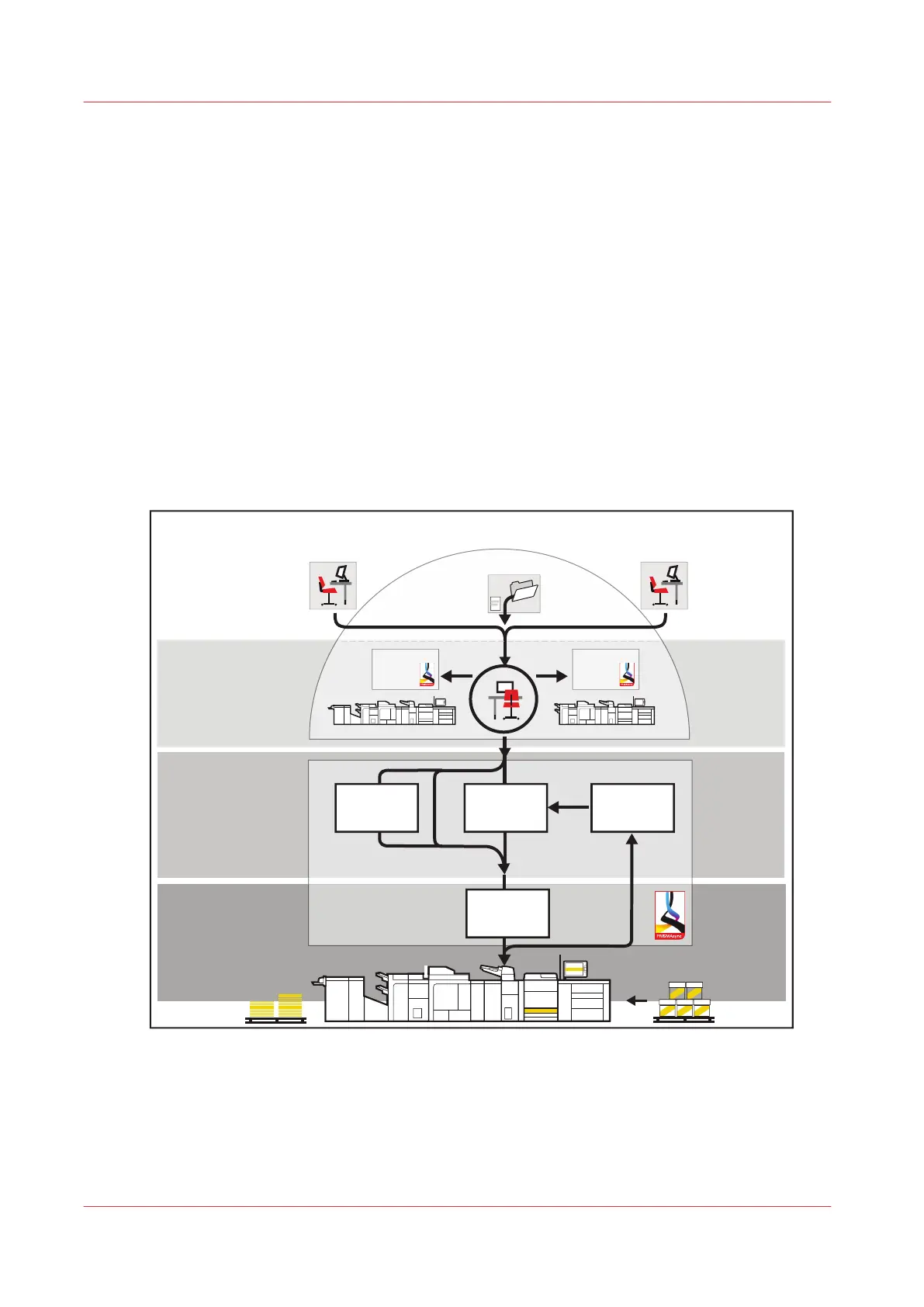
The document printing workflow describes the route from the job preparation to the finishing and
delivery of the printed output. The document printing workflow has four phases:
1.
Job preparation
Prepress staff defines the print document and job settings, and submits the print job to the
PRISMAsync printer. The prepress staff uses PRISMA software, Remote Printer Driver,
automated workflows or hotfolders to prepare and submit the jobs.
2.
Workload planning
Remote Manager is used to monitor the connected print systems, paper trays, scheduled
jobs, and upcoming actions to manage the workload across all connected print systems.
3.
Job planning
Print jobs arrive in one of the following PRISMAsync job locations: a DocBox, the list of
waiting jobs or the list of scheduled jobs. The active workflow profile determines how
PRISMAsync routes the jobs.
4.
Print production
The print system prints and finishes jobs according to the job sequence in the list of
scheduled jobs.
Job preparation
Print production
Job planning
Waiting
jobs
Printed jobs
Scheduled
jobs
Workload planning
Remote Manager
DocBox
PRISMAsync driverPRISMAprepare
[10] Job workflow for document printing mode
Document printing workflow
38
Chapter 3 - Explore the ease of operation
Canon varioPRINT DP line


 To Next Page
 Loading...




