dvanced Guide
> Printing from a Computer >
Printing with the Bundled Application Software
>
Correcting and
Enhancing Photos
> Correct/Enhance Images Window
Correct/Enhance Images Window
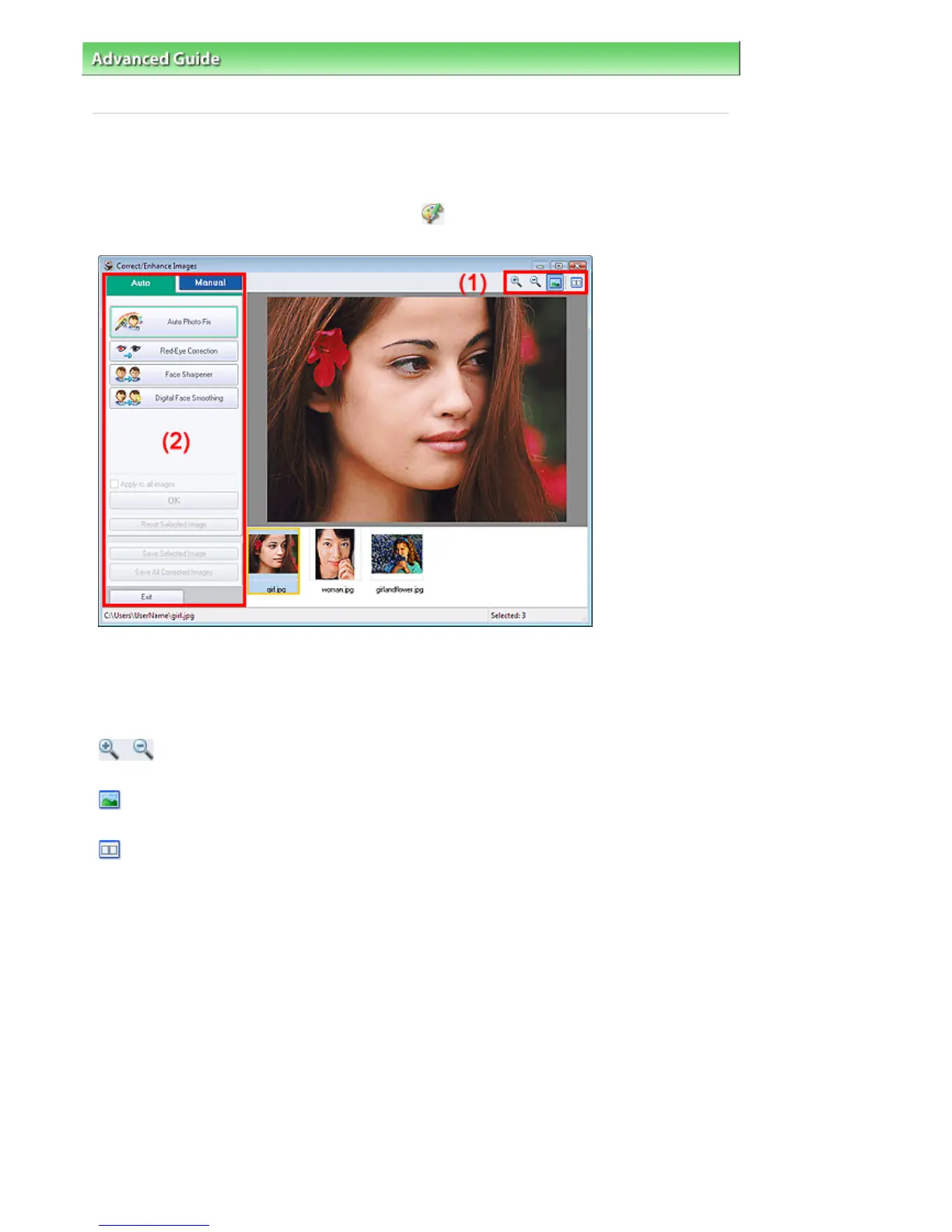
You can correct/enhance images in this window.
To display the Correct/Enhance Images window, click
(Correct/Enhance Images) in the Select
Images or Edit screen, or in the Layout/Print screen of Photo Print.
(1)Toolbar
Toolbar
(Zoom In/Zoom Out)
Displays the enlarged or reduced preview of the page.
(Full Screen)
Displays the entire image in Preview.
(Compare)
Displays the Compare Images window. You can compare the images before and after the correction
side by side.
The image before the correction/enhancement is displayed on the left, and the image after the
correction/enhancement is displayed on the right.
Стр. 154 из 366 стр.Correct/Enhance Images Window


 To Next Page
 Loading...