dvanced Guide
> Printing from a Computer >
Printing with Other Application Software
> Changing the Print Quality and
Correcting Image Data
> Adjusting Brightness
Adjusting Brightness
You can change the brightness of the overall image data during printing.
This function does not change pure white or pure black but it changes the brightness of the intermediate
colors.
The following sample shows the print result when the Brightness specification is changed.
Light is selected
Normal is selected
Dark is selected
The procedure for adjusting brightness is as follows:
1.
Open the printer driver setup window
2.
Select the manual color adjustment
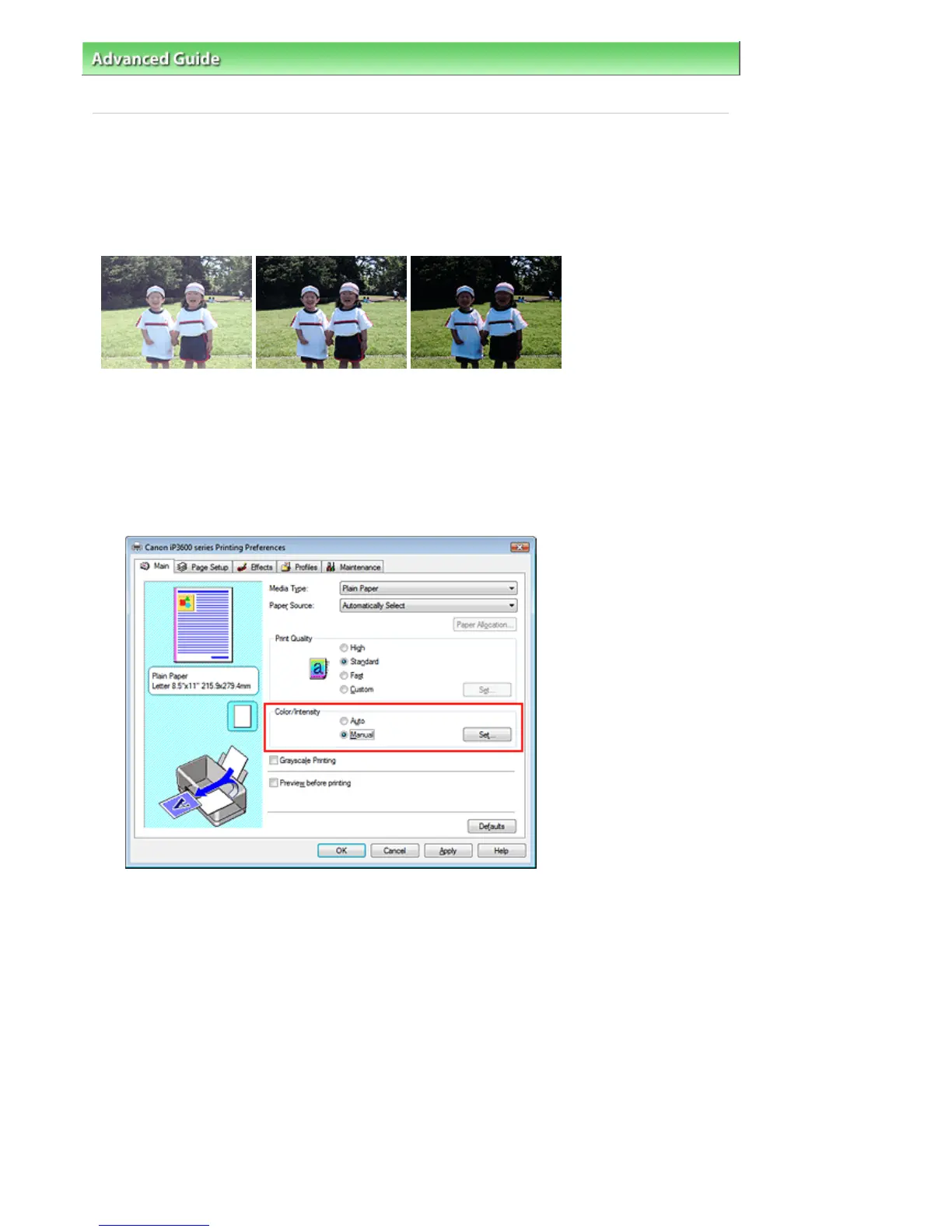
On the Main tab, select Manual for Color/Intensity, and click Set....
The Manual Color Adjustment dialog box opens.
3.
Specify the brightness
Select Light, Normal, or Dark for Brightness, and click OK.
Стр. 247 из 366 стр.Adjusting Brightness


 To Next Page
 Loading...