dvanced Guide
> Printing from a Computer >
Printing with Other Application Software
> Changing the Print Quality and
Correcting Image Data
> Printing a Color Document in Monochrome
Printing a Color Document in Monochrome
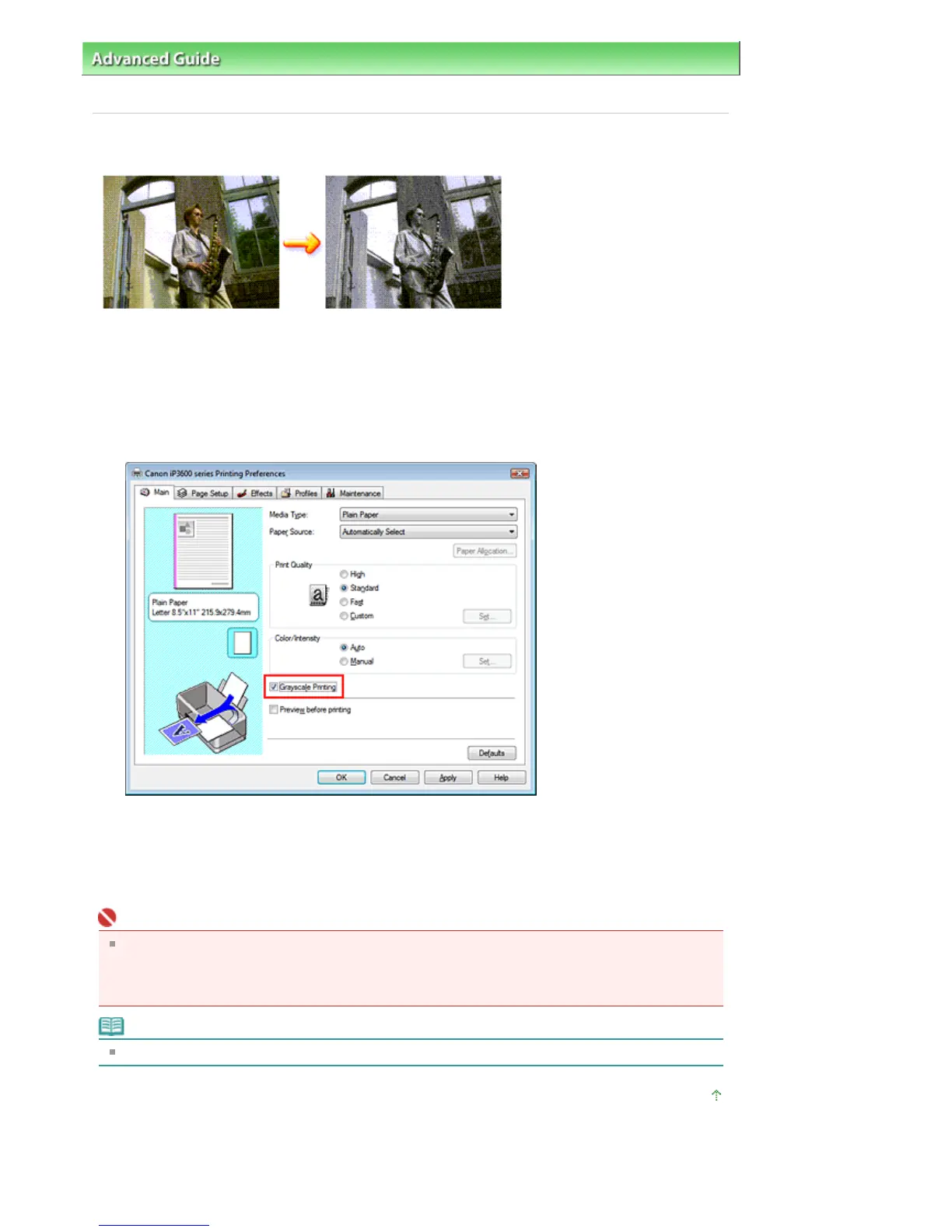
The procedure for printing a color document in monochrome is as follows:
1.
Open the printer driver setup window
2.
Set grayscale printing
Check the Grayscale Printing check box on the Main tab.
3.
Complete the setup
Click OK.
When you execute print, the document is converted to grayscale data. It allows you to print the color
document in monochrome.
Important
When the Grayscale Printing check box is checked, the printer driver processes image data as
sRGB data. In this case, actual colors printed may differ from those in the original image data.
When using the grayscale printing function to print Adobe RGB data, convert the data to sRGB data
using an application software.
Note
During Grayscale Printing, color inks may be used as well as black ink.
Page top
Стр. 235 из 366 стр.Printing a Color Document in Monochrome


 To Next Page
 Loading...