34
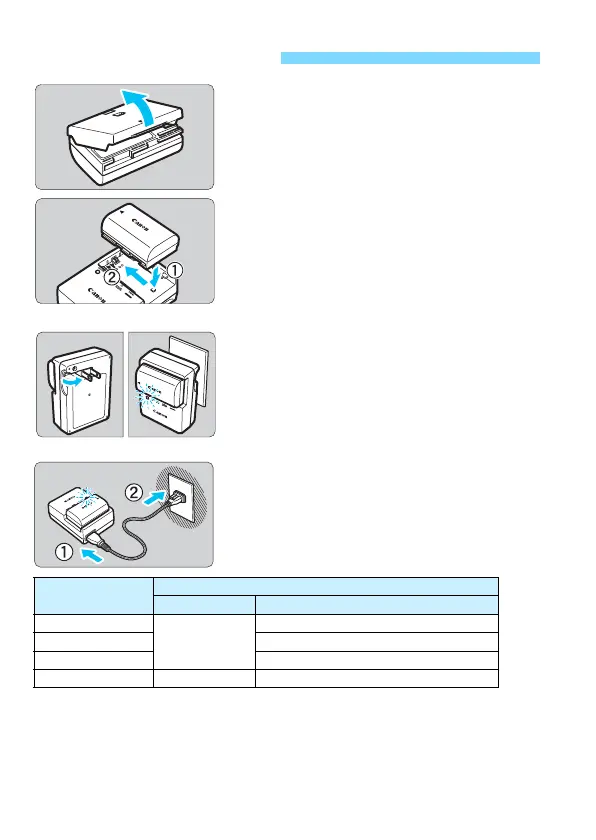
1
Remove the protective cover.
Detach the protective cover provided
with the battery.
2
Attach the battery.
As shown in the illustration, attach the
battery securely to the charger.
To detach the battery, follow the
above procedure in reverse.
3
Recharge the battery.
For LC-E6
As shown by the arrow, flip out the
battery charger’s prongs and insert
the prongs into a power outlet.
For LC-E6E
Connect the power cord to the
charger and insert the plug into a
power outlet.
Recharging starts automatically and
the charge lamp blinks in orange.
It takes approx. 2 hr. and 30 min. to fully recharge a completely
exhausted battery at room temperature (23°C / 73°F). The time
required to recharge the battery will vary greatly depending on the
ambient temperature and the battery’s remaining capacity.
For safety reasons, recharging in low temperatures (5°C - 10°C /
41°F - 50°F) will take longer (up to approx. 4 hr.).
Charging the Battery
Charge Level
Charge lamp
Color Display
0-49%
Orange
Blinks once per second
50-74% Blinks twice per second
75% or higher Blinks three times per second
Fully charged Green Lights up


 To Next Page
 Loading...










