190-00870-02 Rev. A
Garmin G950 Pilot’s Guide for the Pilatus PC-6
33
SYSTEM OVERVIEW
SYSTEM
OVERVIEW
FLIGHT
INSTRUMENTS
EIS
AUDIO PANEL
& CNS
FLIGHT
MANAGEMENT
HAZARD
AVOIDANCE
AFCS
ADDITIONAL
FEATURES
APPENDICES INDEX
SYSTEM SETTINGS
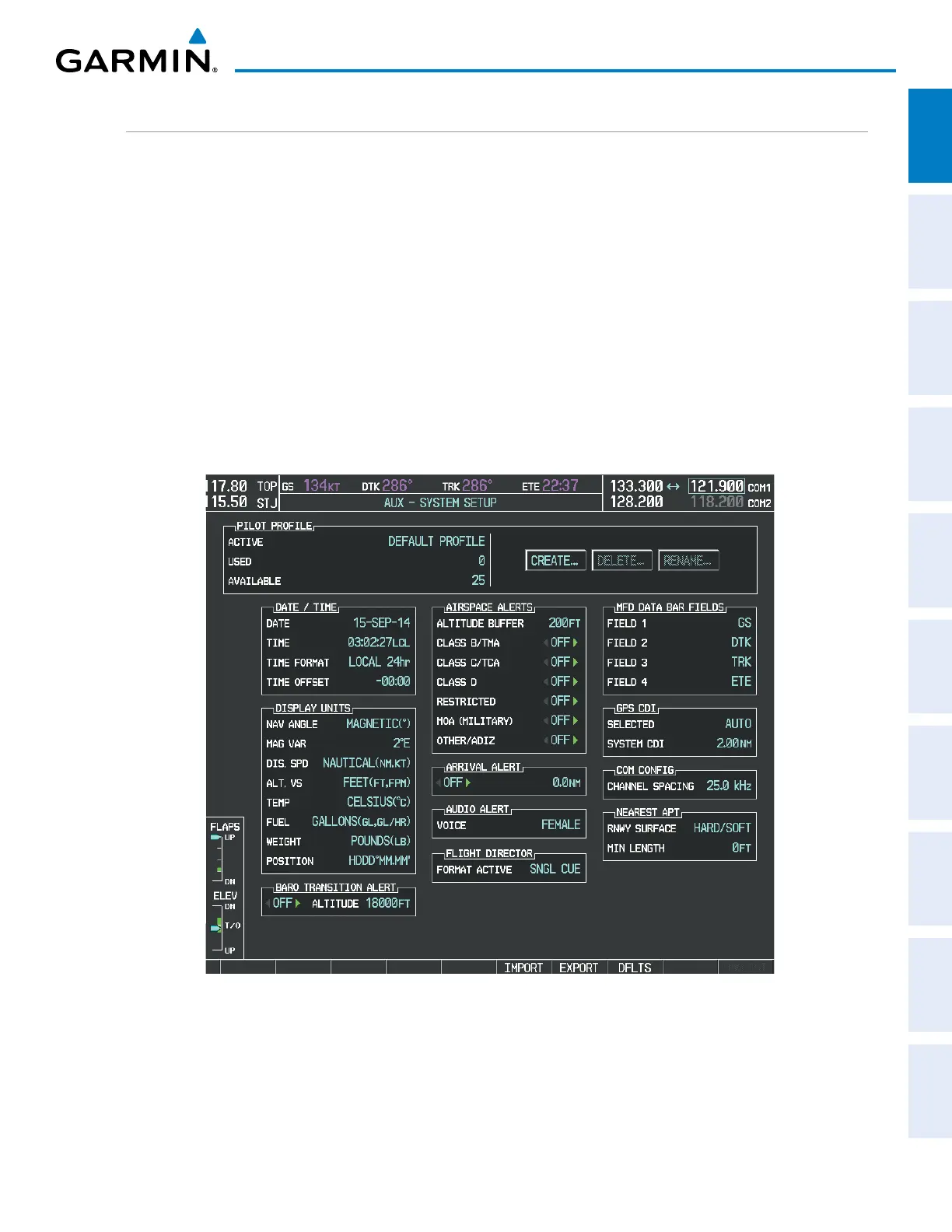
The System Setup Page allows management of the following system parameters:
• Time display format (local or UTC ) • Audio alert voice
• Displayed measurement units • MFD Data Bar (Navigation Status Box) fields
(see the Flight Management Section)
• Barometric Transition Alert
(see the Flight Instruments Section)
• GPS Course Deviation Indicator (CDI) range
(see the Flight Instruments Section)
• Airspace alerts
(see the Flight Management Section)
• COM transceiver channel spacing
(see the Audio Panel and CNS Section)
• Arrival alert • Displayed nearest airports
(see the Flight Management Section)
Figure 1-29 System Setup Page
Restoring system setup defaults:
1) Use the FMS Knob to select the AUX - System Setup Page.
2) Press the DFLTS Softkey.


 To Next Page
 Loading...









