4 - 5
Adjustment
Adjustment
Upper thread tension adjustment
1. Remove the front cover.
2. Remove the 2 screws, and then remove the thread guide A assembly.
3. Remove the 2 screws, and then remove the front panel and manual buttons A/B.
4. Attach the thread guide A assembly with the 2 screws.
5. Set the thread tension dial to [4].
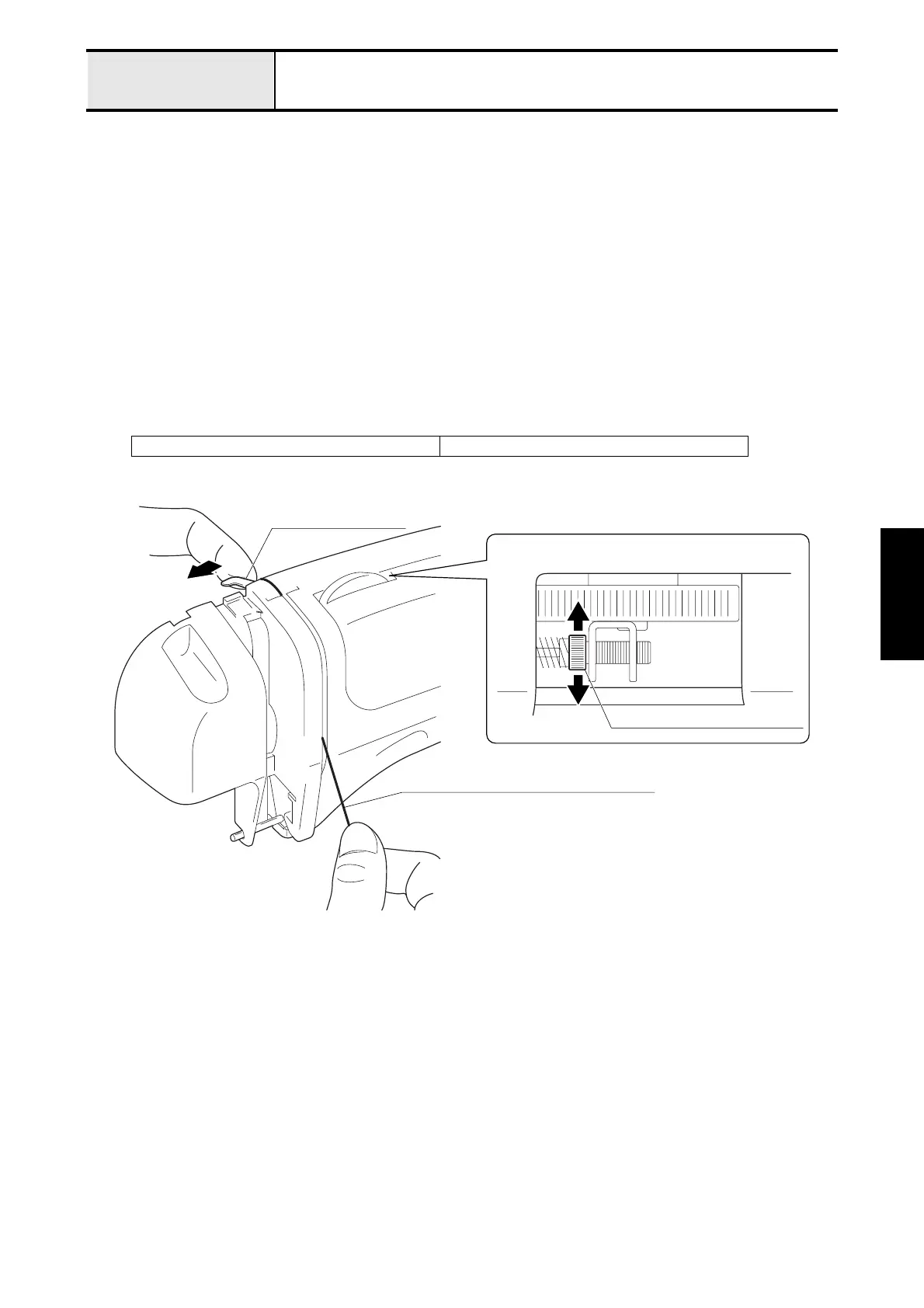
6. Open the thread release plate (move to the right to open the tension disc), and then pass the Schappe Spun Sewing
Thread #60 through the tension disc.
7. Pull the thread with a tension gauge, and adjust the thread tension adjusting screw depth for 0.372 - 0.421 N (38 -
43g).
8. Remove the 2 screws, and then remove the thread guide A assembly.
9. Attach the front panel and manual buttons A/B with the 2 screws.
10. Attach the thread guide A assembly with the 2 screws.
XA9154001 Tension gauge 50 (0.5 N)
Tension release plate
Schappe Spun Sewing Thread #60
Thread tension adjusting screw


 To Next Page
 Loading...