2 - 12
Main parts
Main unit
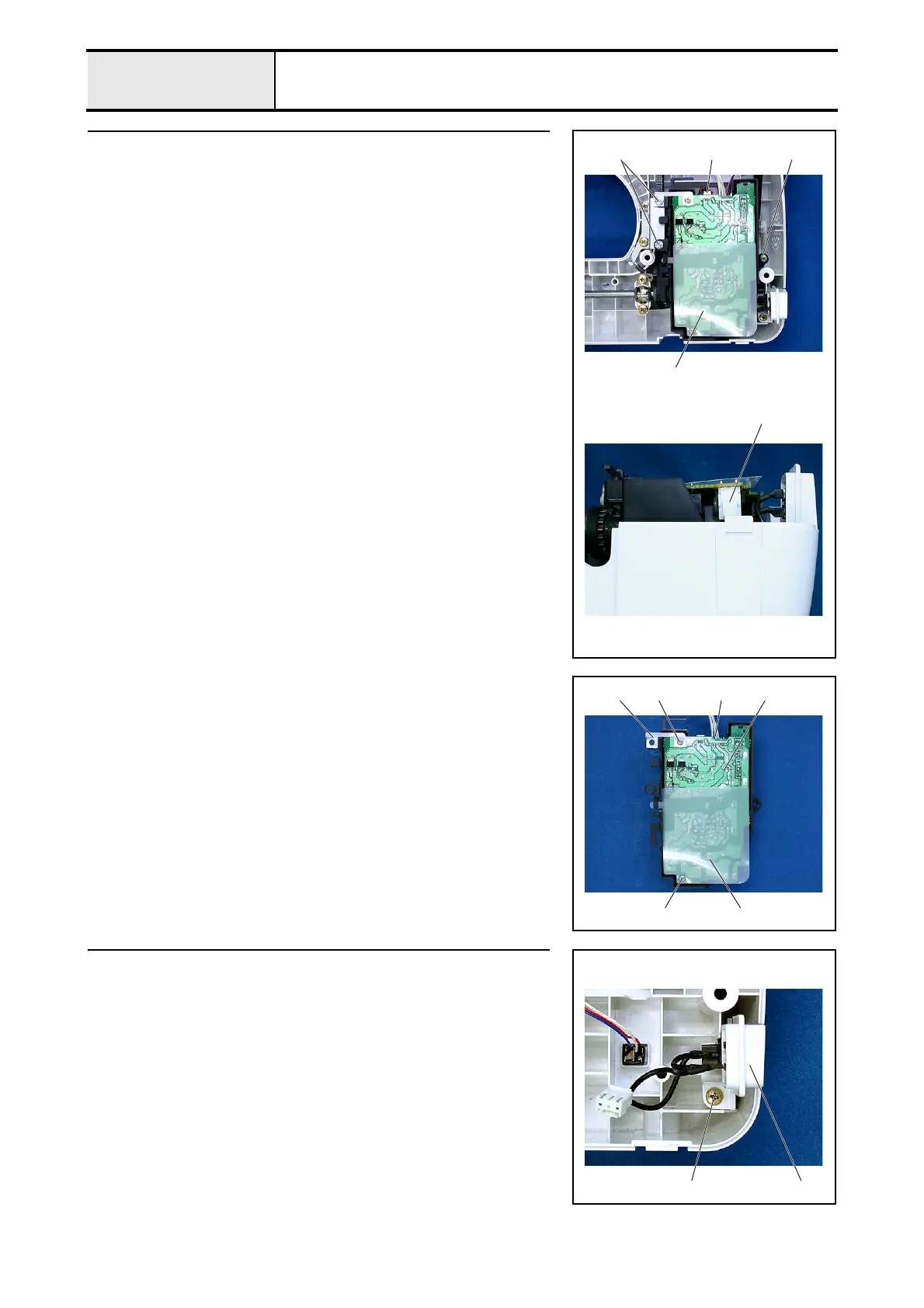
15 Power PCB assembly removal
1. Remove screws 1 and 2 (2 pcs. /1pc.), and then remove the power PCB
assembly 1.
2. Disconnect the main motor lead wire 2 and the inlet assembly connector
3.
*Key point
• Hold the hook on the inlet assembly connector 3 and pull it
out.
1 2 2
1
3
15-1 Power PCB ASSY disassembly
1. Disconnect the power lead wire assembly connector 1.
2. Remove the screw 1, and then remove the power plate spring 2.
3. Remove the screw 2, and then remove the insulator sheet 3.
4. Remove the power PCB 4.
121
2 3
4
16 Inlet assembly removal
1. Remove the screw 1, and then remove the inlet assembly 1.
1 1


 To Next Page
 Loading...