4 - 15
Adjustment
Adjustment
Feed forward/reverse adjustment
1. Attach the front cover.
2. Hold down the backstitching button and the selecting button (right), and turn the power on (the buzzer must sound
four times).
3. Select pattern number [05] to enter "Feed forward and backward mode."
4. Press [Start/Stop] to run the machine in "Feed forward and backward mode," checking the forward and backward
feed length.
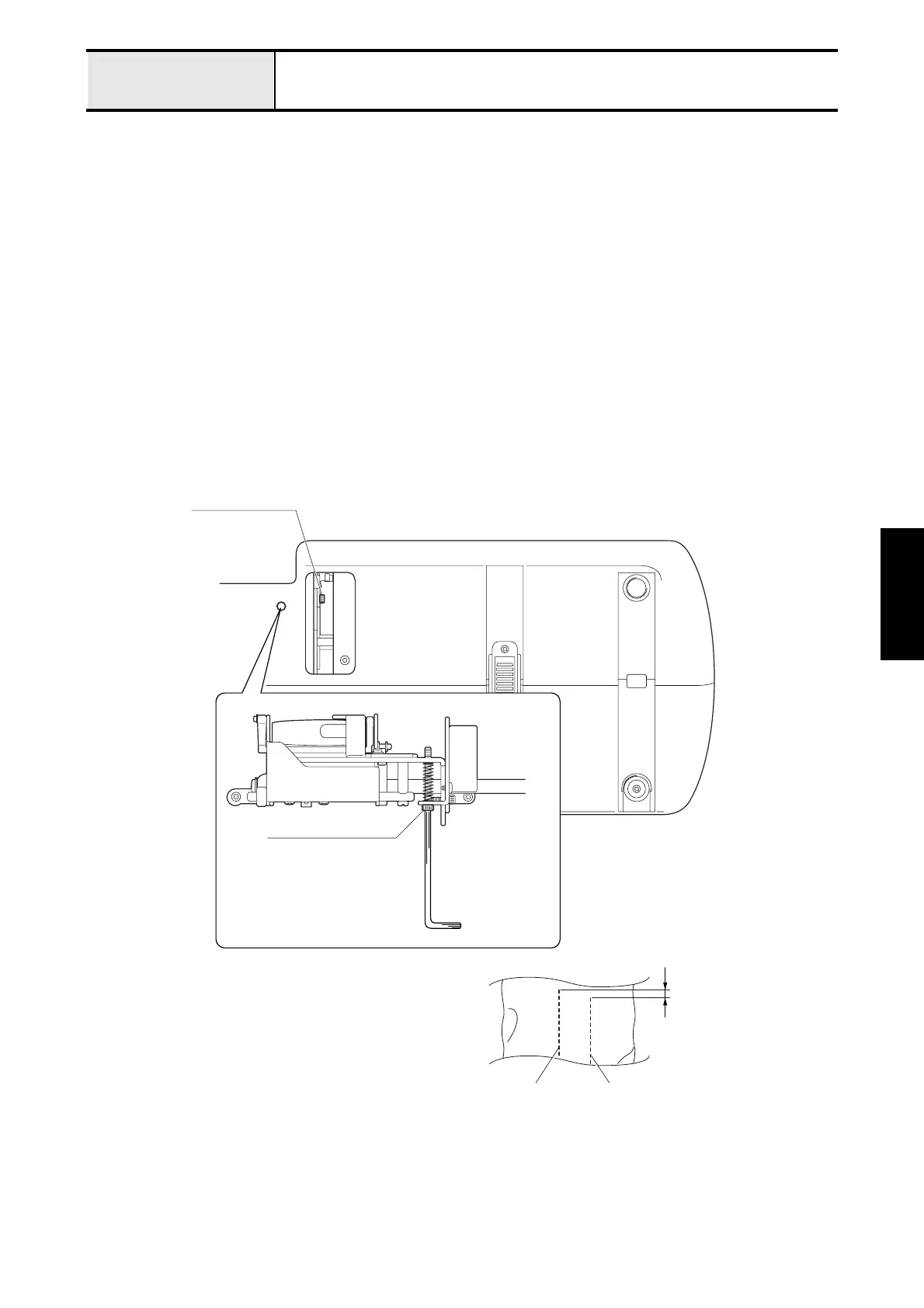
5. Remove base cover A.
6. Loosen the FPM holder assy. screw (3 x 8)
7. Adjust the forward and reverse feed using the FPM holder assy. screw (4 x 25).
*Key point
• When a material of two layers of broadcloth with paper in between is given 100 stitches forward and reverse
("Feed forward and reverse" mode), the forward side should be 0 - 10 mm longer than the reverse side.
• Tightening the screw (4 x 25) ® shortens the reverse side.
• Loosening the screw (4 x 25) ® lengthens the reverse side.
8. Attach base cover A.
Socket bolt (3x8)
Socket bolt (4x25)
0-10mm
Forward Backward


 To Next Page
 Loading...