3 - 18
Main unit
Main parts
26 Front cover attachment
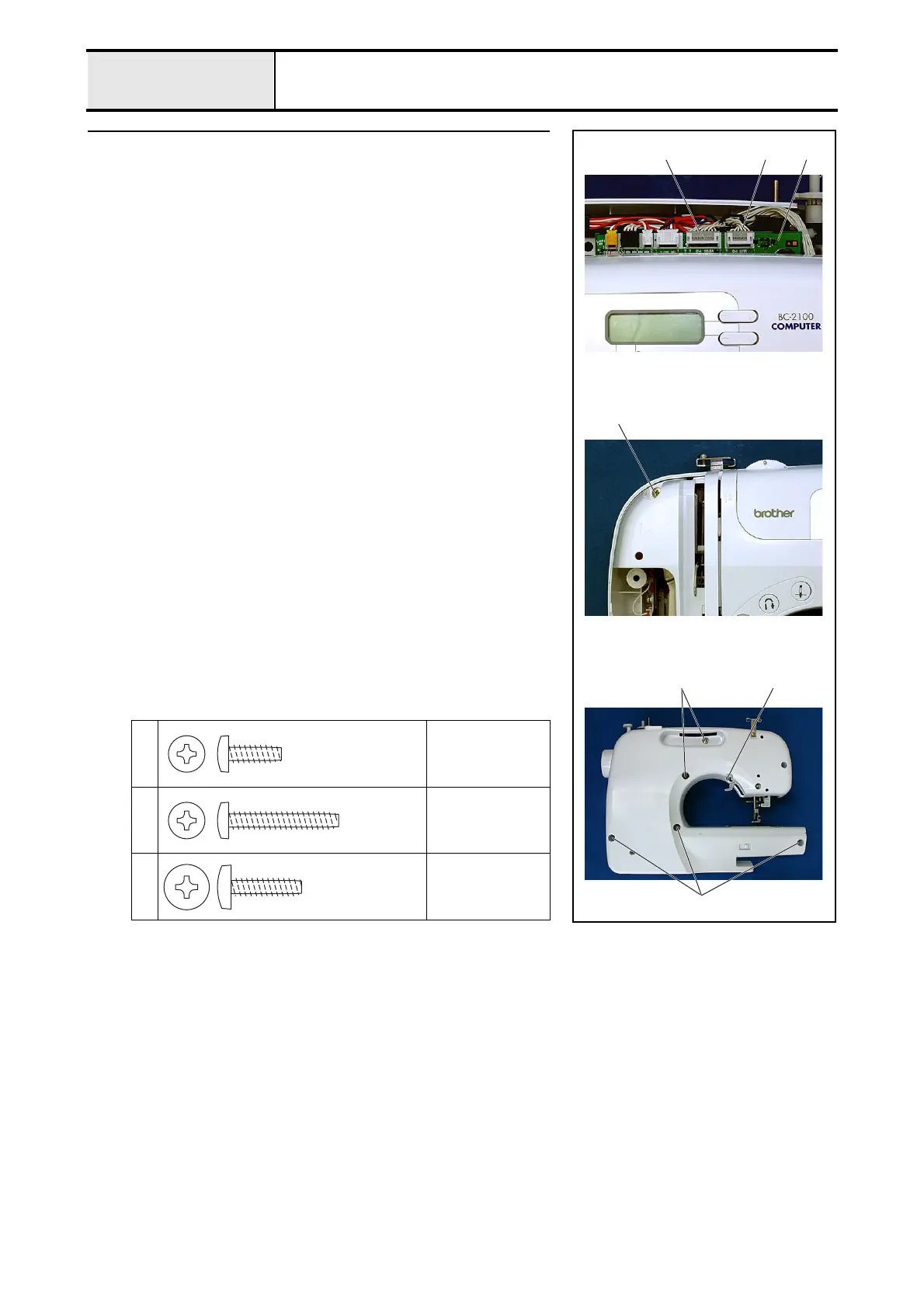
1. Connect the SSVR PCB connector 1 and the operation PCB connector 2
to the main PCB 3.
*Key point
• Pass the lead wires to the hook section of the shutter cover 4
while preventing them from lifting or disconnecting.
<Refer to "5 - 1 Special Instructions of Wiring" for wiring
details.>
2. Attach the front cover to the arm bed cover with screws 1 (front, 1 pc.), 2
(rear, 1 pc.), and 3 (rear, 5 pcs.).
1
Torque
0.88 – 1.18 N
·m
2
Torque
0.88 – 1.18 N
·m
3
Torque
1.18 – 1.57 N
·m
213
1
3
3
2
Giza Tite
4X12
Color; Gold
Giza Tite
4X25
Color; Gold
Giza Tite
5X16
Color; Gold


 To Next Page
 Loading...