Network-related Problems
167
Problem Solving
11
When print result is not what was expected
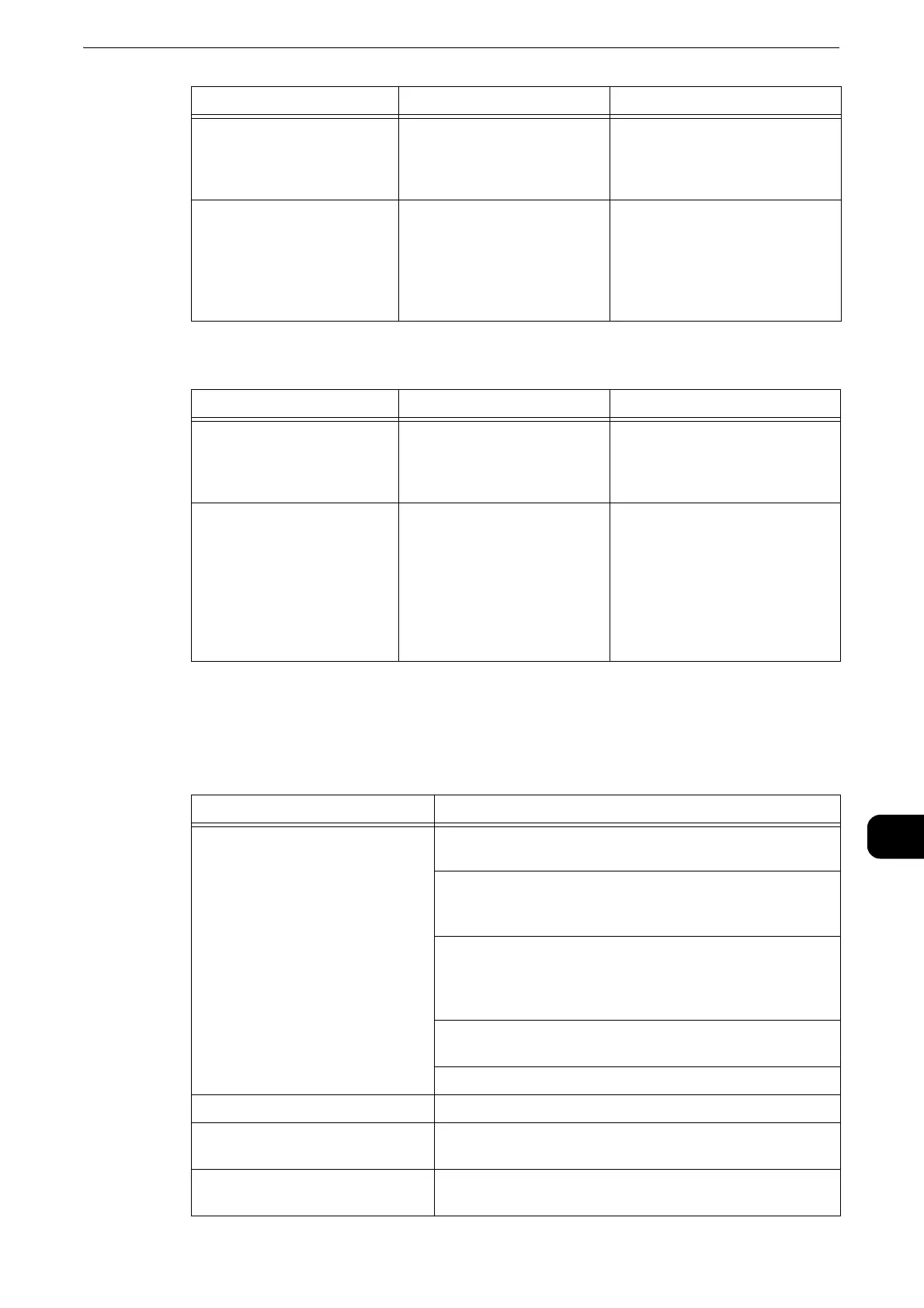
Printer Configuration Web Tool Problems
The possible symptoms and remedies for problems when using Printer Configuration
Web Tool are as follows:
The printer is not set to the
transport protocol
corresponding to the
computer.
Confirm the transport
protocol selected on the
printer.
Select the transport protocol
corresponding to the computer.
The printer is trying to
process a data format that
does not match the data
format of the print data
transmitted from a
computer.
- Set not to output Ctrl-D.
Cause Check point Remedy
Selected printer language
on the printer does not
match the printer language
of the print data.
Confirm the selected printer
language on the printer and
the printer language of the
print data.
Select the printer language on
the printer to match the print
data.
The computer is not using
the print driver supplied with
the printer (is using another
company's print driver).
Confirm whether the print
driver on the computer is the
one supplied with the printer.
On the computer, select the
print driver supplied with the
printer. If the print driver is not
listed for selection, install the
print driver and then select it.
Operation is not guaranteed if
another company’s print driver
is used.
Symptom Remedy
Cannot connect to Printer
Configuration Web Tool.
Is the printer working properly? Check whether the printer
is turned on.
Is the Internet address correctly entered? Confirm the
Internet address again. If the problem persists, enter an
IP address to connect to Printer Configuration Web Tool.
Is a proxy server being used? Depending on the proxy
server, connections may not be possible. Set the browser
to [Not using proxy server] or set that particular address
to [Not using a proxy server].
Are the initial settings of the printer complete? Complete
the initial settings.
Are cookies enabled in your browser? Enable cookies.
The screen display is distorted. Change the window size for the browser.
The latest information is not
displayed.
Refresh the browser.
Characters are not correctly
displayed.
Use language command.
Cause Check point Remedy


 To Next Page
 Loading...