MACHINE OPERATIONS AND CONTROLS
2.
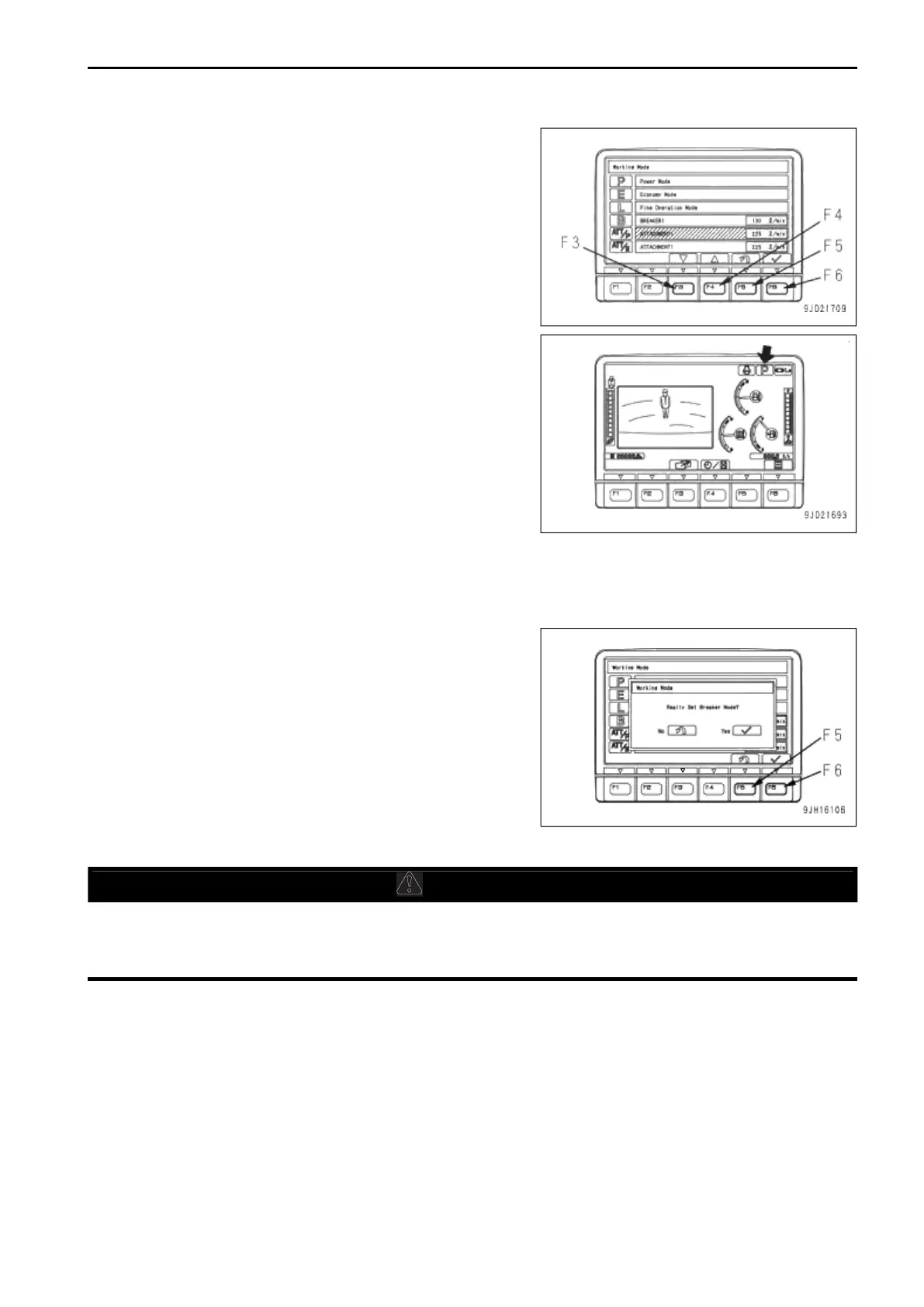
Press the working mode selector switch or, function switch
F3 or F4 to select the appropriate mode.
3.
Select a desired working mode and press function switch
F6.
The change is entered and the screen returns to the stand-
ard screen.
If function switch F5 is pressed, the screen returns to the
standard screen without changing the mode.
• If a working mode is selected, and nothing is done for 5 seconds, the selected working mode is auto-
matically accepted and the screen returns to the standard screen.
• If a working mode is selected and working mode selector switch (1) is kept pressed, the selected mode
is accepted and the screen returns to the standard screen.
• If the breaker mode is selected, "Really Set Breaker
Mode?" is displayed on the screen.
When setting to the breaker mode, press function
switch F6.
If function switch F5 is pressed, the screen returns to
the working mode selection screen.
PROHIBITED OPERATIONS
• Do not operate the work equipment control lever when the machine is traveling.
• If any lever is operated when the auto-deceleration is being actuated, the engine speed will sudden-
ly increase, so be careful when operating.


 To Next Page
 Loading...