Scan to FTP
4
200/250/350 4-19
Scan to FTP Chapter 4
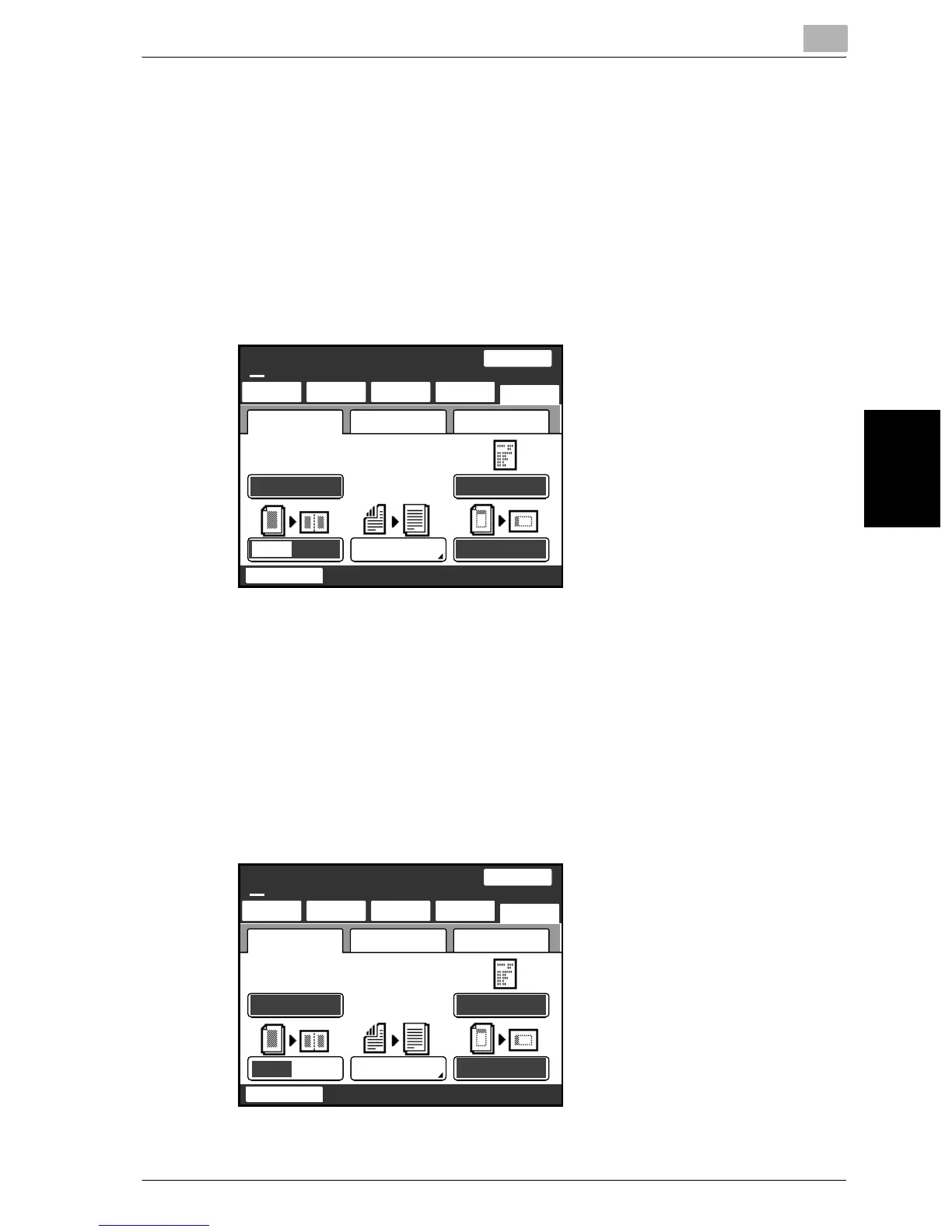
Specifying 2in1 transmission
1 Touch [Menu].
– If the optional fax kit has been installed, touch [FAX Menu].
2 Touch [Setting 1], then [2in1].
– If the optional fax kit has been installed, touch [Set 1], then [2in1].
– Touch the button again to cancel the setting.
The button is highlighted.
Specifying double-sided transmission
1 Touch [Menu].
– If the optional fax kit has been installed, touch [FAX Menu].
2 Touch [Setting 1], then [2-Sided TX].
– If the optional fax kit has been installed, touch [Set 1], then [2-Sided
TX].
SCANReady
Fine
Chain
TSI
TSI only
TX Report
2in1
2-Sided TX Rotation TX
NetworkSetting 1 Setting 2
One-Touch
Search
Direct
Input
Quality&
Reduction
Menu
Job List
100%
Memory
Free
SCANReady
Fine
Chain
TSI
TSI only
TX Report
2in1 2-Sided TX Rotation TX
NetworkSetting 1 Setting 2
One-Touch
Search
Direct
Input
Quality&
Reduction
Menu
Job List
100%
Memory
Free


 To Next Page
 Loading...