2
Setup
2-56 200/250/350
Setup Chapter 2
2.15 Checking the network connection (Ping)
By sending a ping, you can check whether the network (LAN) is properly con-
nected.
The connection to an SMTP server, POP3 server, or any server (with a spec-
ified IP address) can be checked.
To check the network connection
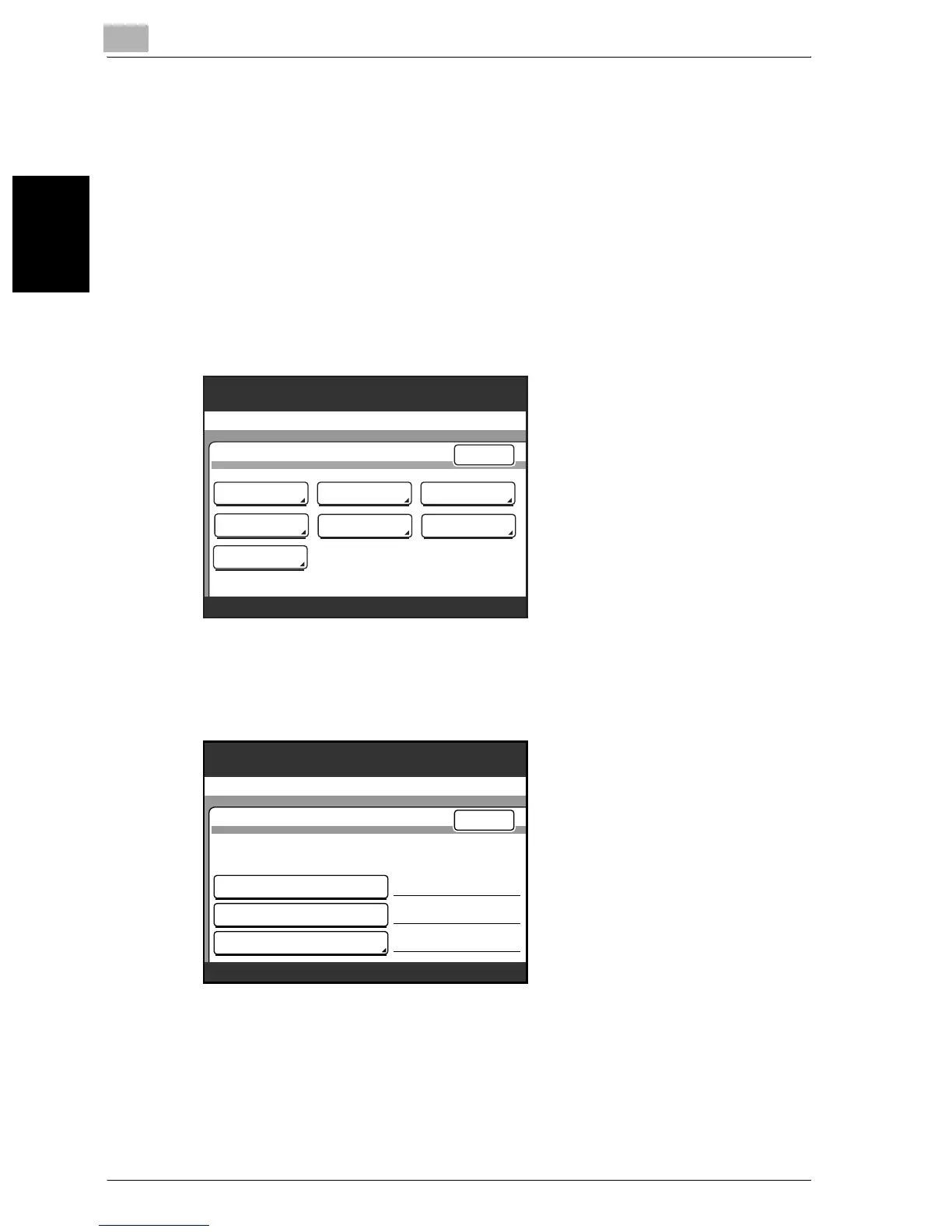
1 Enter Administrator mode, and then touch [Admin. 2].
2 Touch [Ping].
3 Select the connected server.
– If [Ping IP Address] is selected, enter the IP address of the appro-
priate server.
4 Press the [Start] key.
Pinging is performed.
Utility/Counter
Administrator Management 2
Printer
Setting
Software SW
Network
Settings
Ping
Enter
Security
Setting
Delete Job
Memory
Management
Select the address and press START.
Utility/Counter
Ping
SMTP Server Address
POP3 Server Address
192.168.100.110
Ping IP Address
Enter
100%
Memory
Free
192.168.100.110
. . .





 To Next Page