3. Setting the maximum flow volume
The AUX port has been factory-set to 1 action mode. You can also preset the action modes 2, 3, 4, and 5.
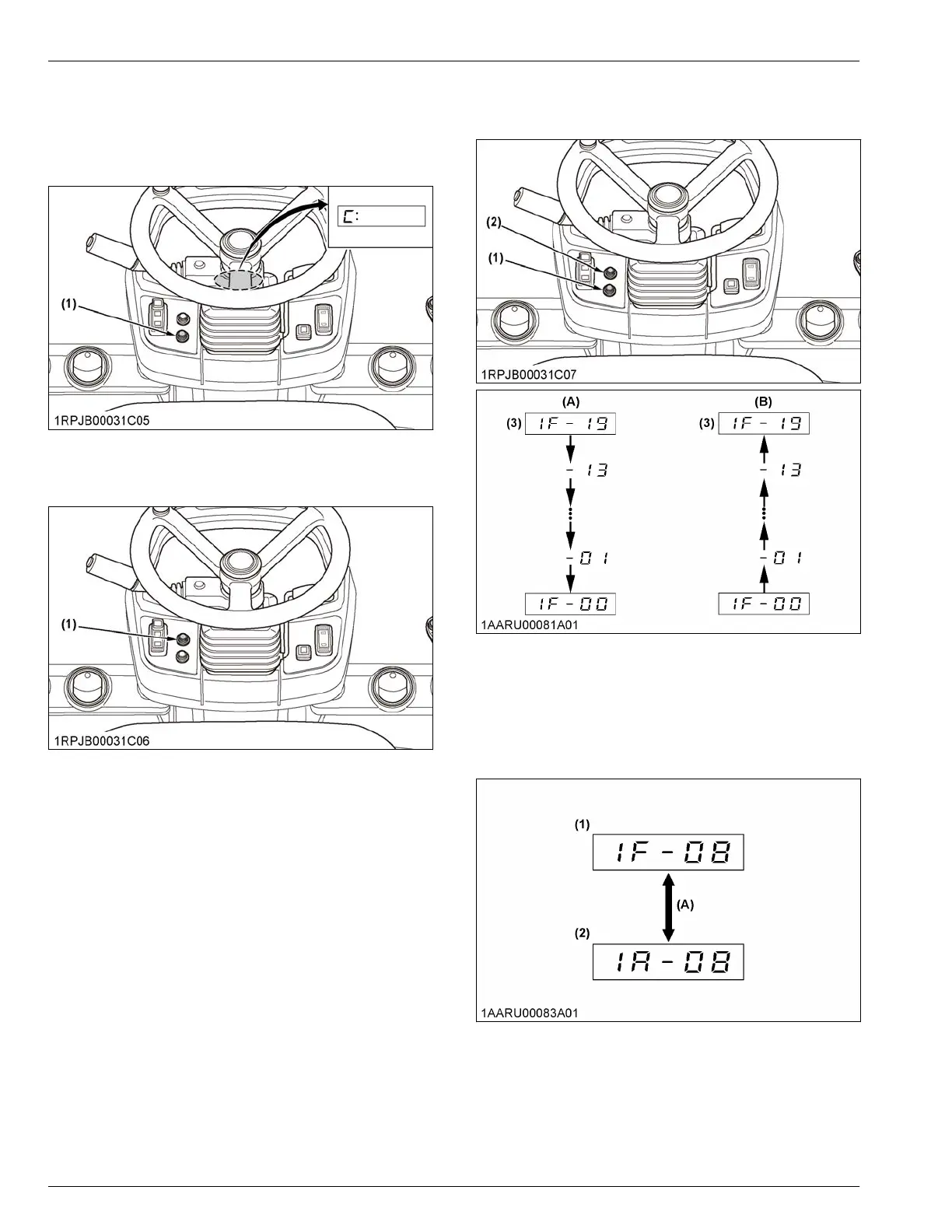
1. With
the starter key at the [RUN] position, press the
user-setting-switch.
(1) User setting switch
2. Choose the AUX-setting-mode by pressing the
display-selector-switch.
(1) Display selector switch
a. Press
the display-selector-switch for a long
time.
b. Press the display-selector-switch to select your
desired AUX-setting-mode number.
c. Press the display-selector-switch for a long time
again.
3. After setting the AUX-setting-mode, press the user-
setting-switch to decrease the volume or press the
display-selector-switch to increase the volume.
(1) User setting switch
(2)
Display selector switch
(3) Max. flow volume value
(A) Press user setting switch to
decrease the volume.
(B) Press display selector switch
to increase the volume.
4. Press
the display-selector-switch for a long time to
go to the next port and set for this port.
Changing the port
(1) Value of left side port
(2)
Value of right side port
(A) Press display selector switch
for a long time.
5. Press
the user-setting-switch for a long time to go
back to step 2 to set for the next action mode.
6. When all the settings of all the action modes have
been finished, press the display-selector-switch for
a long time to return to step 1.
OPERATION OF THE MACHINE AUXILIARY PORT OPERATION


 To Next Page
 Loading...