Messaaging 89
New Messages Notification
Manage Message Conversations
Text and MMS Options
Compose Text Messages
Quickly compose and send text messages on your phone.
1. Press
Home
and touch >
Messaging
.
2. On the Messaging screen, touch . The compose screen opens.
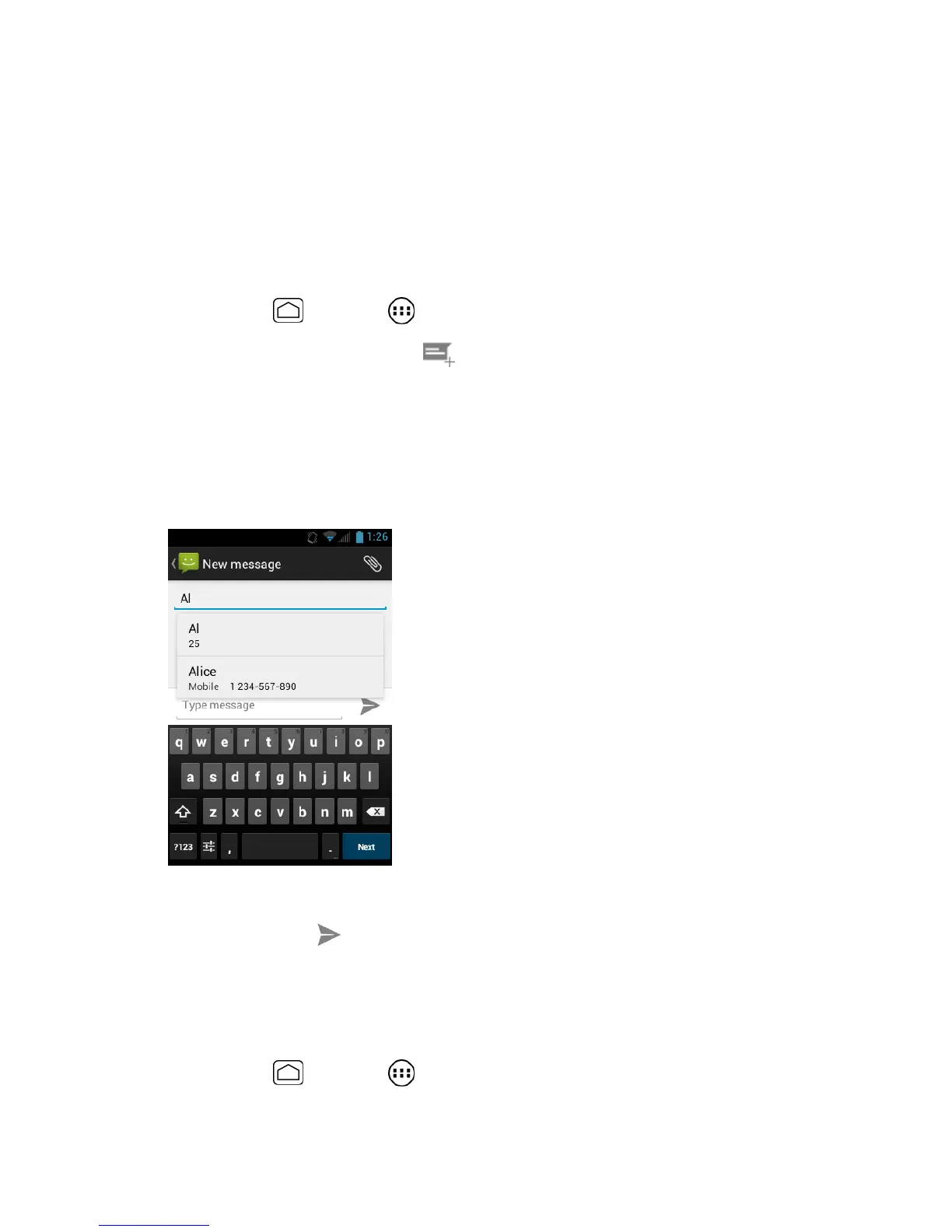
3. Fill in one or more recipients.
Enter phone numbers directly in the
To
field. If you’re sending the message to
several phone numbers, separate the phone numbers with a comma. As you enter
information, any matching phone numbers from your contacts list are displayed.
Touch a match to enter that number or address directly.
4. Touch
Type message
and then start composing your message.
5. When done, touch to send the text message.
Send a Multimedia Message (MMS)
When you need to add a little more to a text message, you can send a multimedia message
(MMS) with pictures, recorded voices, or audio or video files, or slideshows.
1. Press
Home
and touch >
Messaging
.


 To Next Page
 Loading...