17-1
17. AIS SAFETY, NAVTEX
MESSAGES
17.1 AIS Safety Messages
You can send and receive messages via the VHF link, to a specified destination (MM-
SI) or all AIS-equipped ships within communication range of your ship. Messages can
be sent to warn of safety of navigation, for example, an iceberg sighted. Routine mes-
sages are also permitted. Short safety-related messages are only an additional means
to broadcast safety information. They do not remove the requirements of the GMDSS.
17.1.1 How to send an AIS safety message
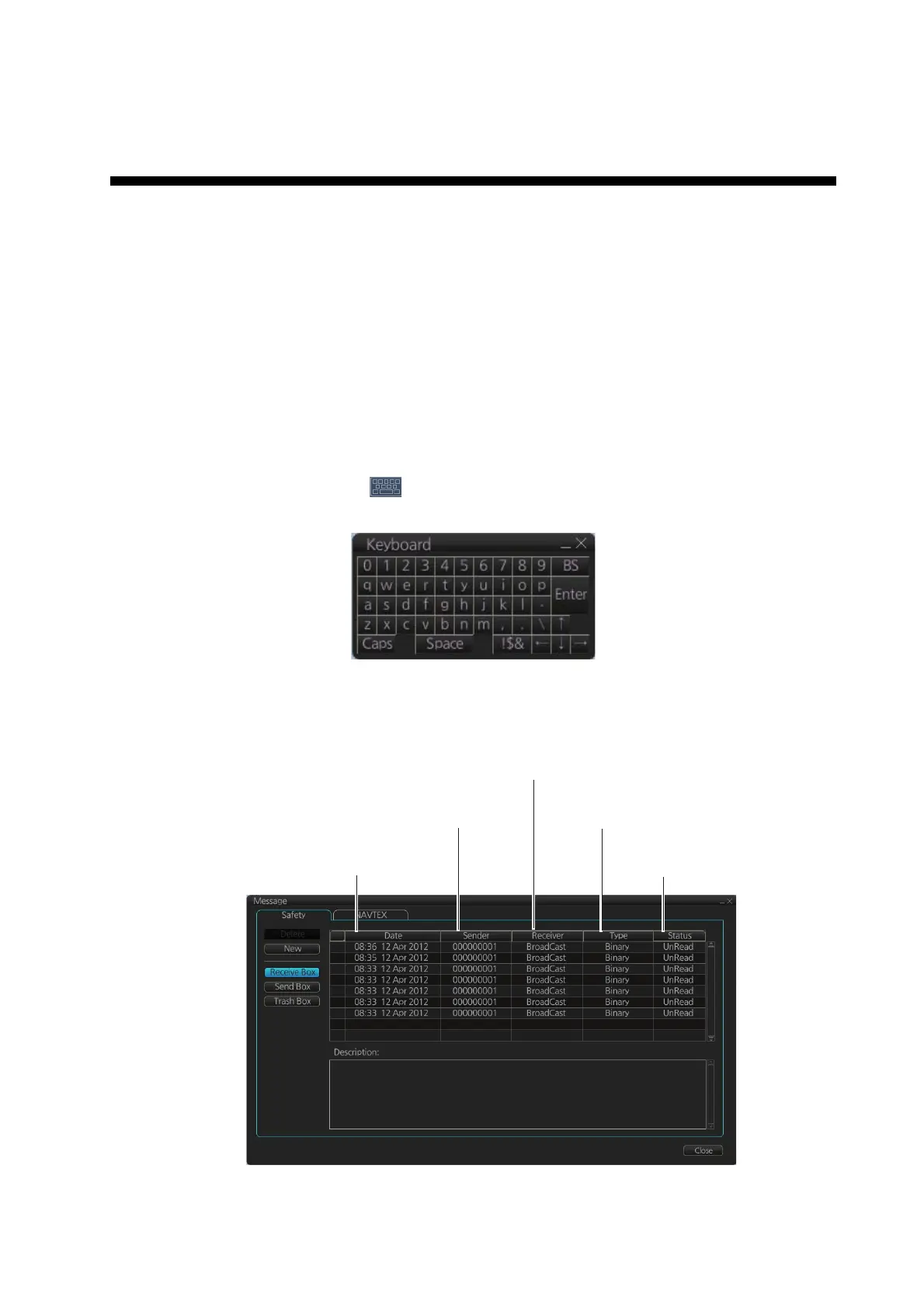
Note: If you are using the Trackball Control Unit RCU-026, display the software key-
board ([DISP] button, [ ], [ON] on the InstantAccess bar) before starting this pro-
cedure.
1. In the Voyage navigation mode, click the [MSG] and [Safety MSG] buttons on the
InstantAccess bar to show the [Message] dialog box.
Type of message
(Binary, Safety)
Status of message
(Read, Unread)
MMSI of
sender
Date
received
MMSI of receiver
(MMSI or “Broadcast”)







 To Next Page