2. RADAR, CHART RADAR OPERATION
2-22
2.17.2 How to set VRM attributes
You can customize the VRMs to suit
your needs.
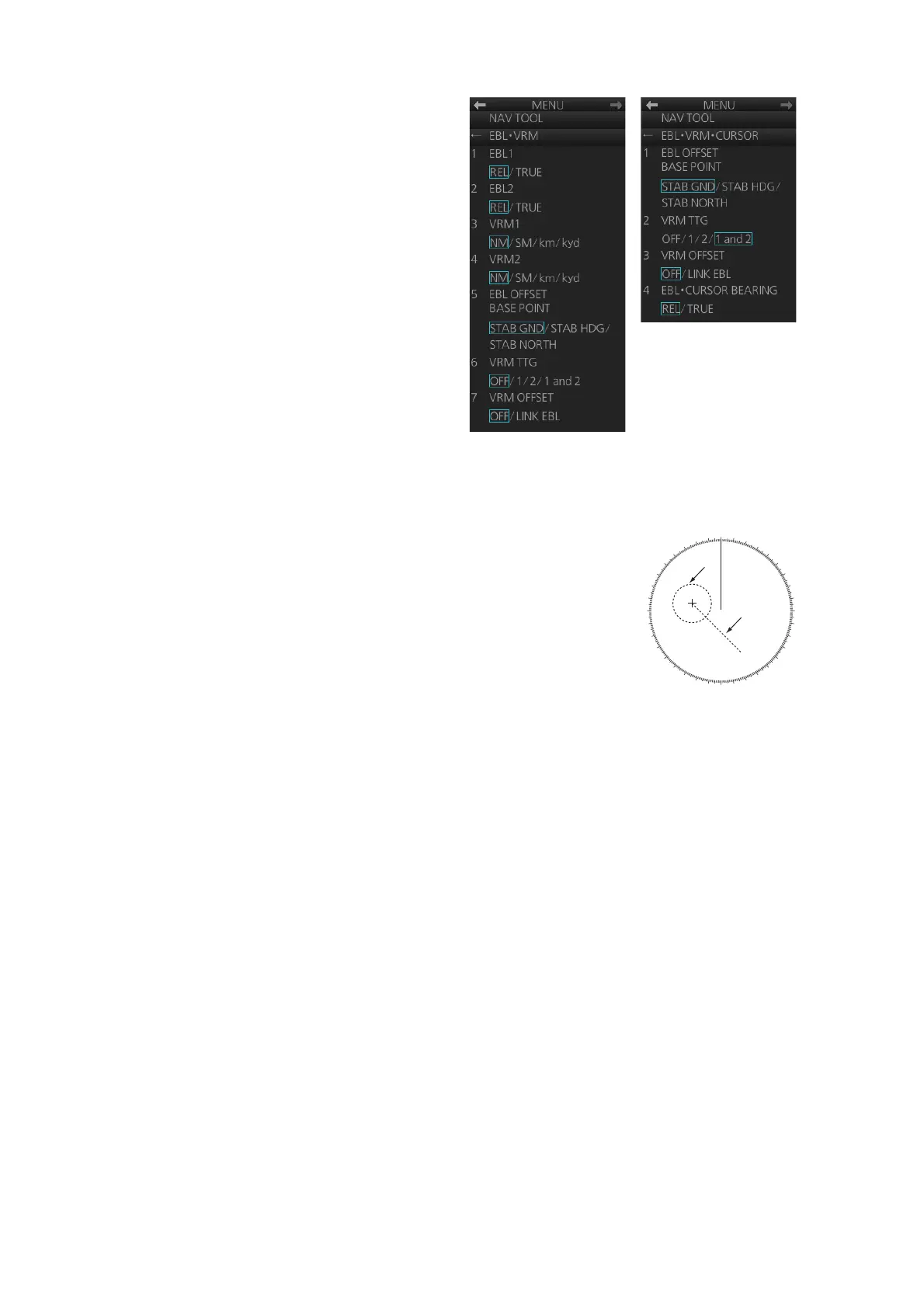
1. Open the menu then select [3
NAV TOOL] and [2 EBL•VRM] (B
type) or [2 EBL•VRM•CURSOR]
(IMO and A types) to display the
[EBL•VRM] menu
([EBL•VRM•CURSOR] menu for
the IMO and A types).
2. For the B-type radar, select [3
VRM1] or [4 VRM2] as appropri-
ate. Spin the scrollwheel to se-
lect desired unit then push the
left button.
3. Select [6 VRM TTG] (B type) or
[2 VRM TTG] (IMO and A types) and then select the VRM(s) that are to show/hide
the TTG indication. [OFF] shows no TTG indication.
4. The [LINK EBL] option for [7 VRM OFFSET] automati-
cally activates the corresponding VRM when the offset
EBL is enabled.
5. Close the menu.
B-type radar
IMO- and A-type radars
000
010
020
030
040
050
060
070
080
090
100
110
120
130
140
150
160
170
180
190
200
210
220
230
240
250
260
270
280
290
300
310
320
330
340
350
Offset
EBL
VRM


 To Next Page
 Loading...