7. Input & Communication
7.2 Local Keypad
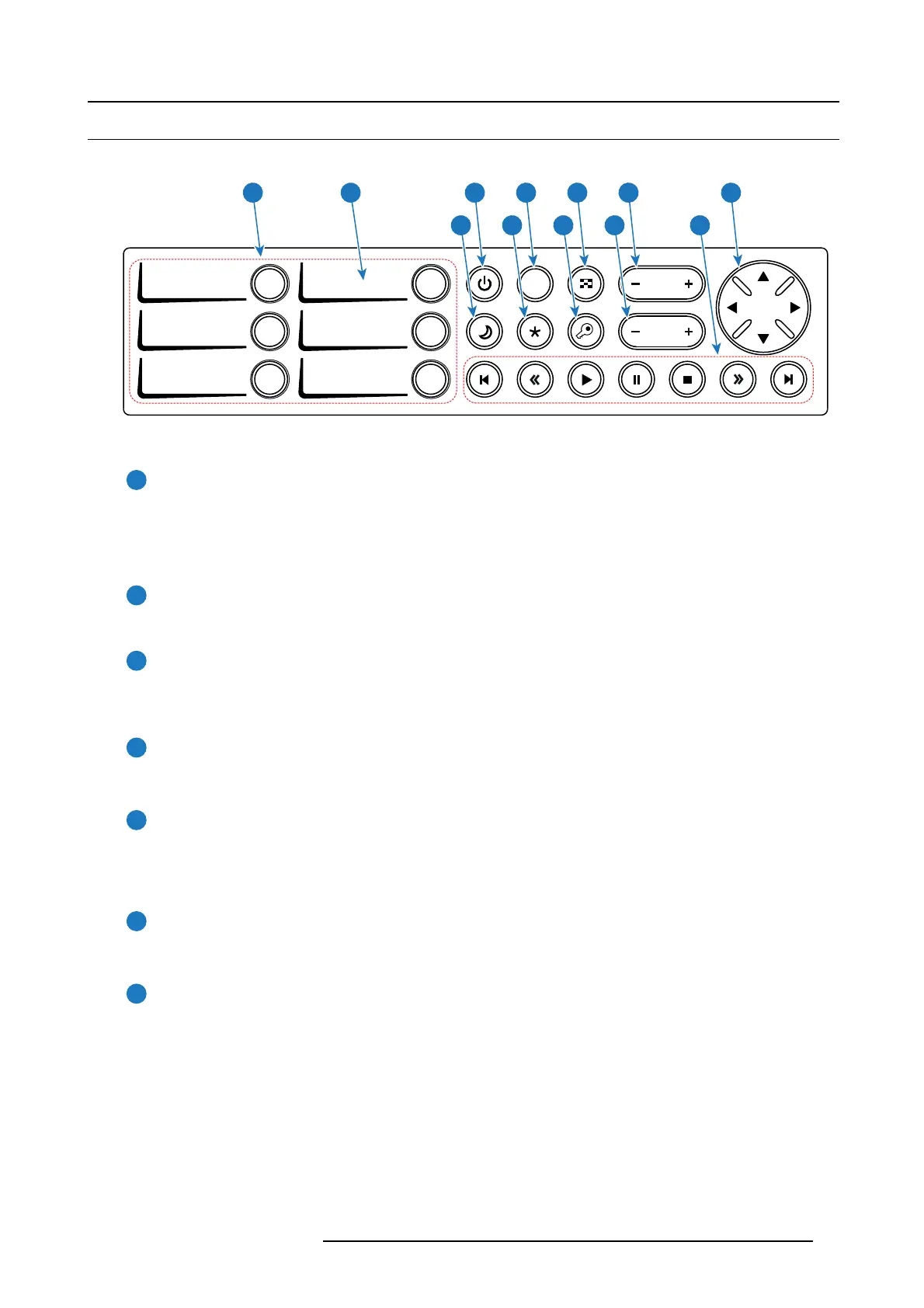
Identification of the buttons
DOWSER
1 4
2 5
3 6
ZOOM
FOCUS
SHIFT
21 3 4 5 6 7
8 9 10 11 12
Image 7-2
Functionality of t he buttons
1
Numeric buttons (No.1 - 6)
All the Numeric buttons (reference 1 image 7-2) of the Loc al K eypad have a blue backlight during norm al operation. W hen
the authorization process is activated with the (security) K ey button, the backlight color of the Num eric buttons changes to
yellow. E ach button can be linked to a macro which allows you to s etup the projector to you r r equirements with one pus h of
a button. The backlight color of the Numeric button is green if the m acro associated with the N um eric key is a ctivated. The
backlight color of the Num eric button is red in c ase one of the ac tions of the macro failed.
2
Marker area
Each Numer ic button has a marker area (reference 2 image 7-2) w here you can write down the name of the M acro.
3
Standby button
Standby b utton (reference 3 im age 7-2) switches the lamp and lam p electronics immediately ON or OFF. The lamp cooling
fans remain active for about 5 minutes. T he speed of the other fans is reduced. The backlight c olor of the Standby bu tton
remains red in standby mode and changes to green in operation mode.
4
Dowser button
The Dow ser button (reference 4 image 7-2) opens or closes the electronic dowser. The backlight c olor of the Dowser button
is green when the dowser is open and r ed when the dowser is c losed.
5
Test P a tte r n button
The Test Pattern button (reference 5 image 7-2) gives direct a cces s to a limited set of the internal test patterns of the
projector. This is a toggle button. To exit the Test P attern m ode toggle through a ll test patterns. Note that the c onvergence
test pattern is not included in this set. The backlight color of the Test Pattern button is red if o ne of the test patterns
is activated and green if none is activated.
6
Focus button
The Focus button (reference 6 image 7-2 ) allows you to focus the projected image on the screen. The backlight c olor of the
Focus button is red in cas e the end of range is reached.
7
Shift bu tto n
The Shift button (reference 7 im age 7-2) allows you to shift the lens u p/down or left/right. The backlight color of the
Shift button is red in case the end of range is reached.
R5977692 DP2K-S SERIES 10/12/2012
37



 To Next Page
 Loading...