EasyManua.ls Logo

Beckhoff TwinSAFE logic FB User Manual

Beckhoff TwinSAFE logic FB
217 pages
To Next Page IconTo Next Page
To Previous Page IconTo Previous Page
Page #64 background imageLoading...
Page #64 background image
Function blocks
62 Function blocks for TwinSAFE logic components
3.5.4 Restart behavior
If all active MonIn inputs and the active EDM inputs are TRUE and the Restart signal changes from
FALSE to TRUE, the Start state (FB state 6) is assumed. The detection of a change of the Restart signal
from TRUE to FALSE triggers a check whether all MonIn inputs are still TRUE and whether the EDM
signal is still TRUE. The output is enabled if these criteria are met and the function block is not in ERROR
state.
NOTE
Restart input
The function block expects a button with make contact at the restart input.
CAUTION
Restart
If the risk and hazard analysis indicates that a restart is to be implemented in the safety controller, the
restart signal must be applied to a safe input.
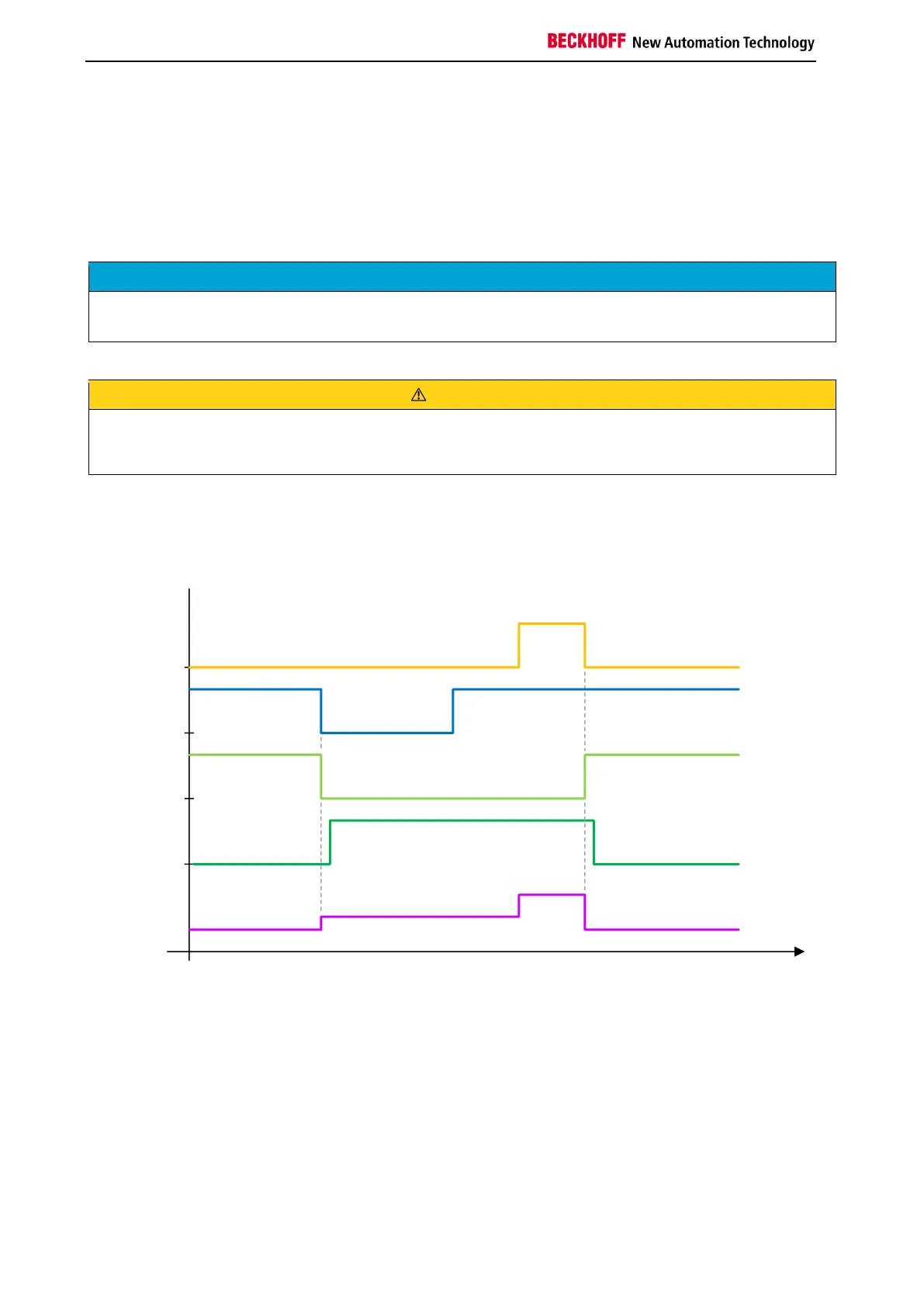
The following diagram shows the behavior when an event is triggered via MonIn and subsequent
acknowledgement of the MON function block via the Restart input. At least one of the EDM inputs of the
FB is active.

RESTART
MonIn
MonOut
EDM
FB State
State 1
State 3
State 6
State 1

Table of Contents

Question and Answer IconNeed help?

Do you have a question about the Beckhoff TwinSAFE logic FB and is the answer not in the manual?

Beckhoff TwinSAFE logic FB Specifications

General IconGeneral
BrandBeckhoff
ModelTwinSAFE logic FB
CategoryIndustrial Electrical
LanguageEnglish

Summary

1 Foreword

Notes on the Documentation

Information regarding the documentation's target audience, origin, currentness, and symbols used.

Safety Instructions

Guidance on safety instructions, delivery state, operator diligence, and explanation of notes.

2 System Description

TwinSAFE Logic Terminals and Connections

Details on TwinSAFE logic terminals, groups, connections, and configuration. Includes diagnosis overview.

System Diagnosis

Information on diagnosing TwinSAFE system components, including diagrams for TwinCAT 2 and TwinCAT 3.

3 Function Blocks

The Function Block AND

Functional description, signal details, diagnostic info, and TwinCAT configuration for the AND logic block.

The Function Block OR

Functional description, signal details, diagnostic info, and TwinCAT configuration for the OR logic block.

The Function Block OPMODE

Description of OPMODE function block for operation mode selection and restart behavior.

The Function Block ESTOP

Details on ESTOP function block: description, signals, configuration, restart behavior, and extensions.

The Function Block MUTING

Description of MUTING block, signals, configuration, examples, and extensions for EL/EJ6910.

The Function Block TON

Functional description, signal details, diagnostic info, and TwinCAT configuration for the TON delay timer.

The Function Block TOF

Functional description, signal details, diagnostic info, and TwinCAT configuration for the TOF delay timer.

The Function Block ADD

Description of ADD block for analog addition: signals, diagnostics, and TwinCAT configuration.

The Function Block SUB

Description of SUB block for analog subtraction: signals, diagnostics, and TwinCAT configuration.

The Function Block COMPARE

Description of COMPARE block for analog input comparison, including architectures, signals, and config.

The Function Block LIMIT

Description of LIMIT block for checking analog input values against Min/Max limits, including signals and config.

The Function Block COUNTER

Description of COUNTER block for up/down counting: signals, diagnostics, and TwinCAT configuration.

The Function Block CAMMONITOR

Description of CAMMONITOR block for electronic cam control: modes, inputs, outputs, parameters, and diagnostics.

4 Appendix

Beckhoff Support and Service

Information on contacting Beckhoff for technical support, system solutions, and after-sales service.

Beckhoff Headquarters Information

Contact details, phone, fax, email, and web address for Beckhoff Automation GmbH & Co. KG.

Related product manuals