18. Plug in the power supply cord and turn on the main switch.
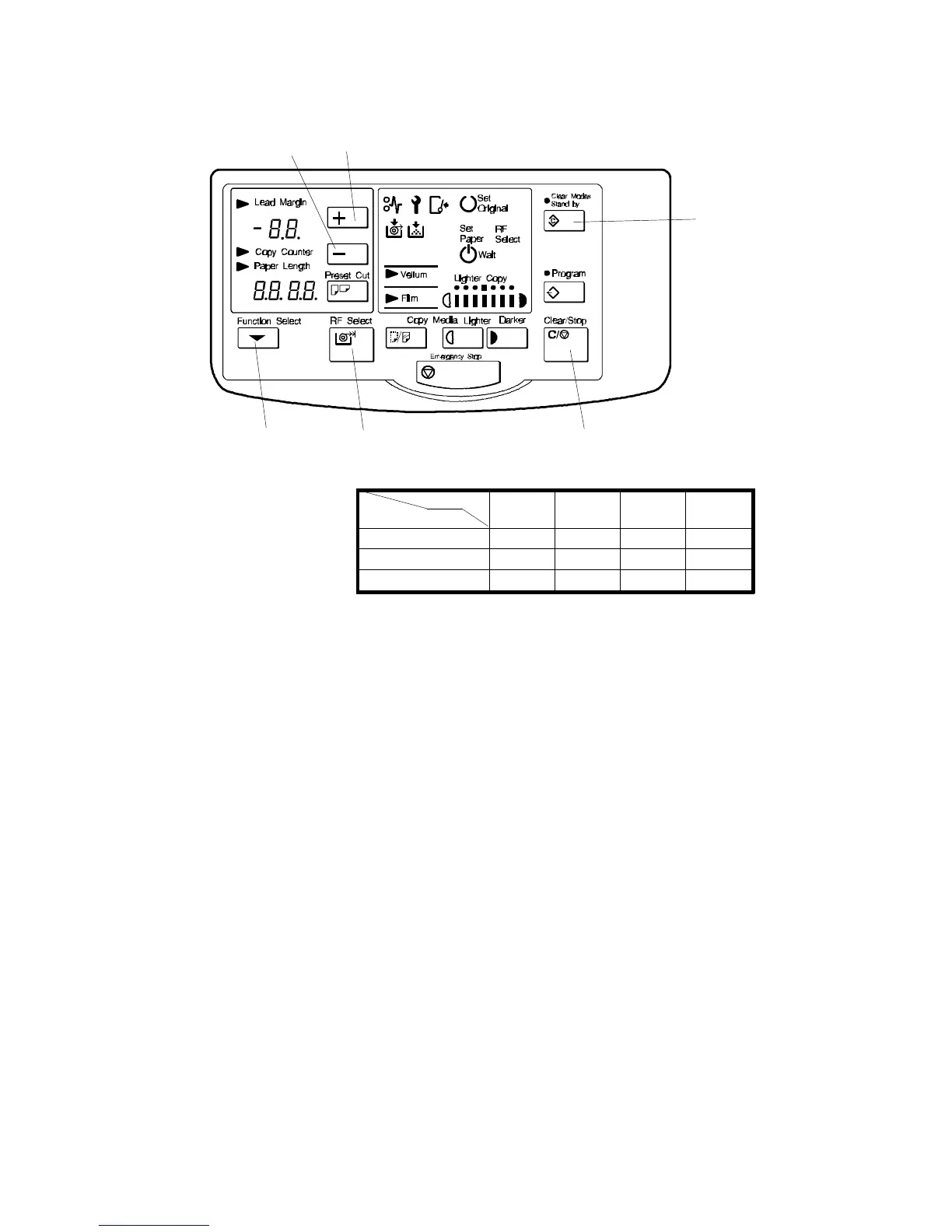
19. Press the following keys on the operation panel:
Clear Modes key [A]
+ key [B]
- key [C]
Clear/Stop key [D]
20. Press the Clear/Stop key again and hold it down for longer than 3 seconds.
The roll paper end and call service indicators will blink (SP mode).
21. Select 40 using the + and - keys. Enter "1" by pressing the following keys.
Function Select key [E]
+ key
RF Select key [F].
22. Input values into SP modes 42 to 47 in accordance with the decal that is
attached to the right side plate.
23. Press the Clear Modes key 3 times to leave the SP mode.
24. Reattach the roll feeder right cover.
25. Check the roll feeder operation.
[B]
[A]
[D]
[F][E]
[C]
300 PRG.
No.
1100 PRG.
No.
NORMAL XX 42 XX 45
HIGH (VELLUM) XX 43 XX 46
LOW (FILM) XX 44 XX 47
Length
Temperature
A163 7-16 SM


 To Next Page
 Loading...









