SERVICE TOOLS
SM 4-1 A251/A252
Service
Tables
4. SERVICE TABLES
4.3 SERVICE TOOLS
4.3.1 SERVICE PROGRAM MODE
All items except for the following are common with the A163 copier. Please refer to
the A163 copier service manual.
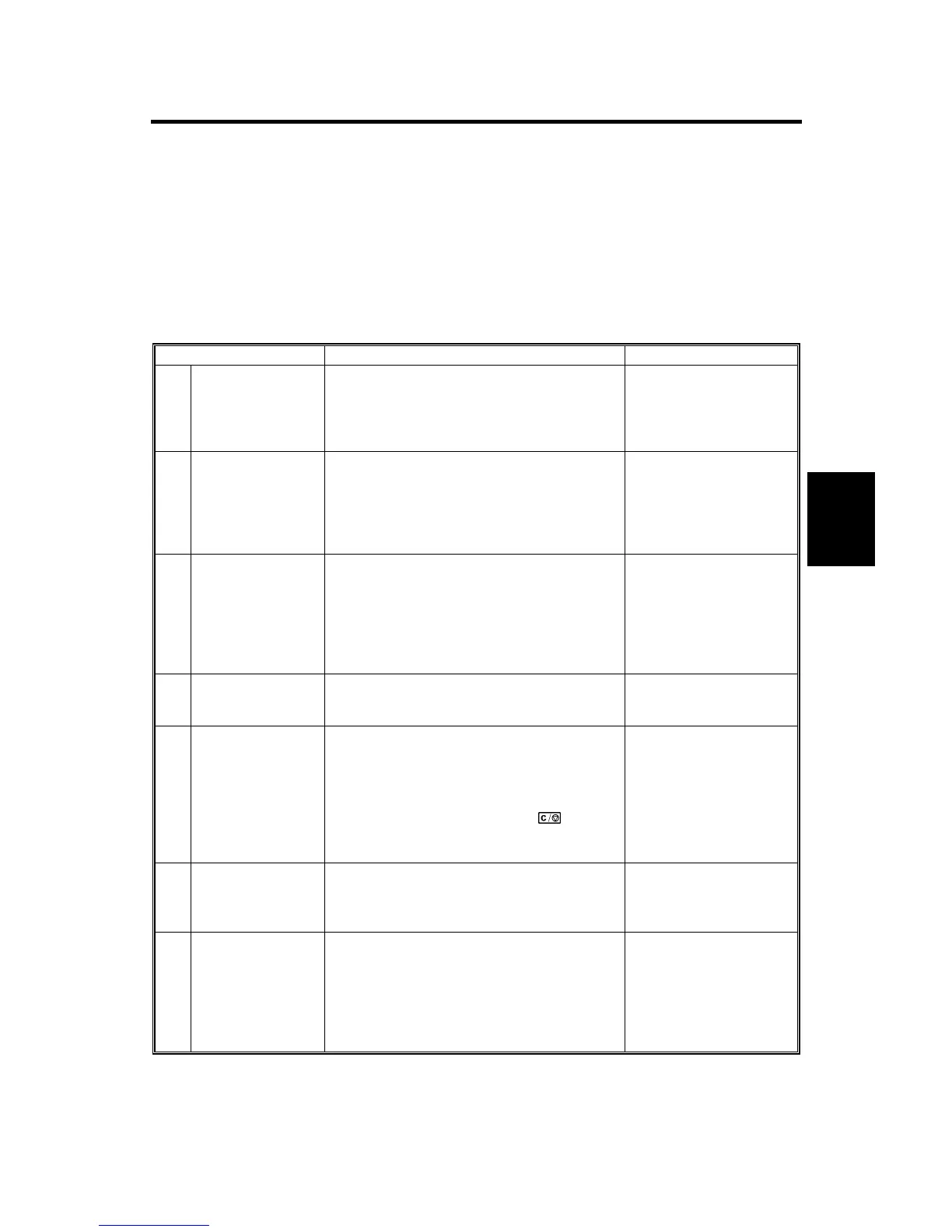
Service Program Mode Table
Mode No. Function Data
*6
Paper Feed Out
Waiting Time
Setting
Refer to the A163 service manual for details.
The paper from the roll feeder is fed out only
when the roll feeder is attached to the A251
copier.
0: 2 minutes
1:1 minute
2: 2 minutes
3: 4 minutes
4: 5 minutes
*13
Original Feed Out
Waiting Time
Setting
Select the time to when the original is
automatically fed out after it has been set on
the original table in the manual feed mode.
(A252 copier only)
0: 2 minutes
1:1 minute
2: 2 minutes
3: 4 minutes
4: 5 minutes
5: No auto feed out
*14
Original Feed Start
Time Setting
Selects the time to when the original feed
roller starts rotating after the original
entrance sensor or original rear sensor for
the rear feed is actuated (A252 copier only).
0: 1 second
1: 2 seconds
2: 3 seconds
3: 4 seconds
4: 5 seconds
5: 6 seconds
6: 7 seconds
*15
Auto Shut-off Time
Setting (120 V
machines only)
Determines the auto shut-off time.
1
←
30
→
240
*16
Original Hold
Mode
After original scanning is finished, the
original exit roller stops before completely
feeding out the original. This is to prevent
the original from dropping onto the floor after
scanning.
The original is fed out when the
$
key is
pressed or when the next original is inserted
A252 copier only).
0: No
1: Original Hold mode
*17
Length Size
Magnification
Adjusts the speed of the original feed motor
(A252 copier only).
The setting can be changed by the key
operation.
-
1.0 (shorter)
←
0.0
→
1.0 (longer)
*18
Semi-synchro Cut
Original Scanning
Mode
Selects whether the roll paper cut key must
be pressed at the appropriate time when the
trailing edge of the original passes the Semi-
synchro cut mark, or whether the original
must be inserted again after the original is
scanned and the length is measured (A251
copier only).
0: Pressing the roll
paper cut key
1: Inserting the original
again


 To Next Page
 Loading...









