Receiver Operation
LOCKING
FRONT
PANEL
CONTROLS
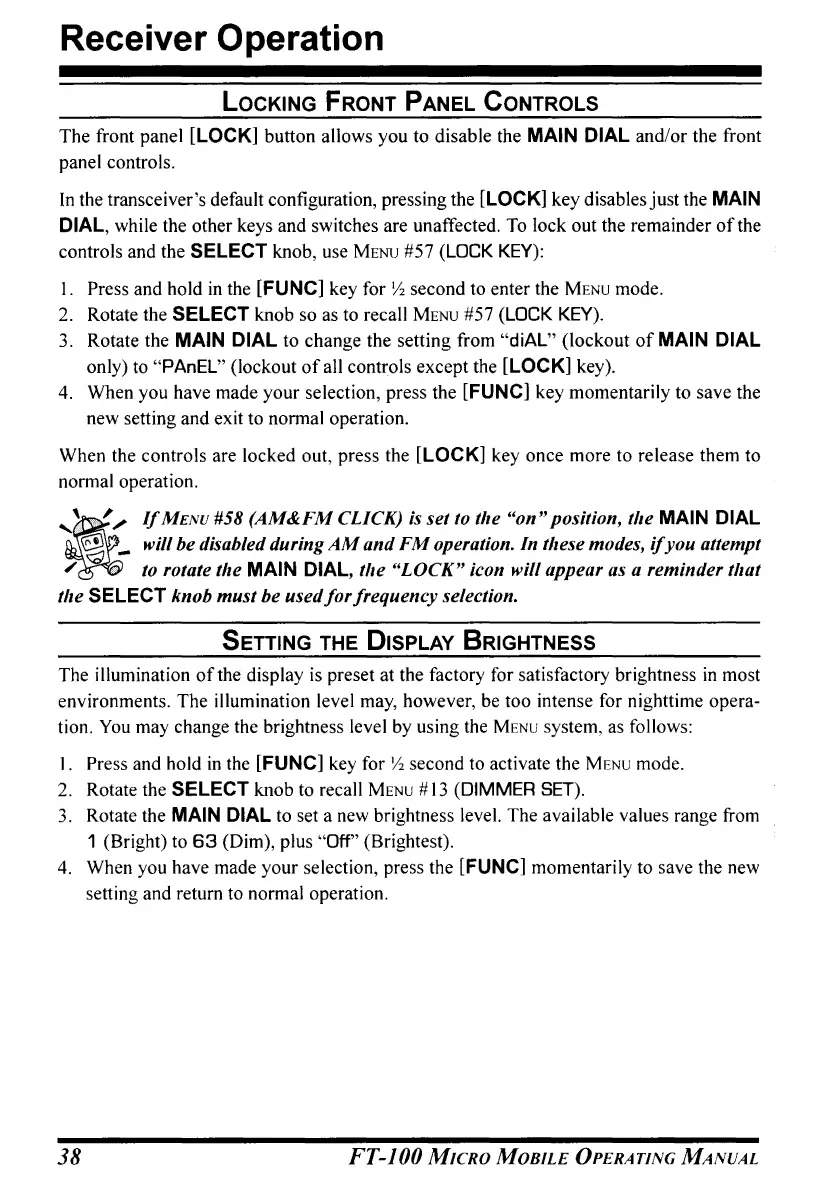
The front panel [LOCK] button allows you to disable the MAIN DIAL and/or the front
panel controls.
In
the transceiver's default configuration, pressing the [LOCK] key disables just the
MAIN
DIAL, while the other keys and switches are unaffected.
To
lock out the remainder
of
the
controls and the
SELECT
knob, use
MENU
#57 (lOCK
KEY):
I. Press and hold
in
the [FUNC] key for
Yz
second to enter the
MENU
mode.
2.
Rotate the
SELECT
knob so as to recall
MENU
#57 (lOCK
KEY).
3.
Rotate the MAIN DIAL to change the setting from "diAL" (lockout
of
MAIN DIAL
only) to "PAnEL" (lockout
of
all controls except the [LOCK] key).
4. When you have made your selection, press the [FUNC] key momentarily to save the
new setting and exit to normal operation.
When the controls are locked out, press the [LOCK] key once more to release them to
normal operation.
It
"",
If
MENU
#58 (AM&FM CLICK)
is
set to the
"on"
position, the MAIN DIAL
[!l
_ will be disabled during
AM
and
FM
operation. In these modes,
if
you attempt
/
':(;,1
.•.
to
rotate the MAIN DIAL, the "LOCK" icon will appear as a reminder that
the
SELECT
knob must be
usedfor
frequency selection.
SETTING
THE
DISPLAY
BRIGHTNESS
The illumination
of
the display
is
preset at the factory for satisfactory brightness
in
most
environments. The illumination level may, however, be too intense for nighttime opera-
tion.
You
may change the brightness level by using the
MENU
system,
as
follows:
1.
Press and hold
in
the [FUNC] key for
Yz
second to activate the
MENU
mode.
2. Rotate the
SELECT
knob to recall
MENU
#
13
(DIMMER SET).
3.
Rotate the
MAIN
DIAL to set a new brightness level. The available values range from
1 (Bright) to
63
(Dim), plus "Off" (Brightest).
4.
When you have made your selection, press the [FUNC] momentarily to save the new
setting and return to normal operation.
38
FT-JOO
MICRO
MOBILE
OPERATING
MANUAL


 To Next Page
 Loading...