QVM6800+ Installation and Operation Manual 24
Chapter 3: Using ZConfigurator
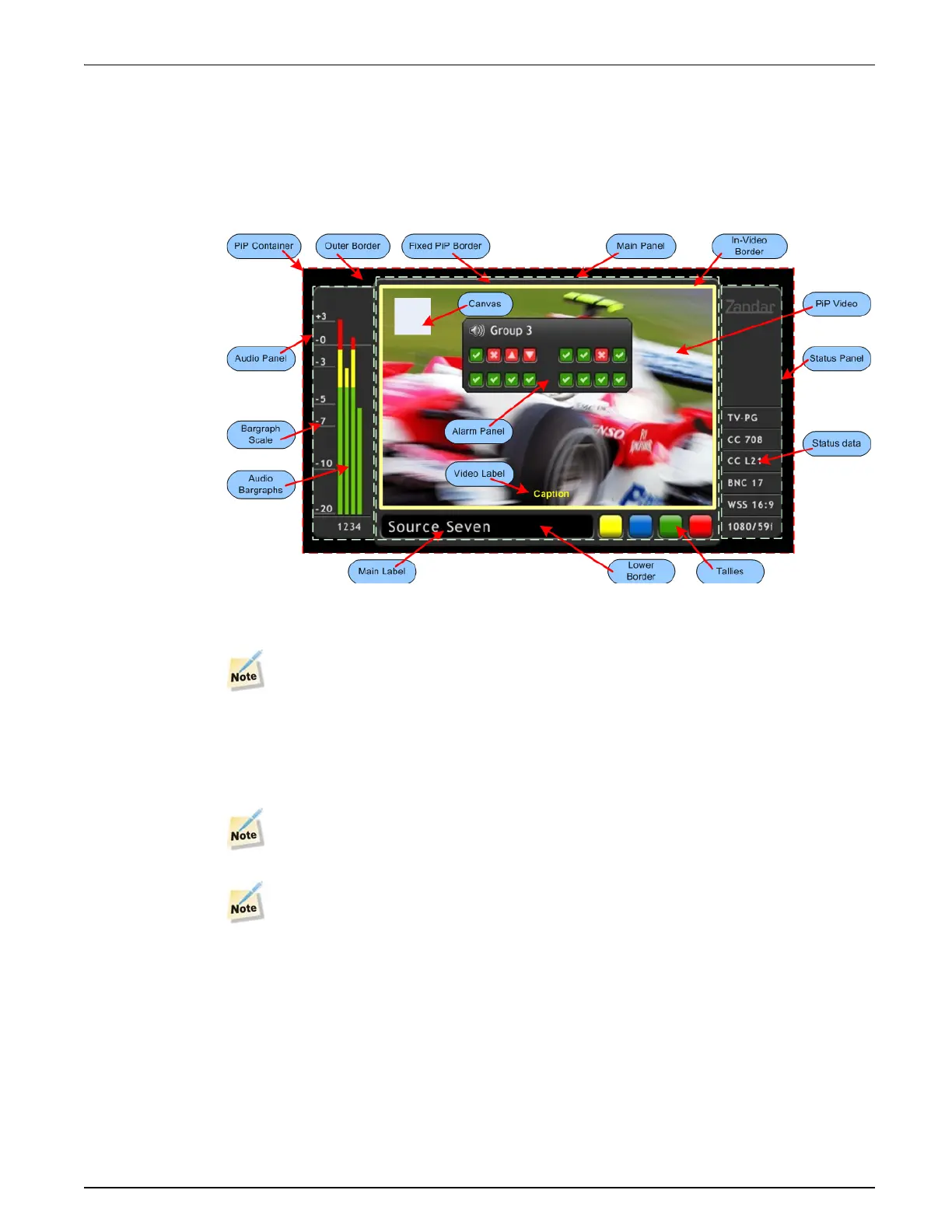
The PiP Container, Panels and Elements
The PiP Container encompasses all the elements that a PiP contains including the main panel
and any audio panels or status panel in it, quick menu access icons, the lower text and tally area
and the video area with its optional audio panels or canvas object.
The following illustration shows some of the panels, panel objects, video objects and PiP
elements that are used in a PiP.
The most basic component of a PiP Container is the Main Panel. It is the panel to which all
other panels dock.
The only way to insert a Main Panel into a completely blank PiP, is to start by inserting a
PiP design from the Elements tab that already has one.
Once a Main Panel has been inserted and a video source has been assigned, the objects that can
be associated with a PiP can be inserted and configured from right-click menus accessible
within the PiP.
A solitary clock or timer does not require a Main Panel.
Video sources are assigned by dragging a selected camera icon to a PiP from the Sources
tab at the right of the editor interface.


 To Next Page
 Loading...