QVM6800+ Installation and Operation Manual 42
Chapter 3: Using ZConfigurator
Copying Settings to Other Units
System Settings and Layouts can be copied to other QVM6800+ units by using the Replicator
function. In addition, multiviewer Profiles may be saved to local storage and loaded at any time
to any multiviewer (of the same type).
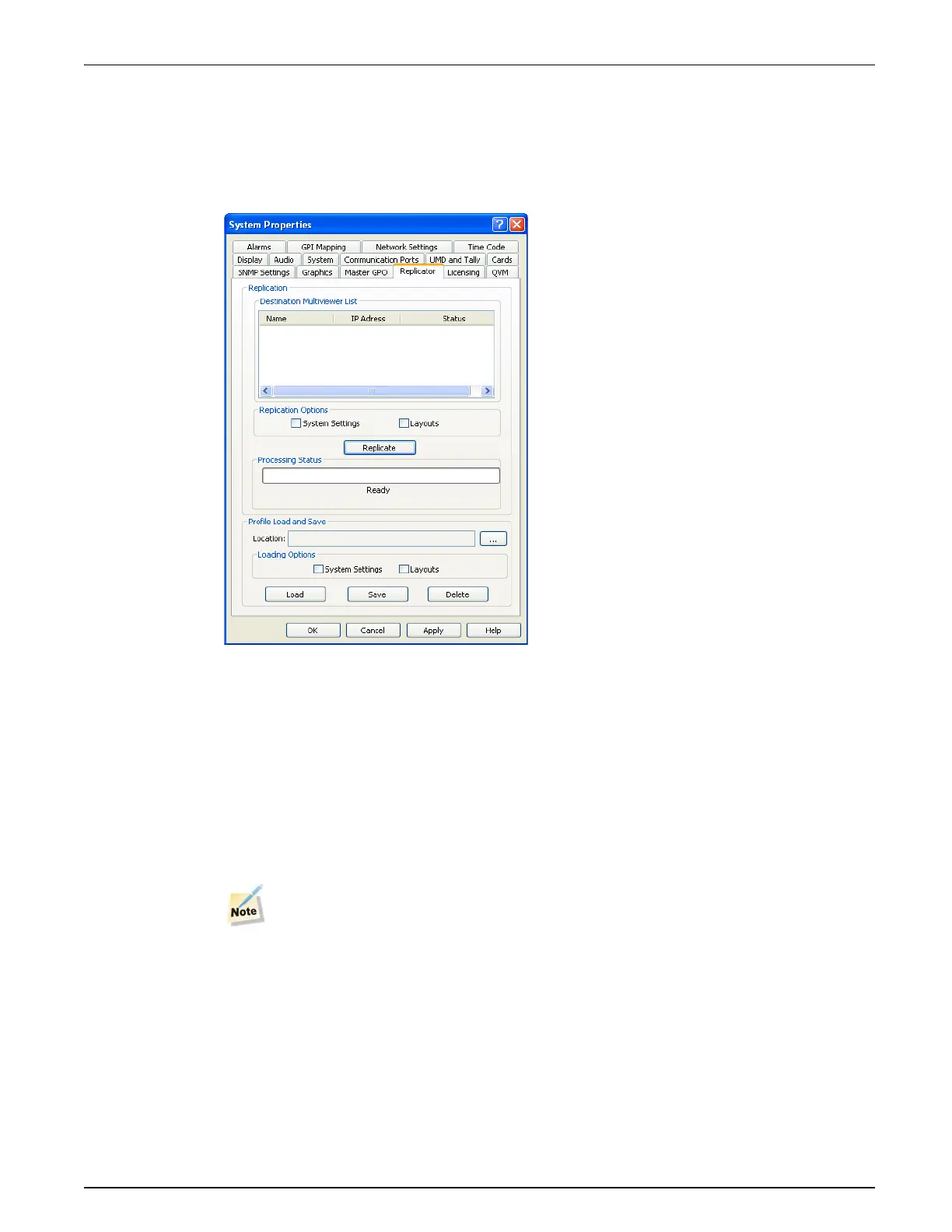
To access the Replicator and Profile functions navigate to System Settings >> Replicator.
Replication
Replication requires that a target multiviewer is connected to the network and that its IP address
is present in the Destination Multiviewer List.
Highlight the desired multiviewer to receive the current multiviewer settings, then select
System Settings and/or Layouts and click on Replicate. This will duplicate the chosen settings
across the network to the target unit.
When Replicating or using Profile Load and Save the target multiviewers should be of the same
type as the source. For example, if replicating a 12 input cascade system it should only be
copied or replicated to other 12 input cascade systems.”
Settings not applicable to the destination unit will be ignored.


 To Next Page
 Loading...