From The N3UJJ.COM Document LibraryFrom The N3UJJ.COM Document Library
MEMORY
CHANNEL
IDS
To help you remember each memory channel's
purpose, the dual bander has the ability to store
an
identifier (ID) for each channel. This
ID
can be a
callsign, repeater name, city, person's name, etc. that
can be formed from the character library.
All
80 memory channels can be assigned
an
ID
of up
to
7 characters.
•
Storing
IDs
26
1 Press [BAND]
to
select the Operating band.
2 Press
[MR]
and select the memory channel for
which you want to store
an
I
D.
3 Press [F], [ID IN] to enter
ID
Input mode.
-
CD
~tjlfUt.
I D
..,,<l;:..l
l-1
L...l
L
..
l
1..~
&...I
4 Turn the ENC control
to
select the first character.
• Pressing [
<4]
deletes the previous character.
Press [
<4]
repeatedly
to
position the blinking
cursor, if necessary.
• To search more quickly through the character
library, hold
[MONI] down and turn the
ENC control. Each step of the ENC control
then moves you 5 characters. Clockwise
rotation moves you ahead; counterclockwise
moves you back
in
the library.
• Pressing
[CLR] aborts
ID
Entry mode and
returns you to Memory Recall.
5 Press[..-].
6 Repeat Steps 4 and 5 until all characters are
entered.
It
is
not necessary to enter [
..-]
after the final
character.
7 Press [SET] to exit.
•
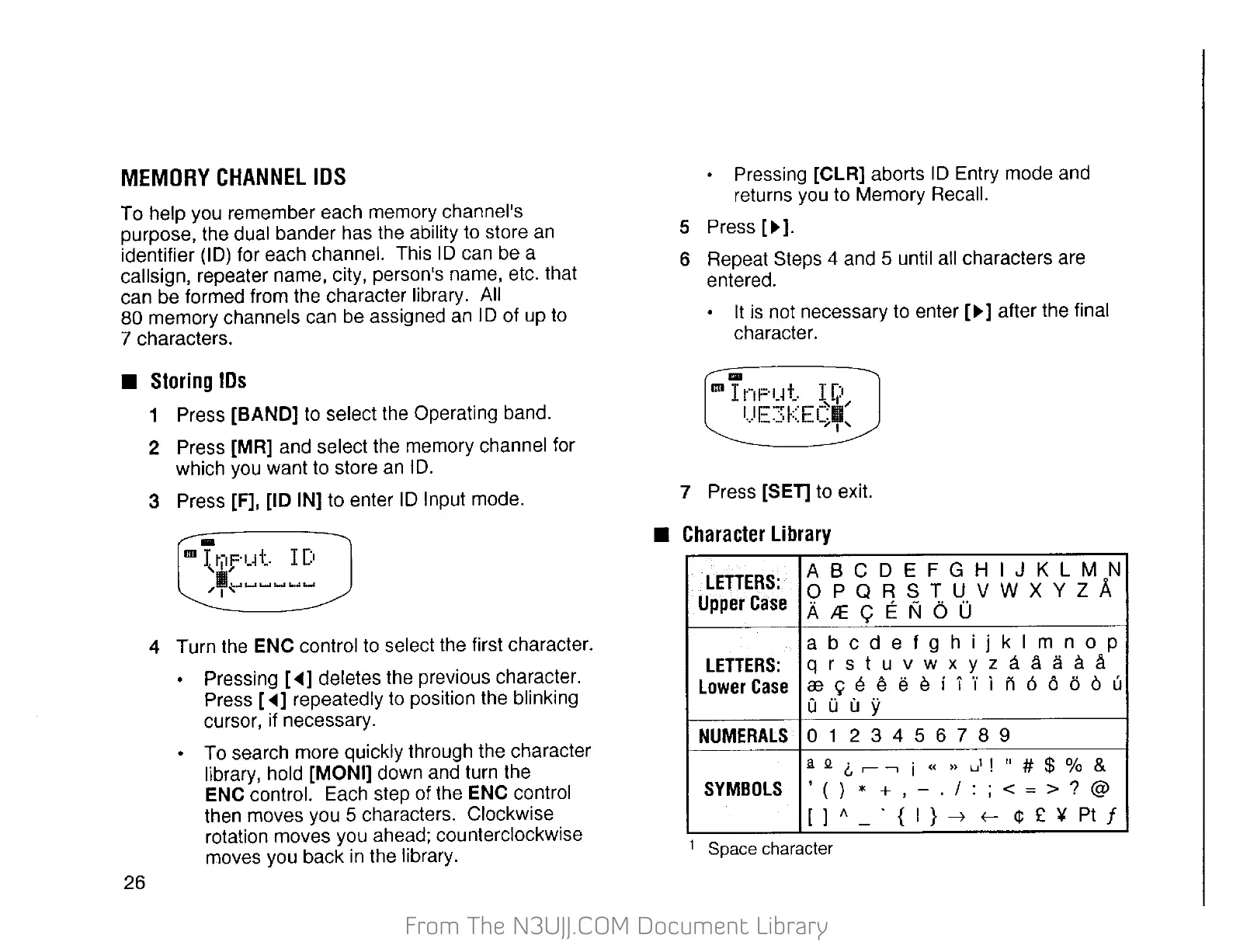
Character
Library
LETTERS:
A 8 C D E F G H I J K L M N
OPQRSTUVWXYZA
Upper
Case
A.LE<;ENOO
abcdefghijklmnop
LETTERS:
qrstuvwxyzaaaac!l.
lower
Case
re<;:eeeeil"il
n666ou
Q 0 u y
NUMERAlS
0 1 2 3 4 5 6 7 8 9
ll
Q (.,
,-
--,
i «
>>
ul
!
rr
# $ % &
SYMBOLS
'()
*
+,-./:;<=>?@
[ ) A
.
{
I}~
¢£¥PI/
-
f-
1
Space character


 To Next Page
 Loading...