23
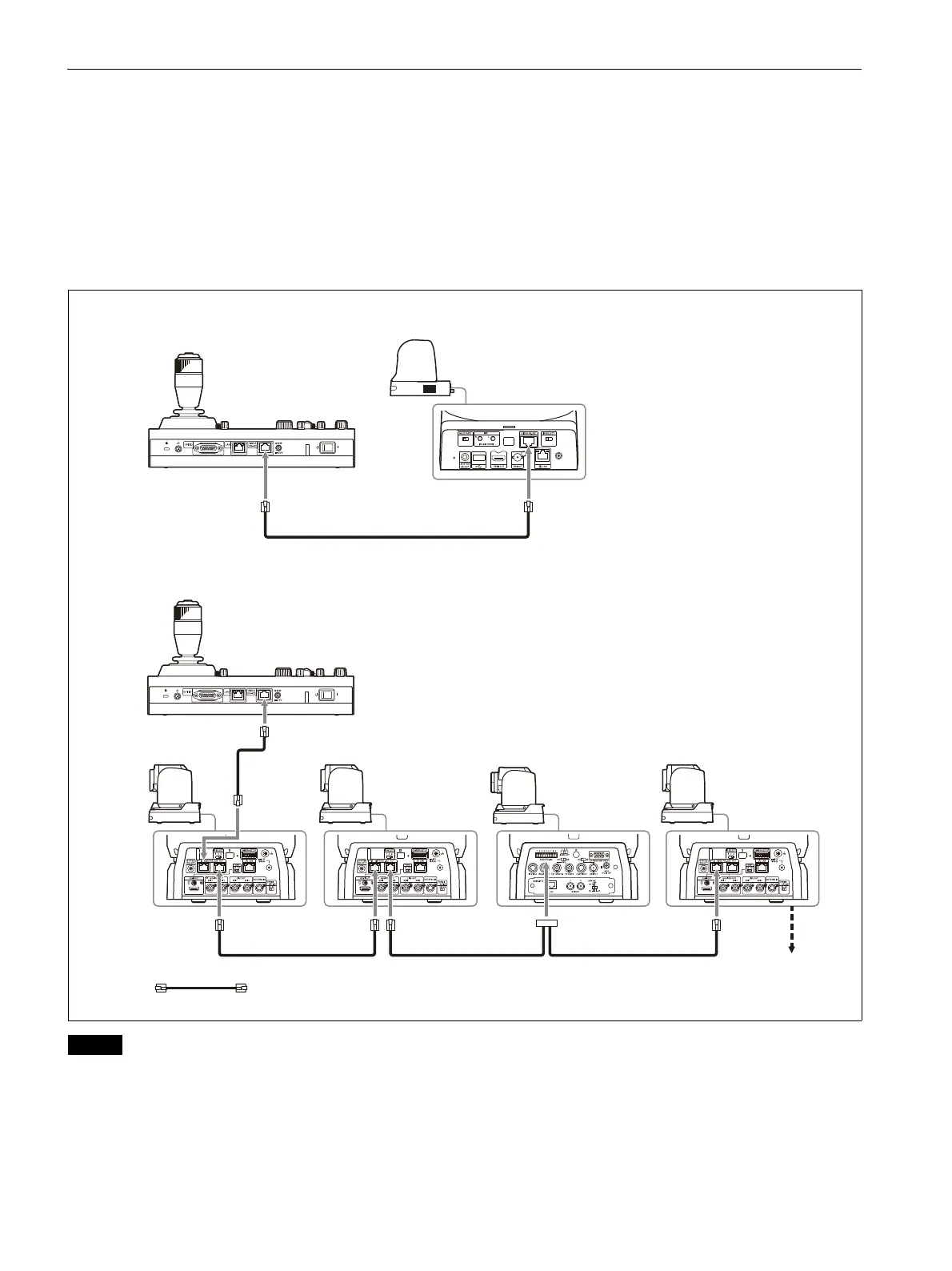
VISCA RS-422 (serial) connection
You can connect multiple cameras in a serial connection using the VISCA RS-422 OUT connectors. In a
serial connection, a remote controller can control up to seven cameras. These cables support connection
at distances of up to 1.2 km.
Use a LAN straight cable for RS-422 connection using the RJ-45 connector.
Connecting remote controllers and cameras using serial connection
Connection example
Notes
• When connecting an SRG-360SHE in a serial connection, only one SRG-360SHE camera can be
connected to a single remote controller.
To connect multiple SRG-360SHE cameras or to mix with othe
r model cameras, use the connection
described in “VISCA over IP (LAN) connection” (page 15).
• The ILME-FR7 does not support serial connection.
RM-IP500
Camera with RJ-45 connector
Up to seven
cameras
RM-IP500
Camera with
RJ-45 connector
Camera with
RJ-45 connector
Camera with
9-pin connector
Camera with
RJ-45 connector
For connection of a single camera to a single remote controller
For connection of multiple cameras to a single remote controller
Remote control signal: LAN straight cable (category 5 or higher)
OUT INOUTIN
IN


 To Next Page
 Loading...









