9 Paper and Other Media
254
Paper and Other Media
9
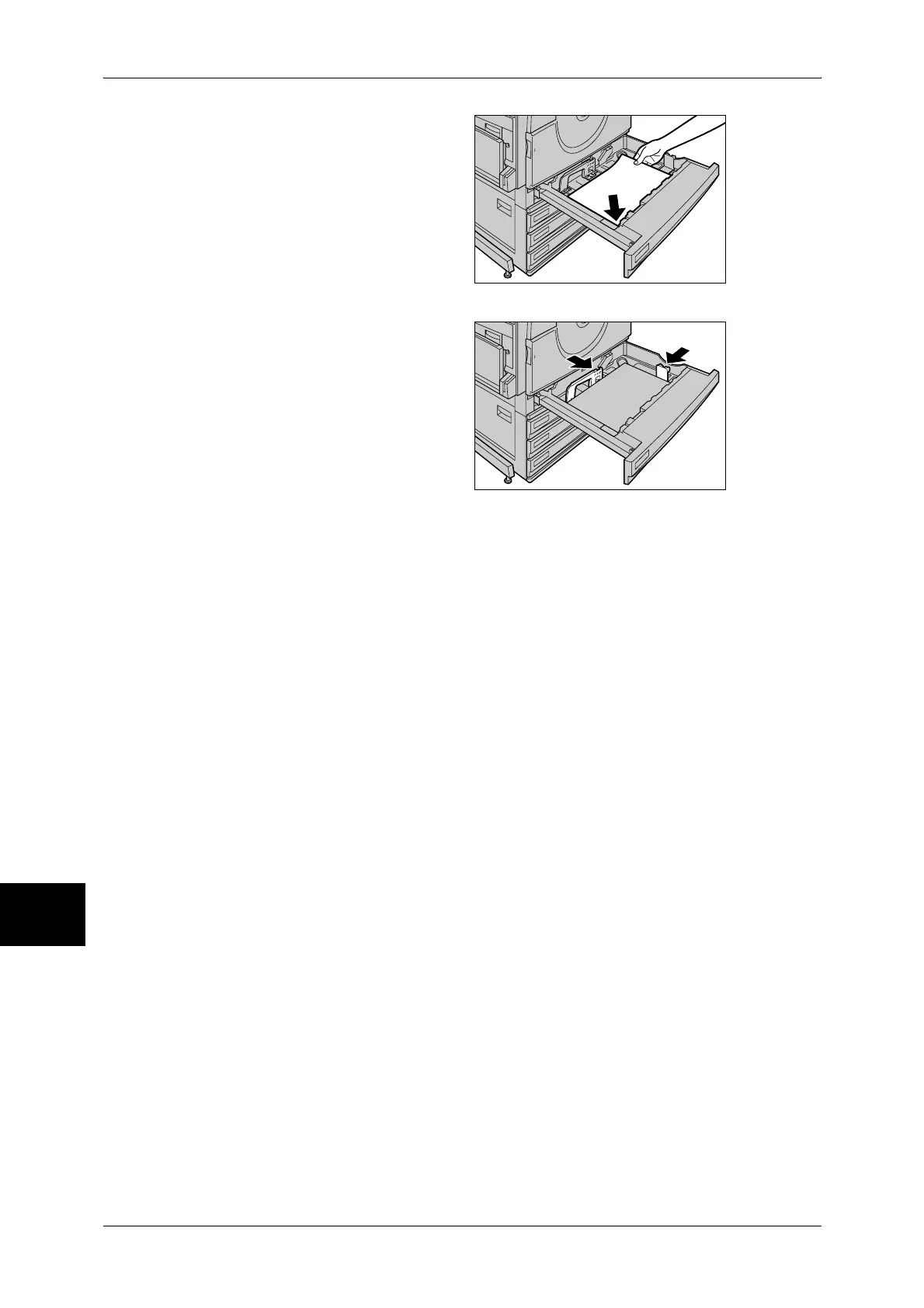
5 Load and align the edge of the
paper to the left front of the tray with
the side to be copied or printed on
facing up.
Important • Do not load mixed paper types
into the tray. It may cause
paper jam.
• Do not load paper exceeding
the maximum fill line. It may
cause paper jams or machine
malfunctions.
6 Move the two paper guides with
holding each so that they lightly
contact the edges of the paper.
Important • When applying paper guides
hardly, it may cause paper
jams.
• Check that the paper guides fit
the paper size. If the paper
guides do not fit the paper size,
it may not detect paper size
automatically or it may cause
paper jams or errors. In this
case slide the paper guides
once and adjust again.
Note • When loading standard size
paper in the Tray, move the
paper guides to the marks
corresponding to the paper size.
7 Push the tray in gently until it comes to a stop.
Note • Affix the paper size label to the front of the paper tray.
8 When changing paper type, set it to trays.
For information on setting paper type, refer to "Changing the Paper Settings" (P.255).


 To Next Page
 Loading...