When the [Check Status] Indicator Is Lit or Flashing
The [Check Status] indicator notifies the user when the machine requires immediate attention.
Flashing in red
The machine is unavailable for use. Press [Check Status] and resolve the problem as soon as
possible.
Flashing in yellow
Maintenance on the machine needs to be performed soon. Perform the required procedure
accordingly.
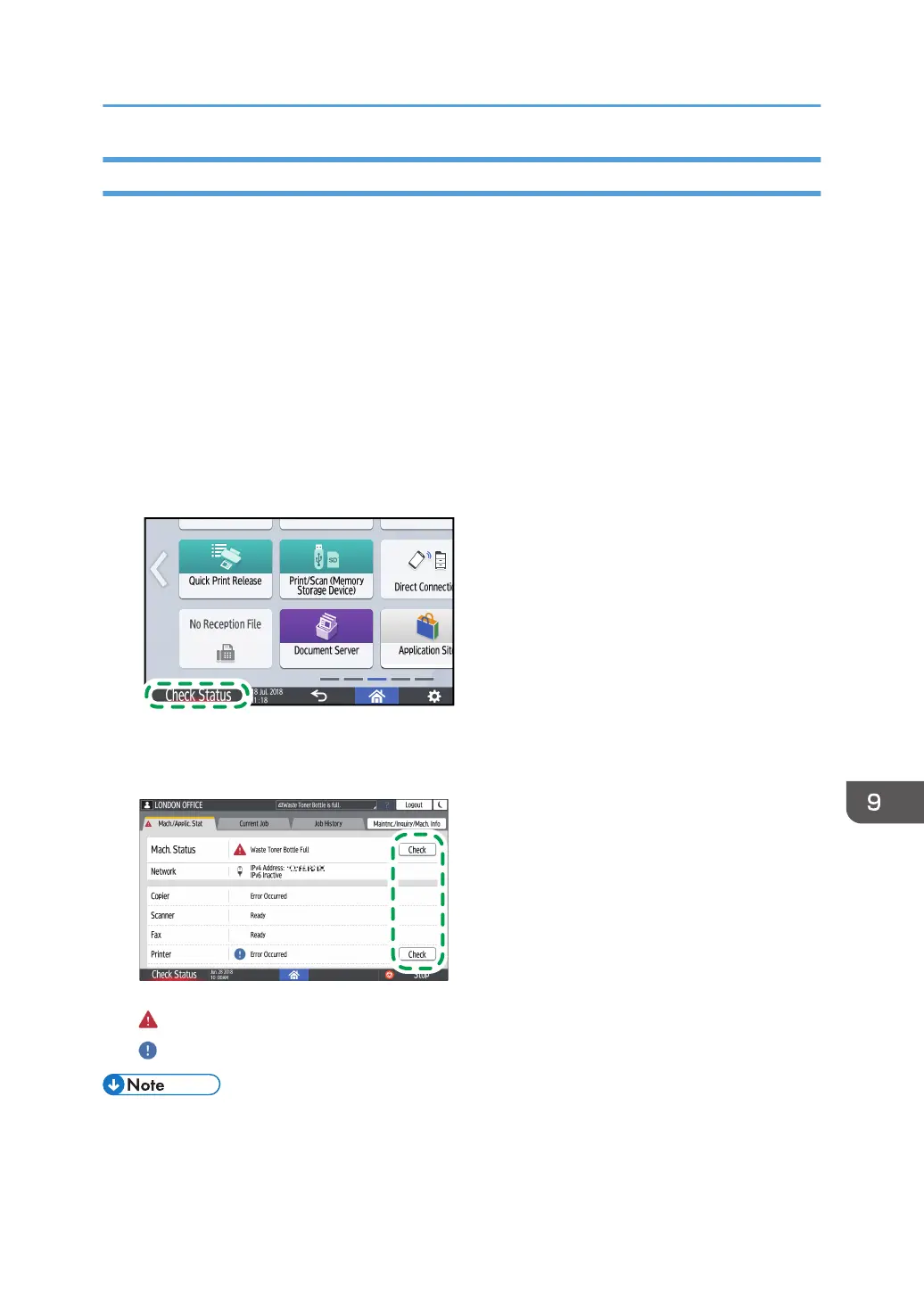
You can display the status confirmation screen with [Check Status]. On the screen, check the detailed
status of the machine or application.
1. Press [Check Status].
2. Press [Check] to check the details, and perform the required procedure.
See "When an Icon is Displayed with a Message", User Guide (Full Version).
: The machine cannot be used.
: Some of the functions cannot be used, or the toner is almost depleted.
• Depending on the machine condition, such as a paper jam or open cover, the status confirmation
screen may be displayed automatically without pressing [Check Status].
Checking the Indicators, Icons, and Messages on the Control Panel
221


 To Next Page
 Loading...