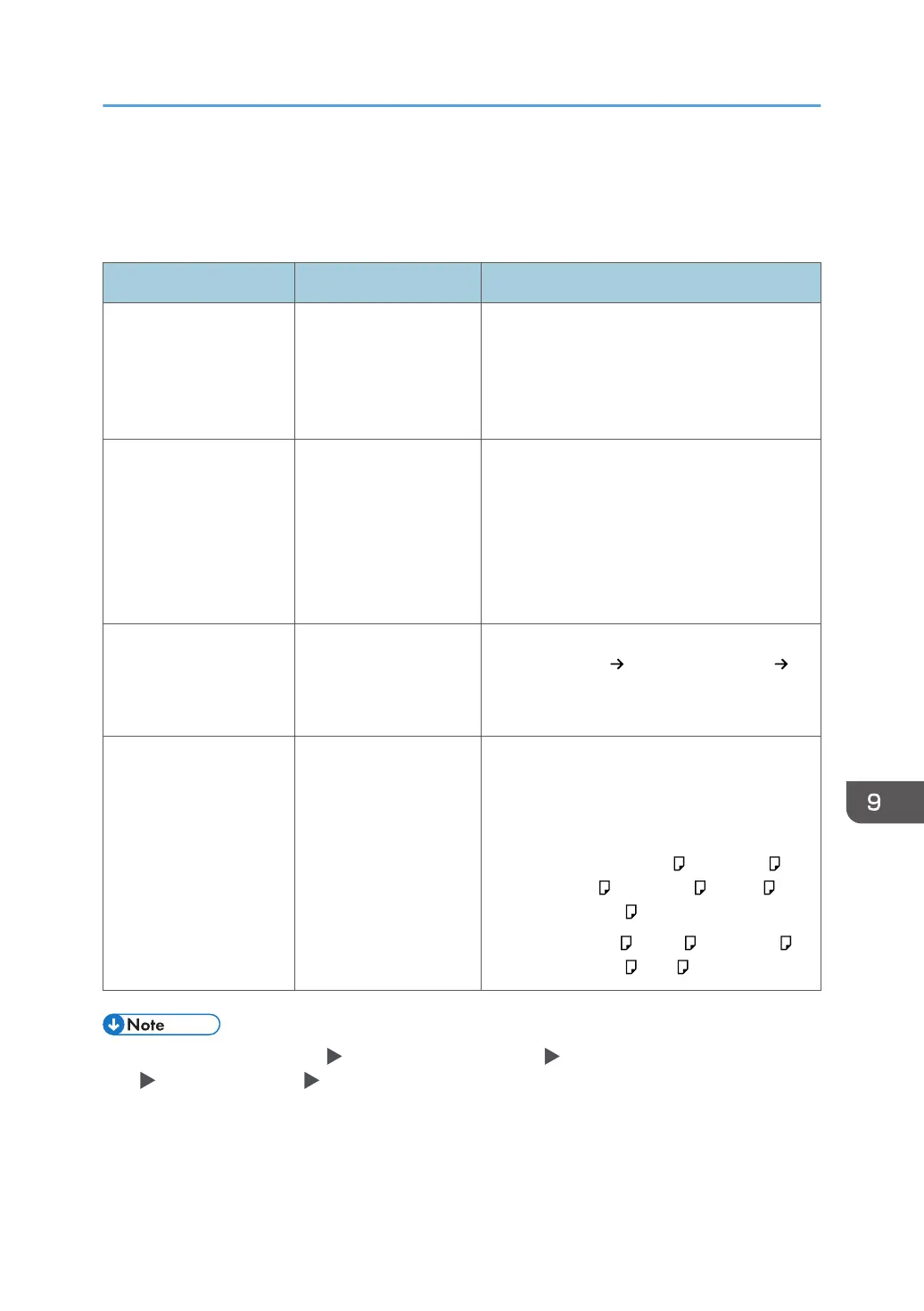
When a Message Appears While Using the
Copy Function
Message Condition Solution and reference
"Original is too long.
Cannot scan 2 sides."
A paper size that is not
supported in 2-Sided
copying or the specified
finishing type is
specified.
Check the paper size supported in 2-Sided
copying and the specified finishing type and
load the supported paper.
page 296 "List of Specifications"
"Exceeded the maximum
number of sheets that can
be used. Copying will be
stopped."
When the copy volume
use limitation is
enabled, copying was
canceled because the
copy volume of the user
exceeded the upper
limit allotted for the user.
For details about the copy volume use
limitation, consult the user administrator. The
user administrator can change the limit on the
copy volume use.
See "Specifying Maximum Print Volume Use of
Each User", User Guide (Full Version).
"Set next original(s), then
press [Start]. After
scanning last original,
press [Finish Scn]."
Duplex copying is
specified.
When not copying onto both sides of paper,
clear the [1 sided 2 sided] and [2 sided 2
sided] check boxes.
"Stapling capacity
exceeded."
The number of sheets
that can be stapled
together is exceeded.
Check the number of sheets that can stapled
together at a time, and reduce the number of
sheets in the original placed on the machine.
Staple capacity (80 g/m
2
, 20 lb. Bond):
• 30 sheets: 8
1
/
2
× 14 , 8
1
/
2
× 13 ,
8
1
/
4
× 14 , 8
1
/
4
× 13 , 8 × 13 ,
8
1
/
2
× 13
2
/
5
• 50 sheets: A4 , B5 JIS , 8
1
/
2
× 11 ,
7
1
/
4
× 10
1
/
2
, 16K
• If you set [On] in [Settings] [Machine Features Settings] [Copier / Document Server Settings]
[Input / Output] tab [Memory Full Auto Scan Restart], even if the memory becomes full, the
memory overflow message will not be displayed. The machine will make copies of the scanned
originals first, and then automatically proceed to scan and to copy the remaining originals. In this
case, the resulting sorted pages will not be sequential.
• See "Input / Output", User Guide (Full Version).
When a Message Appears While Using the Copy Function
231


 To Next Page
 Loading...