IDS X-Series Training v2.7
Reading Numerical Values Stored in Locations via an LED Keypad
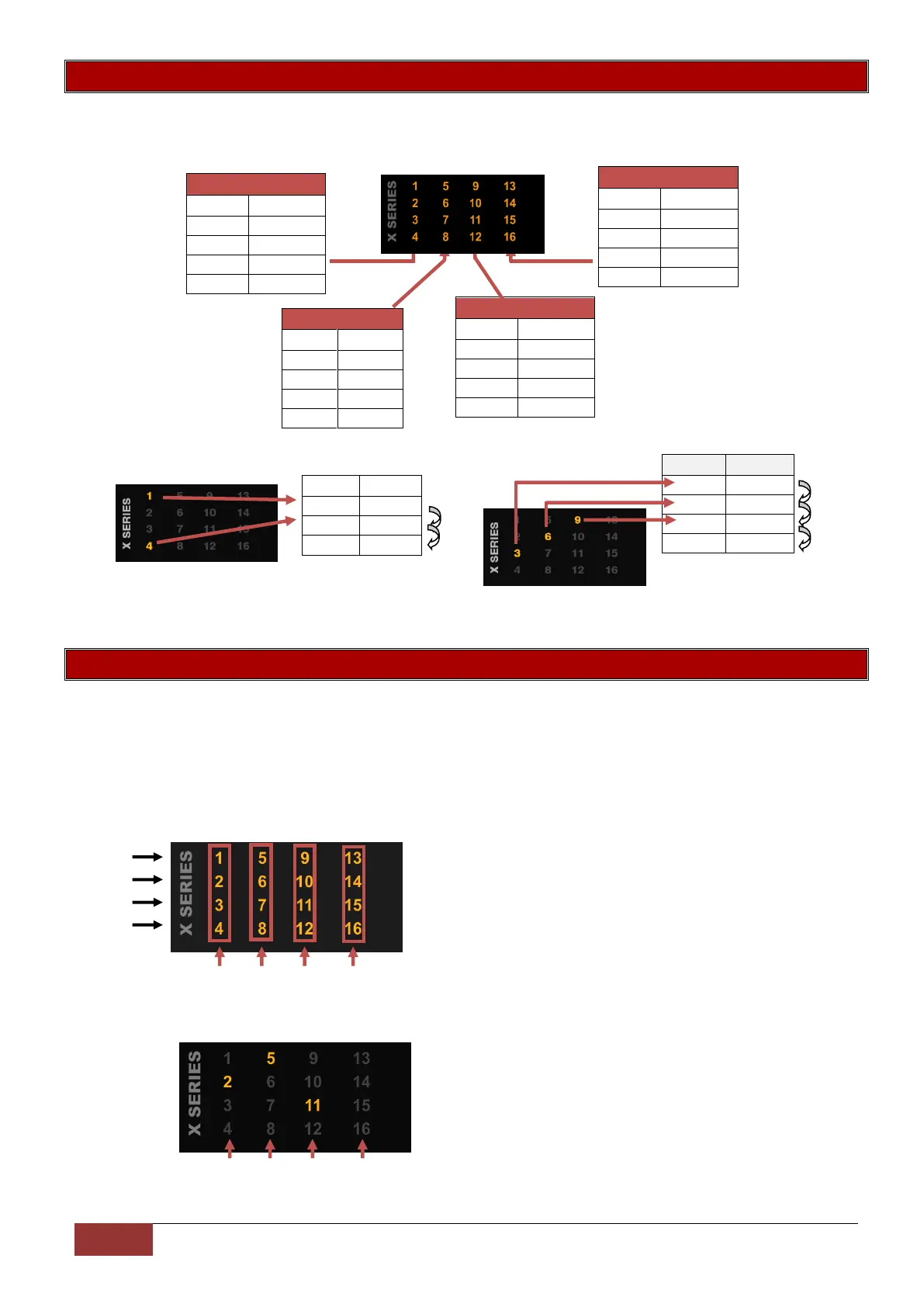
When using an LED keypad, values will be displayed in Binary format. Every zone is given a value which
needs to be added together to makeup the value in the location.
Example:
Reading Time Locations via an LED Keypad
When reading time on an LED keypad remember that it is always in the 24 hour format, (mm:ss, hh:mm),
therefore each digit has four zone LEDs associated to it. Example, zone 1 to 4 belong to digit 1, zone 5 to
8 belong to digit 2, etc. as shown below. As with calculating any value each zone is given a value, zone
1/5/9/13 have a value of 1, zone 2/6/10/14 have a value of 2, zone 3/7/11/15 have a value of 4 and zone
4/8/12/16 have a value of 8.
H = Hour m = minutes s = seconds
Value
1
2
4
8
m m s s
H H m m
Example:
The time in this location is:
21 minutes and 40 seconds


 To Next Page
 Loading...