Contacts 64
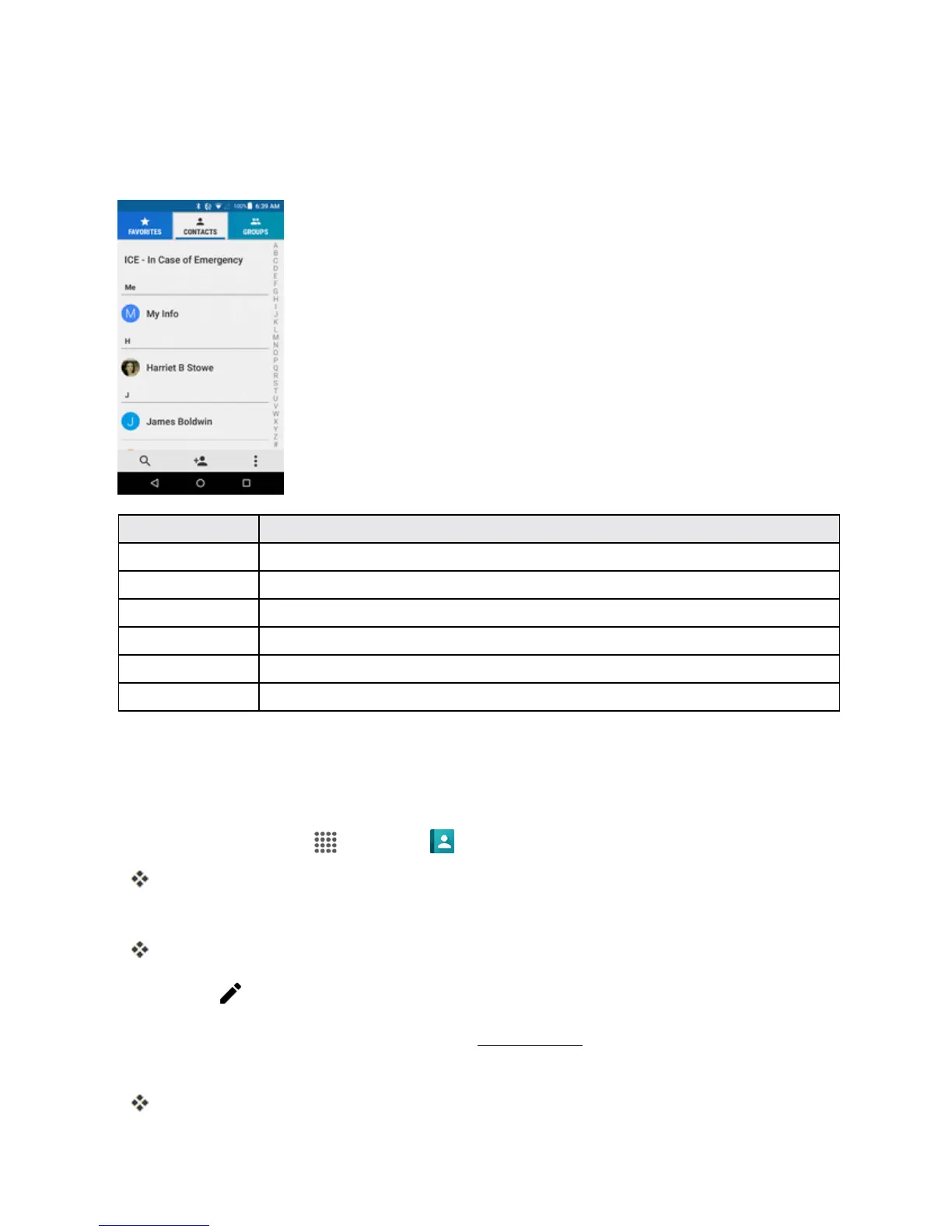
CONTACTS SCREEN LAYOUT
Thefollowingillustrationshow’syourContactsapplayoutanddescribesthevariousfeatures.
Item Description
FAVORITES tab Showfavoritecontacts.
CONTACTS tab Showallcontacts.
GROUPS tab Showcontactgroups.
Search Searchcontacts.
Index Browsecontactsbyletter.
Add new Addanewcontact.
EDIT A CONTACT
Onceyou’veaddedacontact,youcanaddoreditanyoftheinformationintheentry,assignacaller
IDpicture,customizewithauniqueringtone,andmore.
1.
Fromhome,tapApps >Contacts > CONTACTStab.
YouwillseetheContactslist.
2. Tapacontacttoviewitsdetails.
Thecontact’sdetailedlistingappears.
3.
TapEdit .
4. Tapanyfieldyouwanttochangeoradd.SeeAddaContact.
5. Addorchangetheinformation,andthentapSAVE.
Yourchangesaresavedtothecontactentry.



 To Next Page
 Loading...







