Chapter 4 Installation Gen 3 Site Controller System Manual
Intercabling Connections
4-40 68P80801E30-A 5/1/2002
GPS Antennas
The GPS receiver is part of the site controller. Each controller contains one
GPS receiver. Redundancy is accomplished via a second Controller. A GPS
antenna is connected to each GPS receiver.
1. Connect the GPS#1 antenna cable to the GPS A (or RX2 if not using
site controller junction panel) N-type connector opening on the
junction panel.
Extension cables for the antenna feedlines are not provided and must be
procured locally. Superflex™ 1/2” cable is the recommended extension
cable.
2. If Controller B is installed, connect the GPS#2 antenna cable to the
GPS B (or RX3 if not using site controller junction panel) N-type
connector opening on the junction panel.
Alarm System Cabling
All site alarm wires enter from the top of the cabinet and connect to the rear
of the EAS/EAS2.
Site alarm wiring should be complete before installation. This section gives
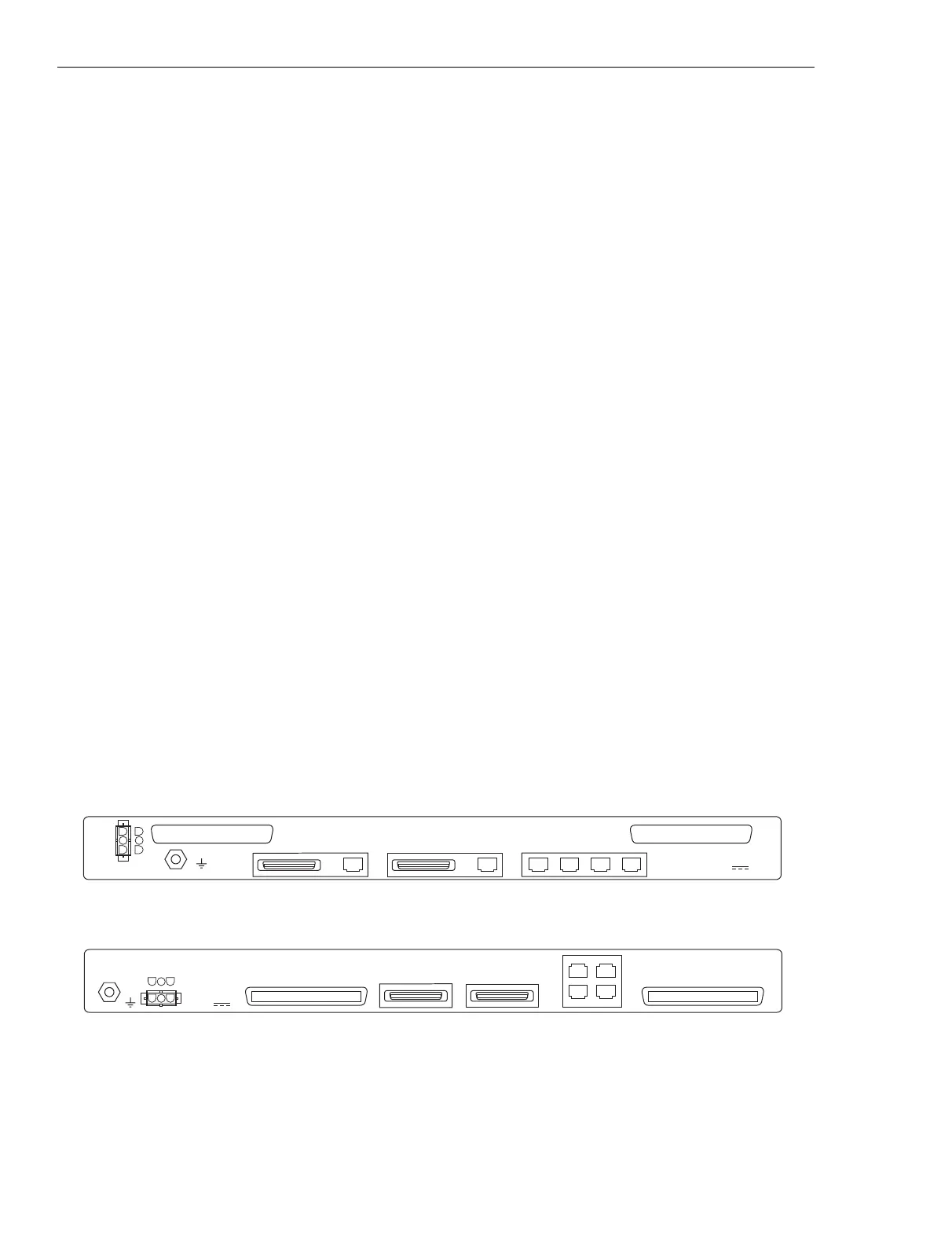
instructions for connecting the site alarms to the EAS/EAS2. Figure 4-18
shows the rear view of the EAS/EAS2. Figure 4-19 shows the connections
between the EAS/EAS2 and punch blocks 1 and 2. Punch block 1 contains
system alarm/control signals while punch block 2 is typically defined as the
“user” alarm/control interface.
iSC403
102600JNM
RF#3RF#2RF#1CONTROLSERIALPARALLEL
CONTROLLER B
SERIALPARALLEL
CONTROLLER A
RTN
-48V
USER ALARM/CONTROL
SYSTEM ALARM/CONTROL
ENVIRONMENTAL ALARM SYSTEM
Motorola
-48V , 1.0A
iSC403_2
041202JNM
RF3RF2
RF1CONTROL
-48V
MOTOROLA
ENVIRONMENTAL
ALARM SYSTEM
INPUT:
PARALLEL
CONTROLLER B
PARALLEL
CONTROLLER A
USER ALARM/CONTROL
RTN
SYSTEM ALARM/CONTROL
-48V , 0.5A
Figure 4-18 Alarm connections on the EAS/EAS2
EAS
EAS2



 To Next Page
 Loading...