Garmin aera 660 Pilot’s Guide
190-02017-20 Rev. E
144
Additional Features
OverviewNavigationFlight PlanningHazard AvoidanceAdditional FeaturesAppendicesIndex
Accessing SiriusXM Radio:
From the Main Menu, touch Tools > SiriusXM Audio.
ACTIVATING SiriusXM SATELLITE RADIO SERVICES
The service is activated by providing SiriusXM Satellite Radio with a coded ID (Radio
ID).
SiriusXM Satellite Radio uses the Radio ID to send an activation signal that,
when received by the compatible SiriusXM device, allows it to play entertainment
programming.
Refer to the compatible SiriusXM device Owner’s Manual for more information on
activating SiriusXM Satellite Radio.
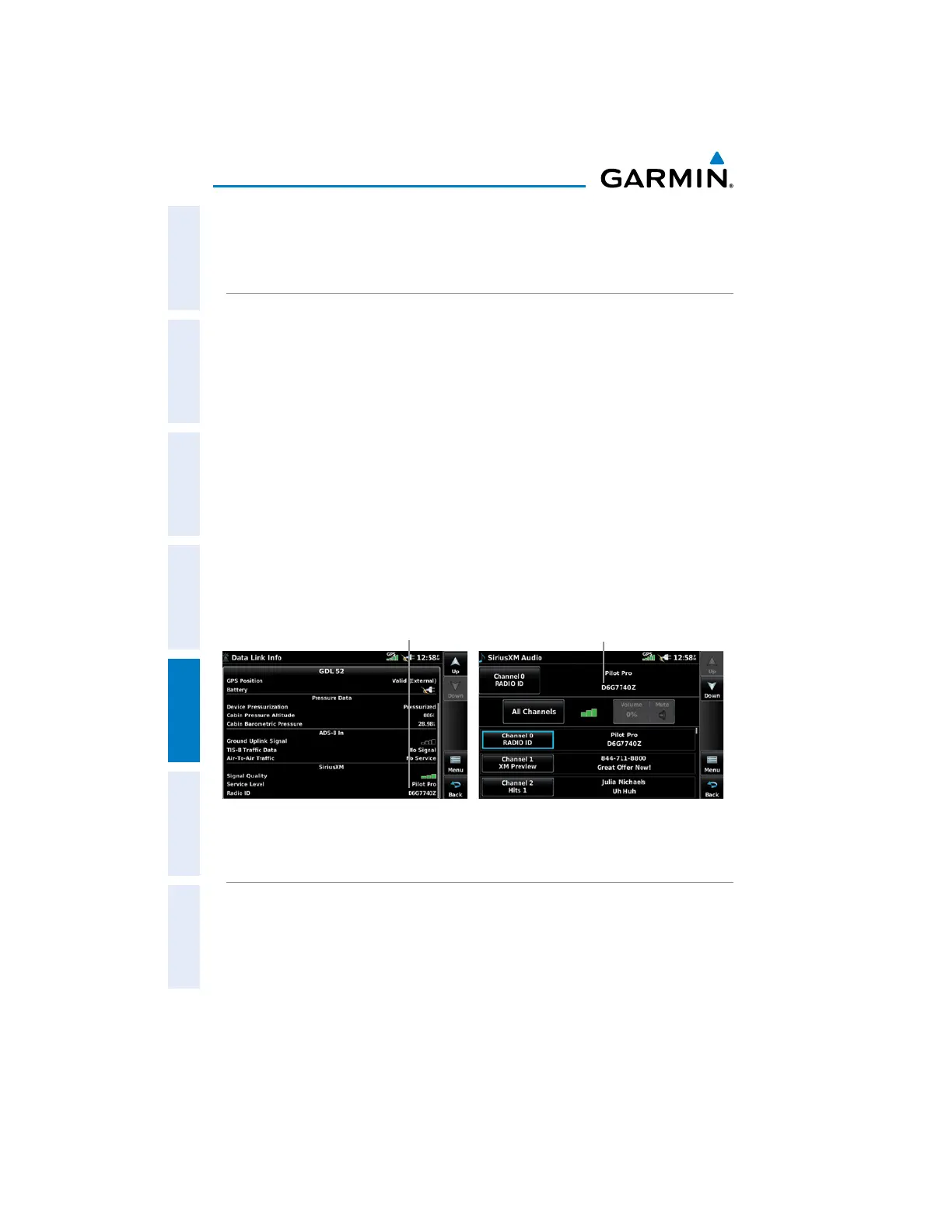
Accessing the Radio ID:
From the Main Menu, touch Tools > Data Link
.
Or
:
Th
e Radio ID is also displayed on channel ‘0’. Channel ‘0’ is the first
channel listed in the ‘All Channels’ Category.
Accessing the SiriusXM Radio ID
(Data Link Information)
Accessing the SiriusXM Radio ID
(Channel 0)
Radio ID
Radio ID
USING SiriusXM RADIO
The SiriusXM Radio function provides information and control of the audio
entertainment features of the SiriusXM Satellite Radio.



 To Next Page
 Loading...










