93
6
FUNCTIONS FOR TRANSMIT
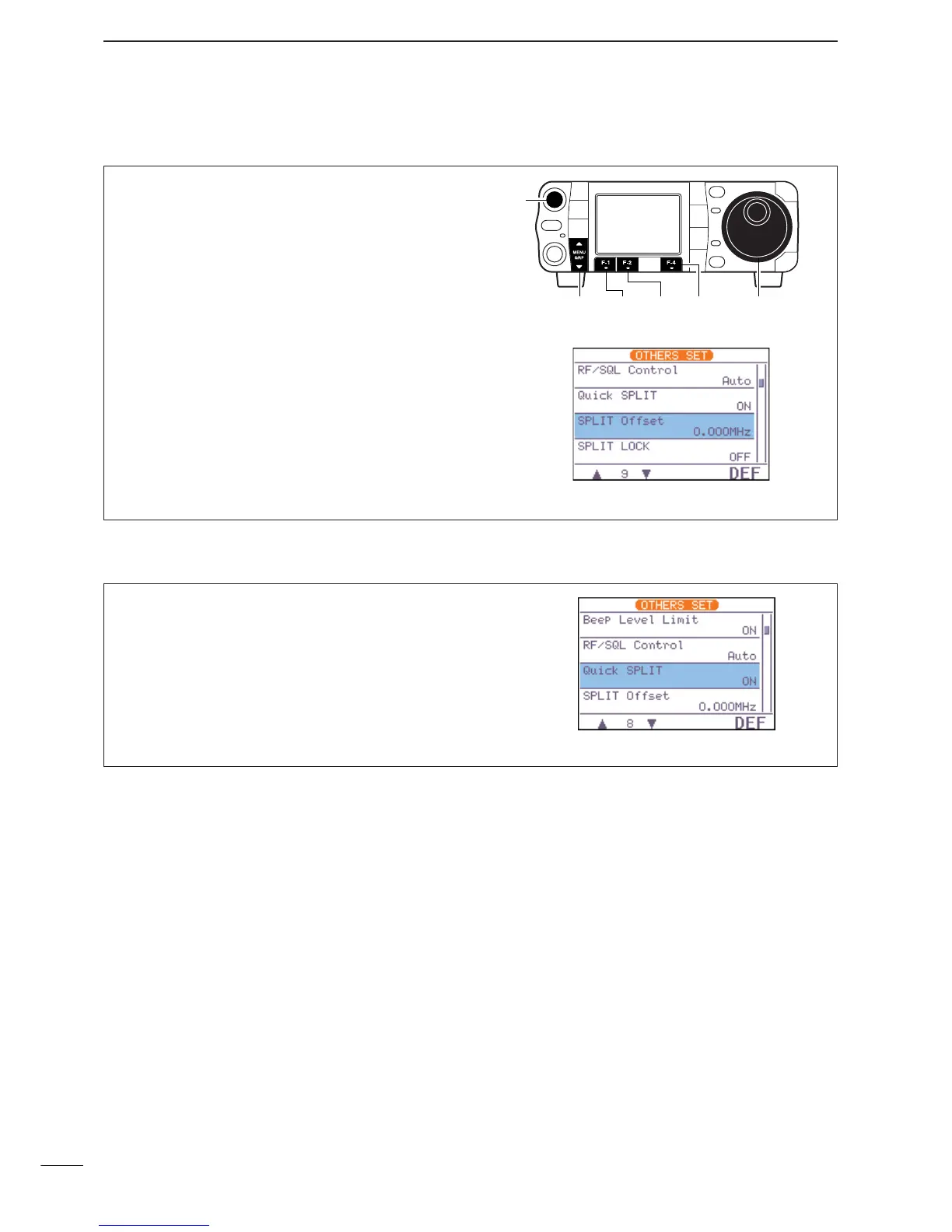
D Quick split setting
q Enter the miscellaneous (others) set mode as
above.
w Push [F-1
≤
] or [F-2
≥
] to select “
Quick
SPLIT
,” then rotate [DIAL] to select the desired
setting.
•Push [F-4
DEF
] for 1 sec. to return to default setting.
e Push [
Z
(
MENU
/
GRP
)] twice to return the normal op-
erating mode.
D
Split offset frequency setting
By setting an often-used split frequency offset in ad-
vance, you can operate the quick split function to se-
lect split operation at the push of one key.
q Push [AF(
SET
)] momentarily to enter the set mode
menu.
w Push [F-4
OTH
] to enter the miscellaneous (oth-
ers) set mode.
e Push [F-1
≤
] or [F-2
≥
] to select “
SPLIT Off-
set
.”
r Rotate [DIAL] to set the desired split offset.
•The split offset can be selected from –9.999 MHz to
+9.999 MHz.
•Push [F-4
DEF
] for 1 sec. to return to default value.
t Push [
Z
(
MENU
/
GRP
)] twice to return the normal op-
erating mode.


 To Next Page
 Loading...