96
7
VOICE RECORDER FUNCTIONS
7
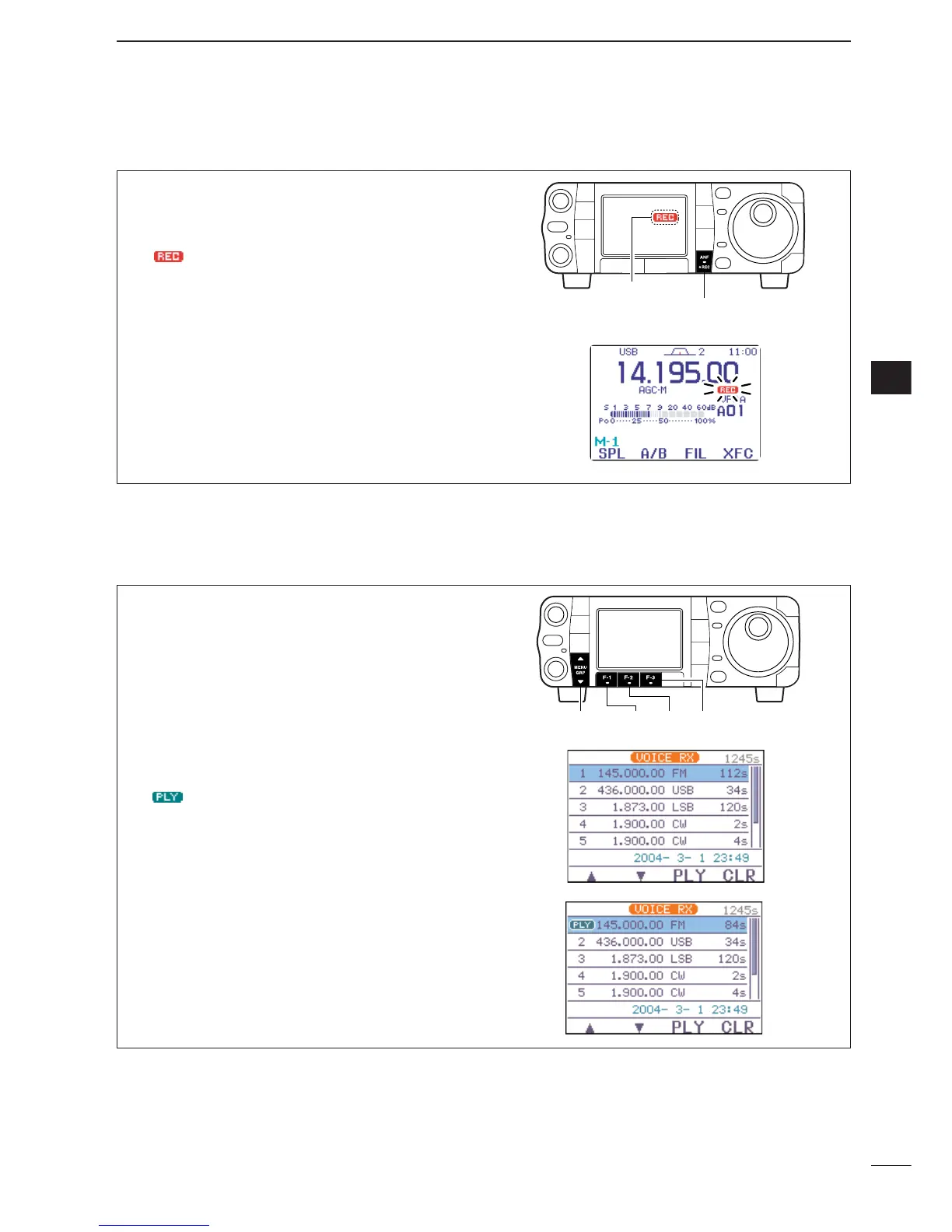
To record the receiving signal contents immediately,
one-touch voice recording is available.
q Push and hold [ANF/
•
REC] for 1 sec. while re-
ceiving a signal to start recording.
• “ ” blinks.
• Records audio into the new track.
w Push and hold [ANF/
•
REC] for 1 sec. again to
stop recording.
•Recording is automatically terminated after 120 sec. or
when a total of the recorded time becomes 1500 sec.
q Select
S
-
1
.
w Push [F-1
VO
] to call up the voice recorder menu.
•If the transmit voice memory channels (T1–T4) screen
appears, push [
Z
(
MENU
/
GRP
)] then push [F-1
RX
] to
select the receive voice memory channel.
• If the voice root menu appears, push [F-1
RX
] to select
the receive voice memory menu. The voice recorder
starting menu can be changed in the miscellaneous
(others) set mode.
e Push [F-1
≤
] or [F-2
≥
] to select the desired
recorded contents, then push [F-3
PLY
] to play-
back.
• “ ” appears.
r Push [F-3
PLY
] again to stop playback, if desired.
•Playback is terminated automatically when all of the
recorded contents in the channel are played.
t Push [
Z
(
MENU
/
GRP
)] twice to exit the voice recoder
mode.



 To Next Page
 Loading...