105
8
MEMORY OPERATION
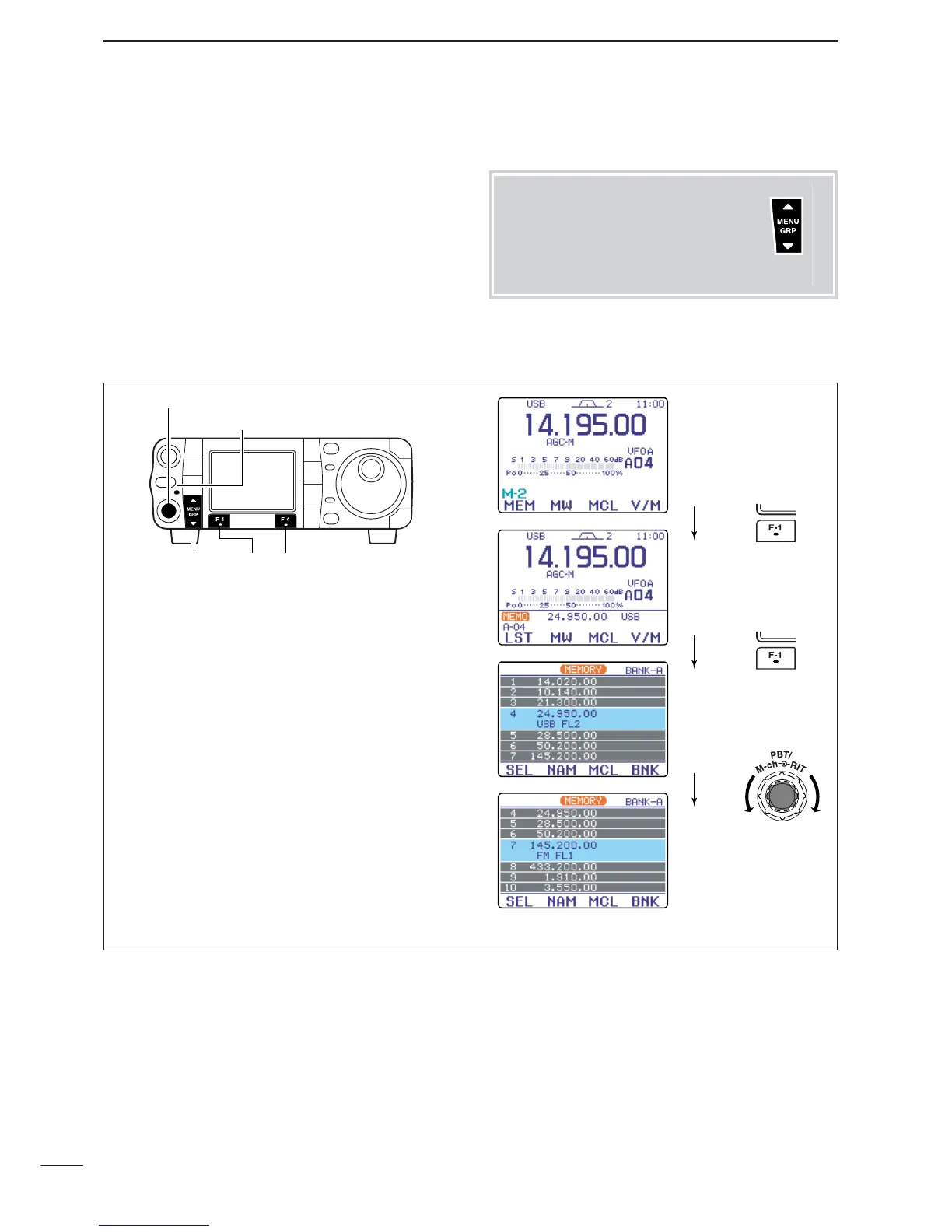
q Select the menu
M
-
2
.
w Push [F-4
V/M
] to select memory mode.
e Push [F-1] (
MEM
,
LST
) twice to enter the memory
channel list.
r Push [PBT/M-ch/RIT] momentarily to select the M-
ch/RIT function, if the twin PBT is selected.
•[PBT/M-ch/RIT] indicator (Green) goes out.
t Rotate [M-ch] (inner) control to select the desired
memory channel.
•All memory channels including blank channels can be
selected.
•[
Y
]/[
Z
] on the microphone also changes the channels.
y To exit the memory channel list, push
[
Z
(
MENU
/
GRP
)] twice.
■ Memory channel list
D Selecting a memory channel using the memory channel list
The memory channel list simultaneously shows 7
memory channels and their programmed contents.
You can select a desired memory channel from the
memory channel list.
Menu group selection
Push [MENU/GRP] for 1 sec.
Selection from:
M
,
S
or
G
(Graphic)
Menu selection (Example: M)
Push [MENU/GRP] momentarily.
Selection from:
M
-
1
,
M
-
2
or
M
-
3



 To Next Page
 Loading...