SECTION 9—SHROUDS/FRAME
Part No. 1125038 95 Pronto
®
M91™and M94™
Removing/Installing the Traction Control Device
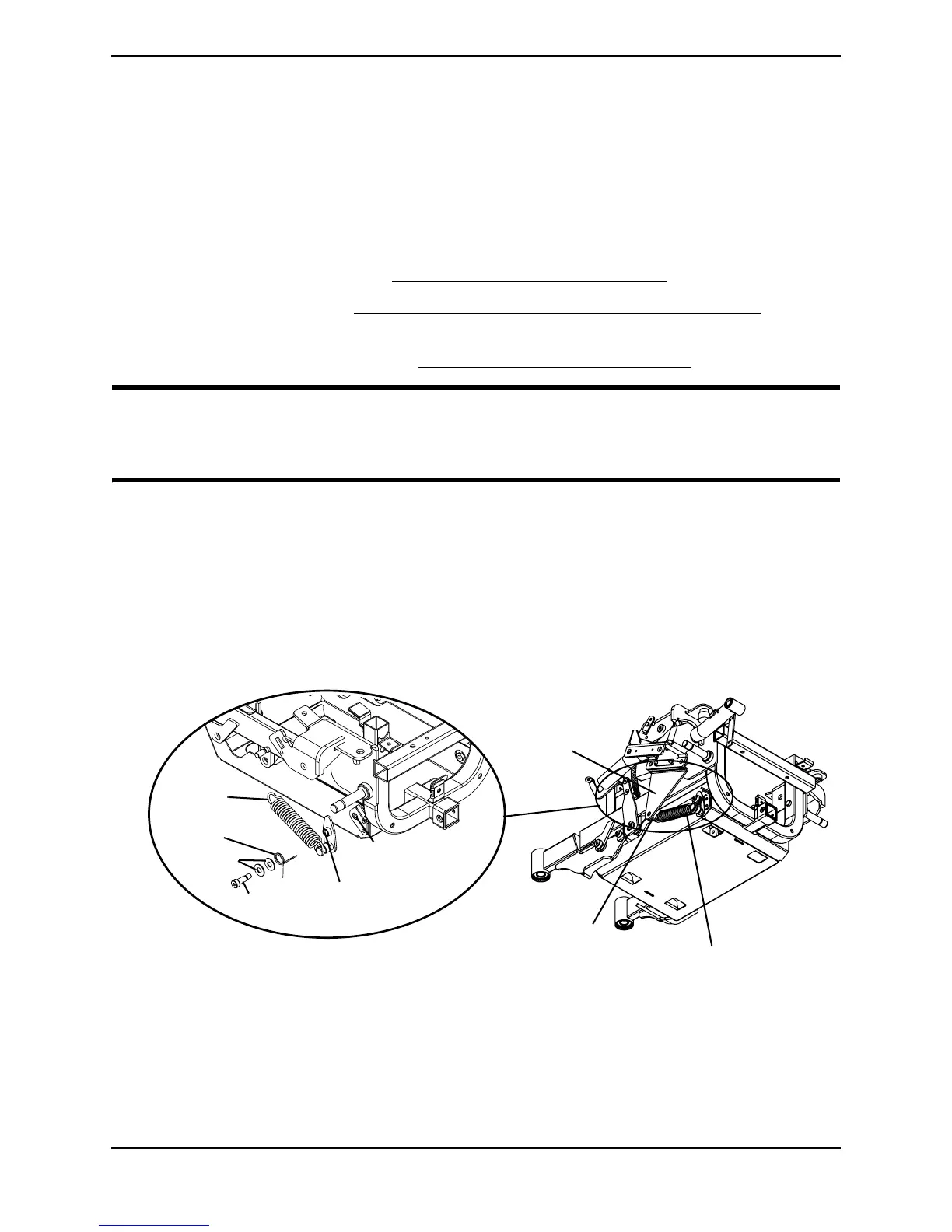
NOTE:Forthisprocedure,refertoFIGURE 9.4.
NOTE:Takenoteofpositionandorientationofthetractioncontroldeviceandmountinghardware
beforeremoval.
Removing
1. Removethebatteries.RefertoInstalling/RemovingtheBatteriesonpage 103.
2. Removetheseat.RefertoRemoving/InstallingorTiltingtheSeatAssembly
on
page 35.
3. Removethesideshroud.RefertoRemoving/InstallingtheShroudsonpage 88.
CAUTION
Use caution when removing the extension spring from the swing arm spring mount
- otherwise, injury may result.
4. Useascrewdrivertoremovetheextensionspringfromthemotormountbracket
springmount.Removetheextensionspringfromthepivotplatespringmount.Set
extensionspringaside.
5. Removethetorsionspringfromthepivotplatespringmount(Detail“A ” of
FIGURE 9.4).Settorsionspringaside.
6. Removethemountingscrewandtwowashersandtorsionspringsecuringthepivot
platetothewheelchairframe(Detail“A ” ofFIGURE 9.4).
FIGURE 9.4 Removing/Installing the Traction Control Device
Wheelchair Frame
Mounting Hole
Mounting
Screw
Washers
Torsion
Spring
Pivot Plate
Mounting Hole
Extension
Spring
Motor Mount Bracket
Spring Mount
Motor Mount
Bracket
DETAIL “A”
Traction Control Device
(shown in place)


 To Next Page
 Loading...